
Linux users prioritize privacy, security, and control over their computing environment. Finding reliable free vpn software linux solutions that align with these values requires understanding both the technical options available and the privacy implications of each choice. While many commercial VPN services dominate the market, Linux offers unique advantages through open-source VPN protocols and client applications that provide transparency, flexibility, and strong security without necessarily requiring paid subscriptions.
The landscape of free vpn software linux has evolved significantly, with modern protocols like WireGuard joining established solutions like OpenVPN and IPsec. Linux distributions typically include robust VPN support through NetworkManager and systemd integration, making it easier than ever to configure secure connections. However, navigating the options requires understanding the differences between protocols, client applications, and configuration approaches that best suit your privacy needs.
Understanding Free VPN Options for Linux
When discussing free vpn software linux, it's essential to distinguish between free-to-use VPN protocols and free VPN services. VPN protocols like OpenVPN, WireGuard, and IPsec/IKEv2 are open-source technologies that anyone can use without cost. Free VPN services, on the other hand, are companies offering limited VPN access at no charge, often with restrictions on bandwidth, server locations, or data collection practices.
The most trustworthy approach for Linux users typically involves using open-source VPN protocols with either self-hosted VPN servers or reputable commercial providers that offer transparent security practices. This strategy provides maximum control and visibility into how your data is handled.
Key Considerations for Privacy-Focused Users
Several factors determine whether a free vpn software linux solution truly protects your privacy:
- Open-source code that can be audited by security researchers
- No-logs policies backed by technical architecture, not just marketing claims
- Strong encryption standards (AES-256, ChaCha20) with forward secrecy
- DNS leak protection to prevent ISPs from tracking your browsing
- Kill switch functionality to block traffic if the VPN connection drops
- Transparent jurisdiction and clear privacy policies
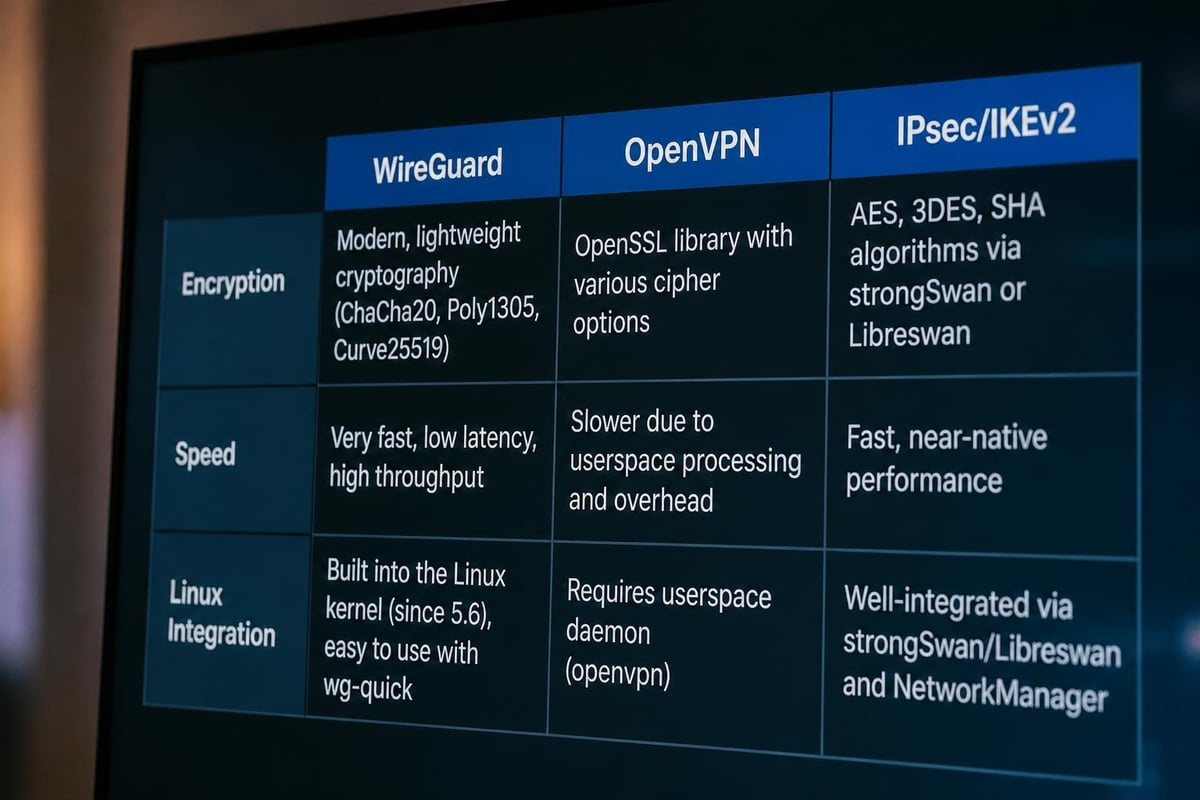
Linux distributions provide built-in support for VPN connections through NetworkManager, making it straightforward to configure connections once you understand the underlying protocol. The GNOME desktop environment simplifies VPN configuration through its network settings interface, while command-line tools offer advanced customization for power users.
WireGuard: The Modern Free VPN Protocol
WireGuard has rapidly become the preferred choice for free vpn software linux deployments due to its simplicity, speed, and modern cryptographic design. Developed specifically with Linux in mind, WireGuard is now integrated directly into the Linux kernel, offering exceptional performance and reliability.
Technical Advantages of WireGuard
WireGuard's lean codebase contains only about 4,000 lines of code, compared to hundreds of thousands in older VPN implementations. This minimalist approach reduces the attack surface and makes security audits more feasible.
| Feature | WireGuard | OpenVPN | IPsec/IKEv2 |
|---|---|---|---|
| Code complexity | ~4,000 lines | ~100,000 lines | ~400,000 lines |
| Setup difficulty | Low | Medium | High |
| Connection speed | Fastest | Fast | Fast |
| Battery efficiency | Excellent | Good | Good |
| Kernel integration | Native (5.6+) | Module | Native |
Installing WireGuard on Linux distributions is straightforward. Most modern distributions include WireGuard in their standard repositories, and the official WireGuard installation page provides comprehensive instructions for various distributions.
Installation typically involves:
- Installing the WireGuard package from your distribution's repository
- Generating public/private key pairs for authentication
- Creating a configuration file with peer information and endpoint details
- Activating the VPN interface using
wg-quickor NetworkManager
The primary limitation of WireGuard as free vpn software linux is that it doesn't include a server discovery or account management system. You must either configure your own VPN server or use a commercial provider that supports WireGuard protocol. Self-hosting requires a cloud server or dedicated machine but gives you complete control over your VPN infrastructure.
OpenVPN: The Established Open-Source Standard
OpenVPN remains the most widely supported VPN protocol across commercial providers and self-hosted solutions. As mature free vpn software linux, OpenVPN offers extensive documentation, broad compatibility, and battle-tested security.
OpenVPN vs. OpenVPN 3 Linux
Two distinct OpenVPN implementations exist for Linux users. The classic OpenVPN client has served the community for nearly two decades, while OpenVPN 3 Linux represents a modern reimplementation with different architectural goals.
The classic OpenVPN client requires root privileges for operation and integrates tightly with system networking. Following the OpenVPN community installation documentation ensures you receive the latest stable version with security patches. Most VPN providers supply .ovpn configuration files compatible with this client.
OpenVPN 3 Linux takes a different approach by allowing unprivileged users to establish VPN connections through a D-Bus service. The OpenVPN 3 Linux community provides distribution-specific packages and usage guidance for this newer implementation.

Configuration and Security Hardening
OpenVPN configuration files contain all necessary parameters for establishing secure connections. Key security considerations include:
- Cipher selection: AES-256-GCM provides authenticated encryption
- TLS authentication:
tls-authortls-cryptprevents unauthorized connection attempts - Perfect forward secrecy: Ensure your provider uses ephemeral key exchange
- Certificate validation: Verify the server's certificate to prevent man-in-the-middle attacks
NetworkManager includes OpenVPN plugin support on most Linux distributions, allowing graphical configuration through the NetworkManager VPN plugin ecosystem. This integration simplifies connection management while maintaining the security benefits of the underlying OpenVPN protocol.
IPsec and IKEv2 with strongSwan
For users requiring enterprise-grade security or specific compliance requirements, IPsec with IKEv2 represents robust free vpn software linux. The strongSwan project provides a comprehensive open-source IPsec implementation particularly well-suited for Linux environments.
IPsec operates at the network layer, offering transparent encryption for all IP traffic. IKEv2 serves as the key exchange protocol, providing fast reconnection capabilities valuable for mobile devices and unstable network connections.
strongSwan Implementation
strongSwan's flexibility makes it suitable for both client and server deployments. The strongSwan documentation covers configuration scenarios ranging from simple road-warrior setups to complex site-to-site connections.
Common strongSwan use cases:
- Connecting to corporate VPNs requiring IPsec
- Building privacy-focused personal VPN servers
- Establishing secure site-to-site links between Linux systems
- Integrating with certificate-based authentication systems
Configuration complexity represents the primary challenge with IPsec-based solutions. Unlike the single configuration file approach of OpenVPN or WireGuard, strongSwan requires careful coordination between multiple configuration files defining connections, certificates, and security policies.
DNS Leak Prevention on Linux
One critical aspect often overlooked when evaluating free vpn software linux is DNS leak prevention. DNS leaks occur when DNS queries bypass the VPN tunnel, revealing your browsing activity to your ISP despite an active VPN connection.
Linux systems using systemd-resolved require specific configuration to ensure DNS queries route through the VPN tunnel. The systemd documentation on VPN integration explains how systemd-resolved handles DNS routing for VPN connections.
Implementing DNS Leak Protection
Several approaches exist for preventing DNS leaks on Linux:
| Method | Complexity | Effectiveness | Compatibility |
|---|---|---|---|
| NetworkManager DNS configuration | Low | High | Most desktops |
| update-systemd-resolved script | Medium | Very High | systemd systems |
| Manual resolv.conf management | High | High | All systems |
| VPN provider's DNS servers | Low | Medium | Provider-dependent |
The update-systemd-resolved utility provides an elegant solution for OpenVPN users on systemd-based distributions. This script automatically configures systemd-resolved when the VPN connects, ensuring DNS queries use the VPN provider's DNS servers with appropriate routing policies.
Testing for DNS leaks requires:
- Establishing your VPN connection
- Visiting a DNS leak test website
- Verifying all DNS queries route through your VPN provider's servers
- Checking that your true ISP's DNS servers aren't visible
Self-Hosting vs. Commercial Providers
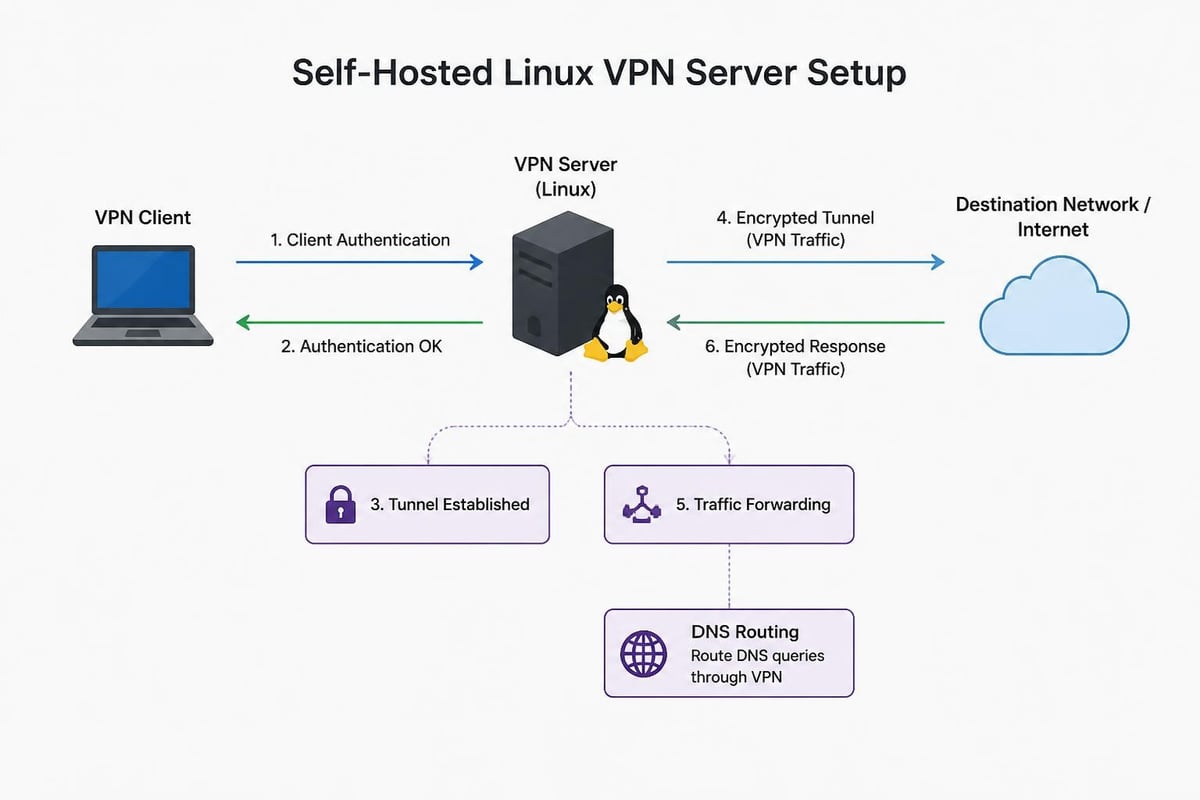
When selecting free vpn software linux, users must decide between self-hosting VPN servers or using commercial providers. Each approach offers distinct advantages and tradeoffs for privacy and security.
Self-Hosted VPN Benefits
Complete control over server infrastructure and logging policies represents the primary advantage of self-hosting. You determine exactly what data, if any, gets logged and for how long it's retained.
Self-hosting requires:
- A cloud server or dedicated machine with static IP
- Technical knowledge for server configuration and maintenance
- Ongoing security update management
- Monitoring for potential intrusions or misuse
Cost considerations include monthly server hosting fees (typically $5-20 for basic cloud instances) and time investment for setup and maintenance. For users with technical expertise, self-hosting provides maximum transparency and control.
Commercial Provider Considerations
Commercial VPN providers offering free tiers typically impose limitations on bandwidth, server selection, or connection speed. When evaluating providers, understanding VPN threat models and privacy considerations helps determine whether a provider's privacy claims align with your security requirements.
Critical evaluation criteria:
- Jurisdiction and legal requirements for data retention
- Independent security audits of infrastructure and code
- Transparent privacy policy with specific technical details
- Open-source client applications
- Support for modern protocols like WireGuard
Many commercial providers offer native Linux clients that handle configuration, DNS leak protection, and kill switch functionality automatically. These clients typically support the same open-source protocols as manual configurations but add convenience features.
NetworkManager Integration and GUI Tools
Desktop Linux users benefit from NetworkManager's VPN integration, which transforms free vpn software linux from a command-line exercise into a graphical configuration experience. NetworkManager supports multiple VPN protocols through plugins, creating a unified interface for connection management.
The connection process through NetworkManager involves importing configuration files or manually entering connection parameters through the network settings interface. Once configured, VPN connections appear alongside Wi-Fi and wired connections, with one-click activation.
Available NetworkManager VPN Plugins
Most distributions package NetworkManager VPN plugins separately from the core NetworkManager installation:
- network-manager-openvpn: Classic OpenVPN support
- network-manager-vpnc: Cisco VPN compatibility
- network-manager-strongswan: IPsec/IKEv2 connections
- network-manager-wireguard: WireGuard protocol support (newer distributions)
Plugin installation typically requires a simple package manager command, after which the VPN type appears as an option when adding new network connections. Configuration can be performed entirely through the GUI for most common scenarios.
Command-Line Configuration for Advanced Users
While GUI tools provide convenience, command-line configuration of free vpn software linux offers maximum flexibility and scriptability. Power users often prefer command-line approaches for automation, troubleshooting, or integration with custom security workflows.
Manual Connection Management
Each VPN protocol includes command-line tools for connection management:
WireGuard: wg-quick up <config> and wg-quick down <config> manage connections defined in /etc/wireguard/
OpenVPN: openvpn --config <file> establishes connections with verbose logging for troubleshooting
strongSwan: ipsec up <connection> and ipsec down <connection> control IPsec connections
Command-line workflows enable scripting for automatic connection on boot, connection monitoring, and integration with firewall rules. Advanced users can implement custom kill switch functionality through iptables or nftables rules that block non-VPN traffic.
Security Auditing and Verification
Verifying that your free vpn software linux actually protects your privacy requires testing and validation beyond simply establishing a connection. Several verification steps confirm proper operation:
- IP address verification: Confirm your public IP matches the VPN server location
- DNS leak testing: Ensure DNS queries don't reveal your location
- WebRTC leak testing: Check that browser WebRTC doesn't expose your real IP
- IPv6 leak testing: Verify IPv6 traffic routes through the VPN or gets blocked
- Kill switch testing: Disconnect the VPN and confirm traffic stops
Online testing tools provide automated checks for most leak types, but understanding the underlying mechanisms allows you to implement custom verification scripts. Packet capture tools like Wireshark or tcpdump enable detailed traffic analysis to confirm encryption is applied correctly.
Monitoring VPN Connection Status
Continuous monitoring ensures your VPN connection remains active and secure:
- System logs (
journalctl -u openvpn@configfor systemd-managed connections) - VPN protocol status commands (
wg showfor WireGuard) - Custom scripts checking public IP periodically
- NetworkManager notifications for connection state changes
Automated monitoring combined with kill switch functionality provides defense-in-depth against accidental privacy exposure.
Performance Optimization Strategies
Free vpn software linux performance depends on multiple factors including protocol choice, server location, encryption settings, and network configuration. Understanding these variables allows optimization for your specific use case.
Protocol performance hierarchy (fastest to slowest under typical conditions):
- WireGuard with modern hardware
- IKEv2/IPsec with hardware acceleration
- OpenVPN with optimized cipher selection
- OpenVPN with maximum security settings
Server proximity significantly impacts latency and throughput. Connecting to geographically distant VPN servers introduces unavoidable latency due to speed-of-light limitations. For performance-sensitive applications, selecting the nearest server location that meets your privacy requirements yields optimal results.
Encryption and Throughput Tradeoffs
Different cipher selections balance security and performance. Modern authenticated encryption ciphers like ChaCha20-Poly1305 or AES-GCM provide both strong security and good performance, especially on systems with hardware AES acceleration.
| Cipher | Security Level | CPU Usage | Throughput |
|---|---|---|---|
| ChaCha20-Poly1305 | Strong | Low | Excellent |
| AES-256-GCM | Strong | Low (with AES-NI) | Excellent |
| AES-256-CBC | Strong | Medium | Good |
| AES-128-GCM | Strong | Very Low | Excellent |
CPU capabilities influence performance significantly. Systems with AES-NI instruction set extensions achieve much higher throughput with AES ciphers. The grep aes /proc/cpuinfo command reveals whether your processor supports hardware AES acceleration.
Privacy Considerations and Threat Models
Selecting appropriate free vpn software linux requires understanding your threat model and privacy requirements. VPNs provide specific privacy benefits but aren't universal solutions for all security challenges.
VPNs effectively protect against:
- ISP tracking of your browsing history
- Network eavesdropping on public Wi-Fi
- Geographic content restrictions
- Bandwidth throttling based on content type
- Basic traffic analysis by network operators
VPNs do not protect against:
- Tracking by websites using cookies and browser fingerprinting
- Malware or compromised applications on your system
- Correlation attacks by well-resourced adversaries
- Data collection by services you're logged into
- DNS queries if DNS leaks aren't properly prevented
Understanding these limitations helps set appropriate expectations and implement complementary privacy measures like browser privacy extensions, careful account management, and operating system hardening.
Multi-Hop and Advanced Configurations
Advanced users sometimes implement multi-hop VPN configurations where traffic routes through multiple VPN servers in sequence. This approach increases privacy against single points of observation but introduces performance overhead and configuration complexity.
Multi-hop implementations typically involve:
- Chaining VPN connections through nested tunnels
- Using Tor in combination with VPN services
- Configuring VPN-over-VPN setups with different protocols
These configurations require careful planning to avoid DNS leaks, ensure kill switch functionality covers all connection points, and maintain acceptable performance for your use case.
Selecting the right free vpn software linux involves balancing privacy requirements, technical capabilities, and performance needs. Whether you choose self-hosted solutions with protocols like WireGuard and OpenVPN or carefully vetted commercial providers, Linux offers unmatched transparency and control over your VPN infrastructure. For users seeking a professionally managed solution with strong encryption, global server coverage, and robust privacy protection including defense against sophisticated threats, ZioFree delivers high-speed VPN access backed by a strict no-logs policy and advanced security protocols designed for today's privacy-conscious users.