
Choosing the right vpn software for chrome has become critical as browser-based threats evolve and privacy concerns intensify in 2026. Chrome remains the world's dominant browser, powering over 65% of web traffic, which makes it a prime target for surveillance, hacking attempts, and data harvesting. Whether you're protecting sensitive business communications, securing remote work connections, or simply maintaining personal privacy, understanding how VPN extensions function within Chrome's architecture determines whether your data stays protected or exposed. This guide explores the technical foundations, security considerations, and practical strategies for deploying vpn software for chrome effectively.
Understanding VPN Software Architecture in Chrome
VPN software for Chrome operates differently than standalone VPN applications. Chrome extensions run within the browser's sandbox environment, using specific APIs to route traffic through encrypted tunnels. The Chrome Extensions API defines how extensions can intercept and redirect network requests, primarily through proxy control mechanisms rather than system-level VPN protocols.
How Chrome Extensions Handle VPN Functions
Most vpn software for chrome implements proxy-based routing rather than true VPN protocols like OpenVPN or WireGuard. Extensions leverage the chrome.proxy API to direct browser traffic through remote servers, creating an encrypted tunnel for web requests. This approach offers several advantages:
- Selective routing: Only browser traffic passes through the VPN, leaving other applications unaffected
- Minimal system permissions: No administrator access required for installation
- Quick activation: Toggle protection on and off without system-level configuration changes
- Cross-platform consistency: Same extension works across Windows, macOS, Linux, and Chrome OS
The Chromium project documentation explains how Chrome processes proxy settings through PAC (Proxy Auto-Configuration) scripts. Understanding this architecture helps users recognize legitimate VPN extensions versus potentially malicious proxies that simply redirect traffic without encryption.

Manifest V3 Impact on VPN Extensions
Chrome's transition to Manifest V3 in 2024 fundamentally changed how extensions operate. Research published in arXiv analyzing Manifest V3's impact demonstrates significant changes to network request handling. VPN software for chrome must now use declarativeNetRequest API instead of the more flexible webRequest API, limiting real-time traffic modification capabilities.
Key changes affecting VPN extensions include:
| Manifest V2 (Legacy) | Manifest V3 (Current) | Impact on VPN Software |
|---|---|---|
| Unlimited webRequest blocking | 30,000 rule limit | Restricts advanced filtering features |
| Background pages run continuously | Service workers with lifecycle limits | May interrupt VPN connections during inactivity |
| Full network inspection | Limited request modification | Reduces debugging and optimization capabilities |
These technical constraints mean some advanced features available in standalone VPN clients cannot be replicated in browser extensions. Users requiring maximum security flexibility may need to supplement browser-based VPN software with system-level solutions.
Security Considerations for Browser-Based VPN Software
The convenience of vpn software for chrome comes with distinct security trade-offs that every user must evaluate. Browser extensions request broad permissions to function, creating potential attack vectors if the extension developer is compromised or malicious. Consumer Reports guidance on browser extensions emphasizes scrutinizing permission requests before installation.
Permission Analysis and Risk Assessment
Legitimate vpn software for chrome requires specific permissions to function properly:
- Proxy configuration: Controls network routing through VPN servers
- Web request monitoring: Identifies traffic to encrypt and route
- Storage access: Maintains user settings and session data
- Tabs permission: Manages per-tab VPN status in advanced extensions
However, some extensions request excessive permissions beyond VPN functionality. The NCSC device security guidance warns that overly permissive extensions can access browsing history, read page content, and intercept credentials. Before installing any VPN extension, verify it requests only necessary permissions and comes from a verified publisher.
Real-World Threats and Vulnerabilities
Browser-based VPN software faces unique security challenges. A Palo Alto Networks analysis revealed how seemingly legitimate proxy extensions harvested user traffic and credentials. In some cases, compromised VPN extensions transformed browsers into botnet nodes, routing malicious traffic through unsuspecting users' connections.
The investigative reporting by Krebs on Security documented several incidents where popular browser extensions were sold to malicious actors who then pushed updates containing data-harvesting code. This threat model means vpn software for chrome requires ongoing vigilance, not just careful initial selection.

Evaluating VPN Software Features for Chrome
Not all vpn software for chrome offers equivalent protection or performance. Understanding which features matter most helps users make informed decisions aligned with their security requirements and use cases.
Essential Security Features
Strong vpn software for chrome must implement these fundamental protections:
- AES-256 encryption: Industry-standard cipher protecting data in transit
- DNS leak prevention: Ensures DNS queries route through VPN tunnel, not ISP
- WebRTC leak blocking: Prevents real IP exposure through WebRTC protocols
- Kill switch functionality: Blocks traffic if VPN connection drops unexpectedly
- No-logs policy: Verifiable commitment to not record user activity or connection data
ZioFree's Chrome extension implements all these protections with independently audited no-logs practices, ensuring browsing activity remains private even from the VPN provider itself. The strict no-logs policy becomes especially critical when facing targeted threats, including sophisticated hacking attempts from state-sponsored actors.
Performance and Usability Factors
Beyond security, practical considerations determine whether vpn software for chrome serves your daily needs effectively:
| Feature | Why It Matters | What to Look For |
|---|---|---|
| Server network size | More servers mean better speeds and geographic options | 50+ countries minimum |
| Connection speed | Determines browsing and streaming performance | <20% speed reduction |
| Simultaneous connections | Protects multiple devices under one account | 5+ devices supported |
| Customer support | Resolves technical issues quickly | 24/7 live chat availability |
| Compatibility | Works across your device ecosystem | Desktop and mobile apps available |
ZioFree's global server network spans 75+ countries with optimized nodes for speed-critical activities. High-speed connections ensure VPN protection doesn't compromise productivity or entertainment experiences.
Deployment Best Practices for Chrome VPN Software
Installing vpn software for chrome correctly maximizes protection while minimizing compatibility issues and performance problems. Following established security protocols ensures your VPN configuration aligns with CISA guidance on network access security.
Installation and Configuration Steps
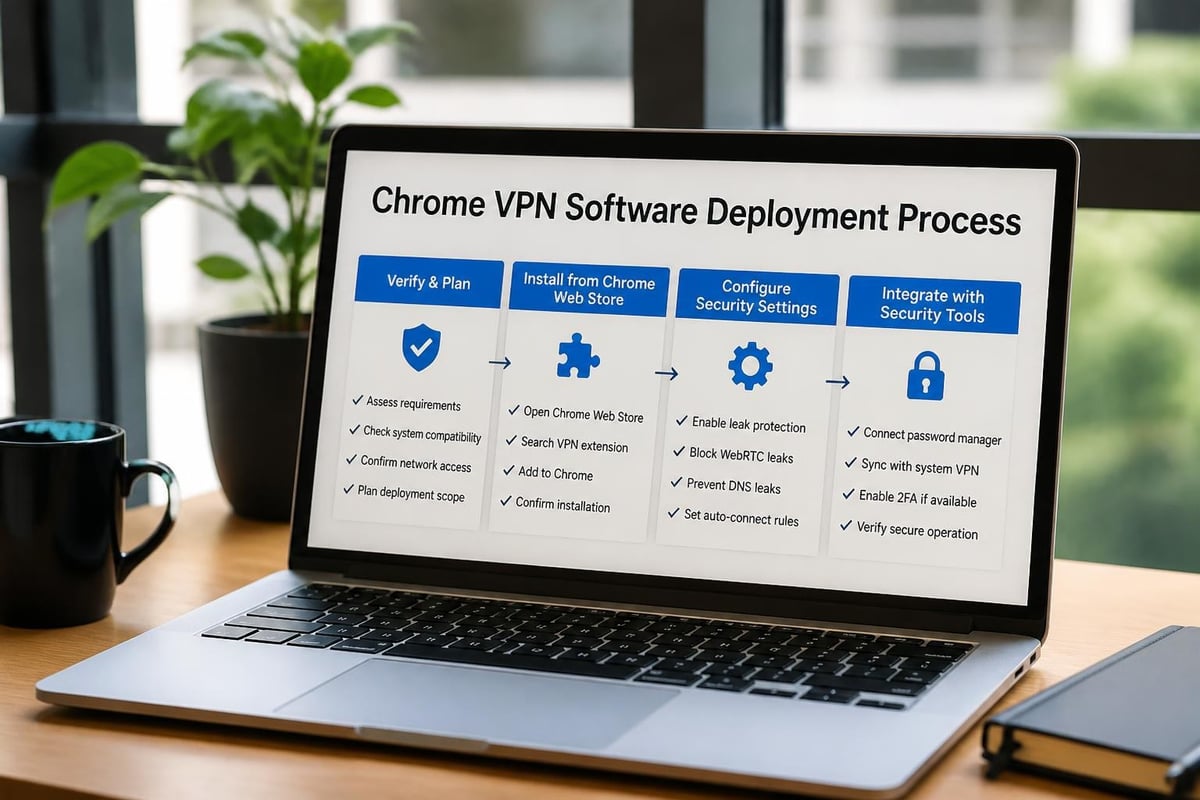
Proper deployment of vpn software for chrome follows this sequence:
- Research and verification: Confirm the extension's publisher identity and review permissions
- Install from official sources: Only use Chrome Web Store listings from verified developers
- Configure security settings: Enable kill switch, DNS leak protection, and WebRTC blocking
- Test for leaks: Use independent testing tools to verify IP and DNS protection
- Establish connection protocols: Set default server locations and auto-connect preferences
Never install vpn software for chrome from third-party download sites or direct APK files. These sources frequently distribute modified versions containing malware or data-harvesting code.
Multi-Layer Security Strategy
Browser-based VPN software works best as part of comprehensive security architecture rather than as a standalone solution. Consider these complementary protections:
- System-level VPN: Protects non-browser traffic like email clients and background applications
- Password manager: Secures credentials separate from browser storage
- Two-factor authentication: Adds verification layer beyond password protection
- Regular security audits: Review extension permissions quarterly and remove unused tools
Organizations deploying vpn software for chrome across teams should establish clear policies governing which extensions are approved, how updates are managed, and when system-level VPN protection is required instead of browser-only solutions.
Privacy Protection and Data Sovereignty
The fundamental purpose of vpn software for chrome centers on protecting privacy against surveillance, tracking, and unauthorized access. Understanding how different VPN architectures handle data determines whether your privacy goals are actually achieved.
Jurisdiction and Legal Framework
Where a VPN provider operates legally affects what data they can be compelled to collect or share. VPN software for chrome should ideally come from providers in privacy-friendly jurisdictions without mandatory data retention laws. Consider these factors:
Privacy-friendly jurisdictions: Switzerland, Iceland, British Virgin Islands, and Panama offer strong privacy protections and resist surveillance cooperation agreements.
Five/Nine/Fourteen Eyes alliances: Countries in these intelligence-sharing partnerships may be subject to data requests that compromise user privacy despite no-logs claims.
Local regulations: Some countries require VPN providers to maintain connection logs or provide backdoor access to authorities.
ZioFree's infrastructure is strategically distributed to maximize privacy protection while ensuring high-speed connectivity. The strict no-logs policy means even if server locations face legal pressure, no user activity data exists to compromise.
Encryption Standards and Protocol Selection
Modern vpn software for chrome should support current encryption standards that balance security with performance:
| Protocol | Security Level | Speed | Best Use Case |
|---|---|---|---|
| WireGuard | Excellent | Fastest | General browsing, streaming |
| OpenVPN | Excellent | Moderate | High-security requirements |
| IKEv2/IPSec | Very Good | Fast | Mobile connections, frequent switching |
| PPTP | Poor (deprecated) | Very Fast | Not recommended |
Browser-based VPN extensions typically implement HTTPS proxying with TLS 1.3 encryption rather than traditional VPN protocols. This approach provides strong encryption for web traffic while maintaining compatibility with Chrome's extension architecture.
Protecting Against Targeted Threats
Advanced persistent threats, including state-sponsored hacking operations, require specialized defenses beyond standard vpn software for chrome configurations. Understanding these threat models helps users implement appropriate protections.
State-Sponsored Attack Vectors
Sophisticated attackers employ multiple techniques to compromise or bypass VPN protection:
- Zero-day browser exploits: Vulnerabilities in Chrome itself can expose traffic before VPN encryption
- DNS poisoning: Manipulated DNS responses redirect traffic to attacker-controlled servers
- Certificate compromise: Stolen or fraudulent certificates enable man-in-the-middle attacks
- Extension compromise: Malicious updates to trusted extensions bypass VPN protection
ZioFree's advanced security protocols specifically address threats from sophisticated actors, including Israeli state-sponsored hacking operations that have targeted journalists, activists, and business leaders. Multi-layer encryption and regular security audits ensure protection against both current and emerging attack methods.
Enhanced Protection Measures
Users facing elevated threat levels should implement these additional safeguards with their vpn software for chrome:
- Dedicated security profiles: Create separate Chrome profiles for sensitive activities with minimal extensions
- Hardware security keys: Use FIDO2 keys for authentication beyond password protection
- Regular browser updates: Apply security patches immediately when released
- Traffic analysis resistance: Use Tor in conjunction with VPN for maximum anonymity when necessary
- Endpoint security: Deploy comprehensive antivirus and EDR solutions on all devices
The combination of robust vpn software for chrome and system-level security tools creates defense-in-depth that resists sophisticated attacks even when individual components are compromised.
Business and Enterprise Considerations
Organizations deploying vpn software for chrome face unique requirements around management, compliance, and integration with existing security infrastructure. Enterprise VPN needs differ substantially from personal use cases.
Centralized Management Requirements
Business VPN deployments require capabilities beyond individual user features:
- Policy enforcement: Centrally mandate VPN usage for specific sites or activities
- User provisioning: Automate account creation and credential management
- Activity monitoring: Track VPN usage for compliance without compromising privacy
- License management: Control costs and allocation across departments
- Integration: Connect with identity providers and security information systems
ZioFree's enterprise solutions provide centralized dashboards for IT administrators while maintaining user privacy through compartmentalized logging that records connection events without tracking browsing activity.
Compliance and Regulatory Frameworks
Industries subject to data protection regulations must ensure vpn software for chrome meets specific compliance requirements:
| Regulation | Key VPN Requirements | Verification Method |
|---|---|---|
| GDPR | Data processing agreements, EU server options | Third-party audits |
| HIPAA | Encryption standards, business associate agreements | Compliance certifications |
| PCI DSS | Secure remote access, network segmentation | Quarterly scans |
| SOC 2 | Access controls, encryption, monitoring | Annual audits |
Organizations should verify their chosen VPN provider maintains relevant certifications and can provide documentation supporting compliance claims.
Performance Optimization Strategies
Even the best vpn software for chrome can impact browsing performance if not properly configured. Understanding optimization techniques ensures security doesn't compromise productivity.
Server Selection and Routing
Strategic server selection dramatically affects connection speeds:
- Geographic proximity: Choose servers closest to your physical location when speed matters most
- Specialized servers: Use streaming-optimized or P2P-enabled servers for specific activities
- Load balancing: Avoid overcrowded servers during peak usage periods
- Protocol optimization: Select protocols balancing security needs with speed requirements
ZioFree's intelligent server selection automatically connects users to optimal nodes based on current load, geographic location, and activity type, ensuring maximum performance without manual configuration.
Browser Configuration for VPN Use
Optimize Chrome settings to work efficiently with vpn software for chrome:
- Disable unnecessary extensions: Each active extension consumes resources and may conflict with VPN operation
- Clear cache regularly: Prevents cached content from bypassing VPN encryption
- Manage tab usage: Excessive open tabs strain both browser and VPN performance
- Enable hardware acceleration: Offloads encryption processing when possible
- Update regularly: Latest Chrome versions include performance improvements and security patches
Users experiencing performance issues should test connection speeds with VPN enabled versus disabled to isolate whether the VPN, browser configuration, or network conditions cause slowdowns.
Selecting and deploying vpn software for chrome requires balancing security, privacy, performance, and usability across diverse threat landscapes and use cases. By understanding Chrome's extension architecture, evaluating security features critically, and implementing comprehensive protection strategies, users can maintain privacy and security without compromising browsing experience. ZioFree delivers enterprise-grade encryption, a global server network, and verified no-logs privacy protection specifically designed to counter sophisticated threats including state-sponsored hacking operations. Protect your browsing activity with high-speed VPN access built for 2026's security challenges.