WireGuard has emerged as the preferred VPN protocol for users seeking speed, security, and simplicity. One of its most powerful capabilities is split tunneling, which allows you to route only selected traffic through the VPN while other connections use your regular internet path. This granular control over network routing enables you to protect sensitive data without sacrificing performance for services that don't require VPN protection. Understanding wireguard split tunneling configuration gives you the flexibility to optimize both security and speed for your specific needs.
Understanding WireGuard Split Tunneling Fundamentals
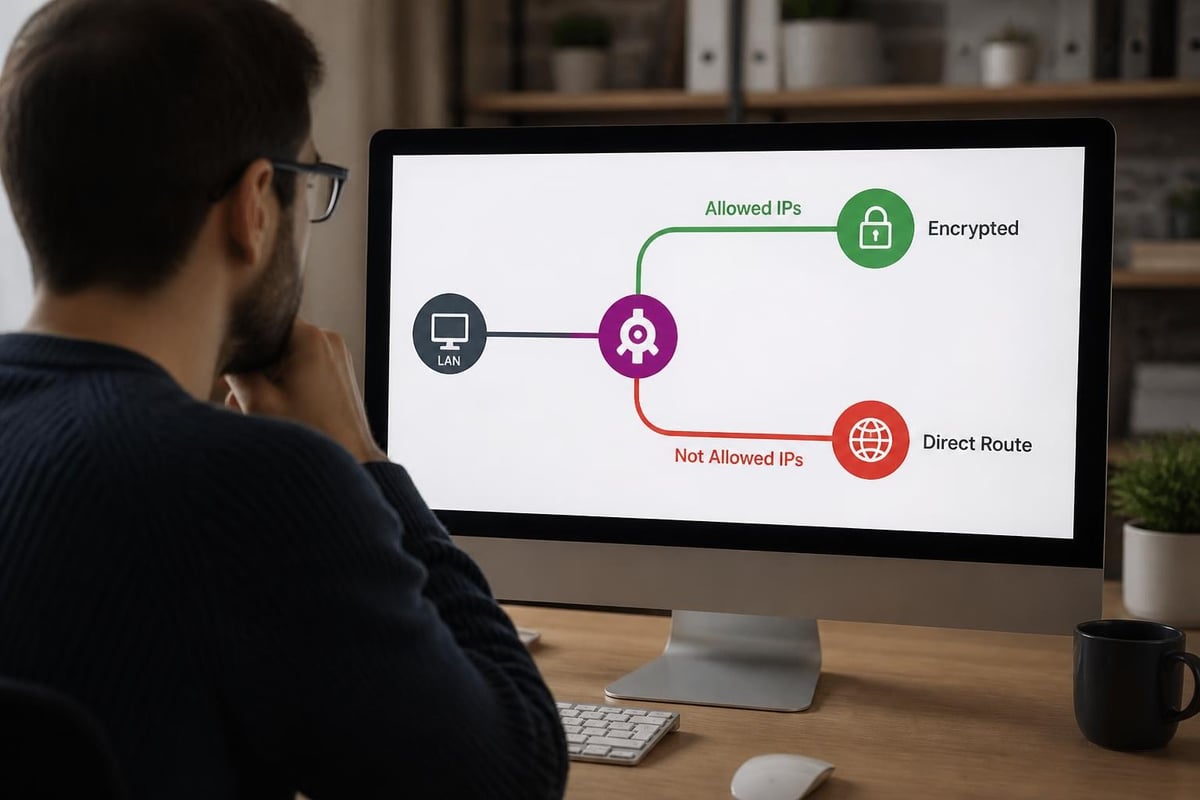
WireGuard split tunneling operates through a mechanism called cryptokey routing, which differs fundamentally from traditional VPN approaches. Instead of creating a virtual network adapter that captures all traffic by default, WireGuard uses AllowedIPs configuration to determine which destination addresses should be encrypted and routed through the tunnel.
The AllowedIPs parameter on each peer defines the IP ranges that WireGuard will handle. When you configure a full-tunnel VPN, you typically set AllowedIPs to 0.0.0.0/0 and ::/0, which captures all IPv4 and IPv6 traffic. For wireguard split tunneling, you specify only the networks you want protected, creating routing table entries that direct matching traffic through the encrypted tunnel while everything else follows normal routing.
How Cryptokey Routing Works
Each WireGuard peer associates public keys with allowed source IP addresses. When a packet arrives, WireGuard checks if the destination matches any configured AllowedIPs ranges. If it does, the packet is encrypted with the peer's public key and transmitted through the tunnel. This elegant design eliminates complex firewall rules and routing policies required by older VPN protocols.
The WireGuard whitepaper describes this cryptokey routing table as the core innovation that makes the protocol both faster and more secure. Unlike traditional VPNs that rely on certificates and connection states, WireGuard's stateless design means split tunnel decisions happen at wire speed with minimal overhead.
Common WireGuard Split Tunneling Use Cases
Organizations and individuals implement wireguard split tunneling for several practical scenarios. Understanding these use cases helps you design the right configuration for your environment.
Bandwidth Optimization
Many users want to protect sensitive traffic without routing high-bandwidth streams through VPN infrastructure. Video conferencing, media streaming, and large file downloads can bypass the VPN while confidential business communications remain encrypted. This approach delivers security where needed while maximizing performance for bandwidth-intensive applications.
Accessing Local Network Resources
Remote workers frequently need simultaneous access to both corporate resources through VPN and local network devices like printers, NAS systems, or smart home equipment. Split tunneling enables you to route corporate network ranges through WireGuard while keeping local RFC1918 addresses on your direct connection.
Geographic Content Access
Some users want to access geo-restricted content through specific VPN endpoints while maintaining fast, direct connections for general browsing. This configuration routes only designated services through privacy-focused VPN providers while everyday traffic uses local internet.
Multi-Cloud Connectivity
Enterprises running infrastructure across multiple cloud providers can configure split tunneling to direct traffic destined for specific cloud regions through appropriate WireGuard tunnels. This creates efficient, encrypted pathways between cloud environments without forcing all internet traffic through a central gateway.
| Use Case | AllowedIPs Configuration | Traffic Through VPN | Direct Traffic |
|---|---|---|---|
| Remote Work | Corporate network ranges | Internal apps, email, file shares | Streaming, local devices |
| Privacy Browsing | Specific application IPs | Banking, health portals | News, entertainment |
| Cloud Access | Cloud provider CIDR blocks | AWS, Azure, GCP resources | Public internet |
| Gaming | Game server ranges only | Multiplayer game traffic | Web browsing, downloads |
Configuring AllowedIPs for Split Tunneling
The AllowedIPs directive is the primary control mechanism for implementing wireguard split tunneling. Proper configuration requires understanding both what you want to protect and the routing implications of your choices.
Basic Split Tunnel Configuration
A simple client configuration that routes only a corporate network (10.0.0.0/8) through the VPN looks like this:
[Interface]
PrivateKey = CLIENT_PRIVATE_KEY
Address = 10.10.10.2/32

[Peer]
PublicKey = SERVER_PUBLIC_KEY
Endpoint = vpn.example.com:51820
AllowedIPs = 10.0.0.0/8
PersistentKeepalive = 25
This configuration creates routing entries that send only 10.0.0.0/8 traffic through the tunnel. All other destinations follow your default gateway. The ArchWiki WireGuard documentation provides extensive Linux-specific examples of these configuration patterns.
Multiple Network Ranges
You can specify multiple AllowedIPs entries separated by commas to route several distinct networks through the tunnel:
AllowedIPs = 10.0.0.0/8, 172.16.0.0/12, 192.168.100.0/24
Each range receives its own routing table entry. This flexibility enables precise control over which destinations use the encrypted tunnel.
Excluding Specific Networks
WireGuard doesn't natively support exclusion lists, but you can achieve similar results by specifying all ranges except those you want to exclude. For more complex scenarios, policy-based routing on routers using firewall marks provides greater flexibility.
Advanced Split Tunneling Techniques
Beyond basic AllowedIPs configuration, several advanced techniques enable more sophisticated wireguard split tunneling deployments.
Application-Based Routing
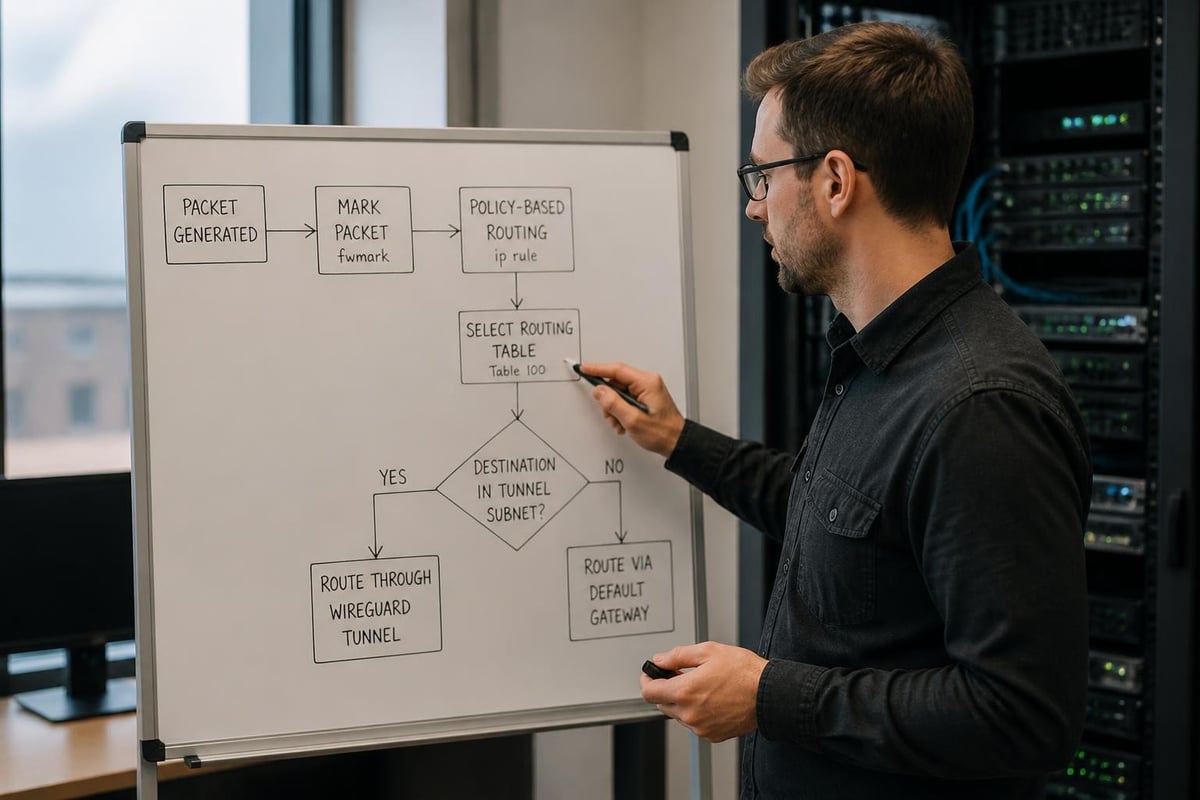
Linux systems can use network namespaces or firewall marks to route traffic from specific applications through WireGuard while other processes use direct connections. This approach creates virtual network environments where selected applications run within a namespace that has WireGuard as its only default route.
The process involves:
- Creating a network namespace for VPN traffic
- Moving the WireGuard interface into that namespace
- Launching specific applications within the namespace
- Leaving other applications in the default namespace
This technique provides process-level isolation and works particularly well for applications you want to permanently route through VPN infrastructure.
Policy Routing with Firewall Marks
Modern Linux systems support marking packets with firewall rules and then routing marked traffic through specific tables. This enables dynamic wireguard split tunneling based on source ports, destination addresses, or application UIDs.
The configuration requires:
- Setting the FwMark parameter in WireGuard configuration
- Creating custom routing tables for VPN traffic
- Writing iptables or nftables rules to mark packets
- Implementing routing policy database (RPDB) rules
pfSense routing documentation describes these concepts from a firewall perspective, showing how enterprise appliances implement sophisticated routing policies.
DNS Considerations
DNS resolution presents unique challenges in split tunnel configurations. If your DNS queries leak outside the tunnel, they can reveal your browsing activity even when web traffic is encrypted. Proper DNS handling requires:
Split DNS Configuration
Configure your system to query different DNS servers based on the domain being resolved. Internal corporate domains query through the VPN tunnel, while public domains use your ISP's resolvers. This prevents internal hostname leaks while maintaining performance for public lookups.
DNS Over WireGuard
Route DNS traffic specifically through the WireGuard tunnel by adding your DNS server IPs to AllowedIPs. Many secure VPN services provide DNS servers that accept queries only from connected clients, preventing DNS leaks.
Preventing DNS Leaks
Modern implementations like Cloudflare's WARP client handle DNS carefully in split tunnel mode, showing how commercial VPN applications address these concerns. The key is ensuring DNS queries match your routing policy-if you're tunneling traffic to example.com, the DNS query for example.com must also go through the tunnel.
Platform-Specific Implementation Details
Different operating systems handle wireguard split tunneling with varying levels of native support and configuration complexity.
Linux Split Tunneling
Linux offers the most flexibility for WireGuard configuration. The wg-quick utility automatically manages routing tables based on AllowedIPs, making simple split tunneling straightforward. For advanced scenarios, you can examine the wg-quick implementation to understand exactly how it manipulates routing and firewall rules.
Manual configuration gives complete control:
- Create custom routing tables in /etc/iproute2/rt_tables
- Use ip rule commands to define routing policy
- Apply firewall marks with iptables
- Configure interface-specific routing with ip route
Windows Configuration
Windows WireGuard clients support AllowedIPs-based split tunneling natively. Microsoft's VPN routing guidance covers split tunnel concepts for enterprise deployments, though WireGuard's implementation differs from Windows' built-in VPN stack.
The official WireGuard Windows client creates routes based on AllowedIPs automatically. For application-specific routing on Windows, third-party tools can bind applications to specific network interfaces, effectively creating application-level split tunneling.
Router-Based Split Tunneling
Implementing wireguard split tunneling on your network router provides centralized control that applies to all connected devices. This approach requires more sophisticated configuration but delivers powerful network-wide policies.
Router implementations typically use:
- Multiple routing tables for VPN and direct traffic
- Policy routing based on source IP (which client), destination, or protocol
- DNS redirection to ensure proper resolution
- Firewall rules to prevent leaks
The OpenWrt WireGuard extras documentation provides detailed guidance for embedded router configurations, including scripts and UCI configuration examples.
Security Implications and Threat Models
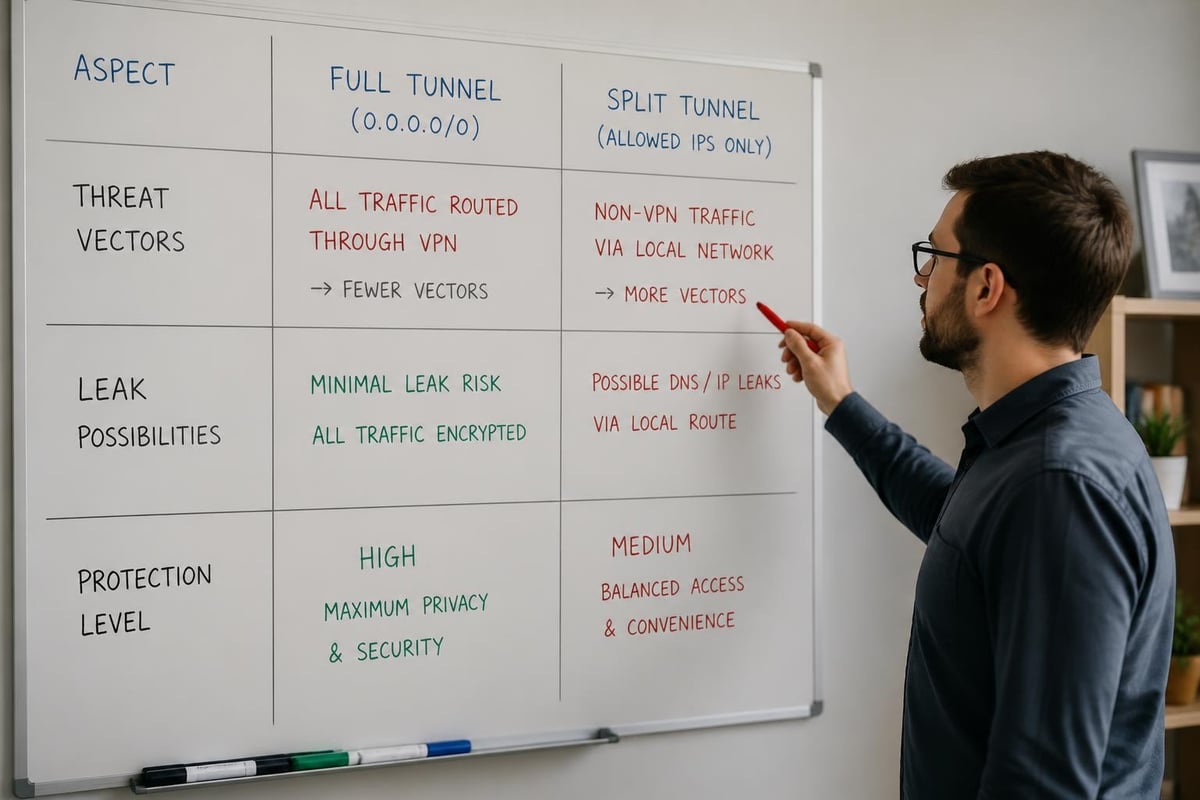
While wireguard split tunneling provides flexibility and performance benefits, it introduces security considerations that full-tunnel VPNs avoid.
Traffic Correlation Risks
Split tunneling creates distinctive traffic patterns that sophisticated adversaries might use for correlation attacks. If an observer can see both your direct traffic and your VPN endpoint, they might infer relationships between the two streams based on timing, volume, or other metadata.
Research on WireGuard security tradeoffs examines these implications, showing that split tunnel designs must balance usability against enhanced traffic analysis risks.
Leak Prevention
Misconfigured split tunneling can accidentally leak sensitive traffic outside the VPN. Common leak vectors include:
IPv6 Leaks
If you configure only IPv4 ranges in AllowedIPs but your system has IPv6 connectivity, traffic might escape through IPv6. Always include both IPv4 and IPv6 ranges in your AllowedIPs configuration, or disable IPv6 entirely if you're not using it through the tunnel.
DNS Leaks
As discussed earlier, DNS queries to resolvers outside your VPN can reveal your browsing history. Verify your DNS configuration using leak testing tools and ensure queries for tunneled destinations also traverse the tunnel.
WebRTC Leaks
Browser-based real-time communication can establish direct peer connections that bypass VPN routing entirely. Browser extensions or configuration changes can prevent WebRTC from leaking your real IP address.
When Full Tunneling Is Better
Some scenarios demand full-tunnel VPN configurations despite the performance overhead. Situations requiring complete traffic encryption include:
- Accessing networks in hostile environments
- Operating under comprehensive surveillance threats
- Meeting regulatory compliance requirements for all traffic encryption
- Preventing any metadata leakage about online activities
Privacy-focused VPN providers often recommend full tunneling as the default secure posture, implementing split tunneling only when users explicitly configure it.
Troubleshooting Split Tunnel Configurations
Even properly configured wireguard split tunneling setups can encounter issues. Systematic troubleshooting helps identify and resolve routing problems.
Verifying Route Installation
After establishing a WireGuard connection, verify that routes were installed correctly:
Linux:
ip route show
ip route show table all | grep wg
Windows (PowerShell):
Get-NetRoute | Where-Object {$_.NextHop -like "*wg*"}
These commands display the active routing table, showing whether AllowedIPs ranges are being routed through the WireGuard interface.
Testing Traffic Paths
Confirm traffic actually uses the expected path with traceroute or tracepath:
traceroute -n 10.0.0.1
traceroute -n 8.8.8.8
The first command (assuming 10.0.0.0/8 is in AllowedIPs) should show the WireGuard tunnel. The second should show your normal ISP routing.
Common Configuration Errors
Overlapping Routes
If you have existing routes that overlap with AllowedIPs ranges, routing conflicts can occur. More specific routes (longer prefix lengths) take precedence, which can cause unexpected behavior.
Missing Return Routes
The WireGuard server must have return routes for your client's tunnel IP. If the server's AllowedIPs for your peer doesn't include your client address, responses can't reach you through the tunnel.
Firewall Interference
Firewalls on either endpoint can block WireGuard traffic. Ensure UDP port 51820 (or your configured port) is permitted. Also verify that firewall rules don't prevent forwarding for your AllowedIPs ranges.
Performance Optimization Strategies
Properly configured wireguard split tunneling delivers excellent performance, but several optimization techniques can further improve results.
MTU Tuning
WireGuard adds overhead to packets (60 bytes for IPv4, 80 for IPv6). Setting your WireGuard interface MTU to your network MTU minus this overhead prevents fragmentation. For typical 1500-byte Ethernet MTUs, configure WireGuard with MTU 1420 for IPv4.
Selecting Optimal Servers
When using commercial VPN services, server selection significantly impacts performance. Fast VPN service providers maintain servers in multiple regions, allowing you to choose endpoints closest to both your location and your destination.
Table Lookup Optimization
On Linux systems handling high packet rates, consider using nftables with sets rather than long lists of iptables rules. This reduces lookup time for policy routing decisions in complex split tunnel configurations.
Enterprise WireGuard Split Tunneling Deployment
Organizations implementing wireguard split tunneling for remote access face additional considerations around consistency, management, and monitoring.
Centralized Configuration Management
Deploy WireGuard configurations through:
- Configuration management tools (Ansible, Puppet, Chef)
- Mobile device management (MDM) platforms for corporate devices
- Zero-touch deployment systems that provision clients automatically
Centralized management ensures all remote workers receive consistent split tunneling policies that reflect organizational security requirements.
Monitoring and Compliance
Enterprise deployments require visibility into VPN usage:
Traffic Metrics Track which networks users access through tunnels versus direct connections. This data helps optimize AllowedIPs configuration and identify potential policy violations.
Connection Status Monitor active WireGuard connections, disconnection rates, and authentication failures. Reliable VPN infrastructure should maintain high availability and consistent performance.
Audit Logging While no-logs VPN services prioritize privacy, enterprises often need connection logs for security incident response and compliance documentation.
Scaling Considerations
WireGuard's efficient design enables servers to handle thousands of concurrent connections, but split tunneling introduces routing complexity. Large-scale deployments should consider:
- Load balancing across multiple WireGuard endpoints
- Geographic distribution to reduce latency
- Automated peer provisioning and key rotation
- RFC 8678 guidance for handling multihomed scenarios
Future Developments in Split Tunneling
WireGuard development continues actively, and several emerging capabilities will enhance split tunneling functionality.
Dynamic Route Updates
Current WireGuard implementations require configuration file changes or interface restarts to modify AllowedIPs. Future enhancements may enable dynamic route updates based on network conditions, application requirements, or security policies without disrupting existing connections.
Application Integration
Operating system vendors are increasingly integrating WireGuard into their VPN frameworks. Native OS support will simplify wireguard split tunneling configuration through graphical interfaces and standardized APIs.
Performance Improvements
Protocol optimizations and hardware acceleration continue advancing WireGuard performance. Modern CPUs with AES-NI and cryptographic instruction sets already enable multi-gigabit throughput, and future developments will further reduce overhead for split tunnel scenarios.
Mastering wireguard split tunneling gives you precise control over which traffic receives VPN protection while maintaining optimal performance for services that don't require encryption. Whether you're routing sensitive business communications through secure channels or optimizing bandwidth usage, proper split tunnel configuration delivers both security and efficiency. ZioFree provides high-speed WireGuard-based VPN access with flexible routing options, global server locations, and strict privacy protections that keep your data secure from sophisticated threats. Experience the perfect balance of performance and protection with our advanced VPN infrastructure.