Configuring a vpn setting for iphone has become essential for protecting your privacy and securing your internet connection in 2026. With increasing threats from state-sponsored hacking attempts and pervasive data collection, iPhone users need reliable VPN protection that integrates seamlessly with iOS. This comprehensive guide walks you through every aspect of VPN configuration on iPhone, from basic setup to advanced security features, ensuring you can establish a secure connection that protects your data from unauthorized access.
Understanding VPN Protocols on iPhone
Apple's iOS platform supports several VPN protocols, each offering different balances of security, speed, and compatibility. The iOS VPN framework provides native support for IKEv2/IPSec, L2TP/IPSec, and modern protocols through third-party apps.
IKEv2/IPSec Protocol
IKEv2 (Internet Key Exchange version 2) represents the most robust native protocol available for vpn setting for iphone configurations. This protocol excels at maintaining connections during network transitions, such as when switching from Wi-Fi to cellular data.
Key advantages of IKEv2:
- Automatic reconnection when network connections drop
- Strong encryption using AES-256 cipher suites
- Fast connection establishment compared to older protocols
- Battery efficiency through optimized data handling
The IKEv2 standard (RFC 7296) defines the protocol's security guarantees and implementation requirements. For users concerned about state-sponsored threats, IKEv2 provides enterprise-grade protection when properly configured.
Modern Protocol Support
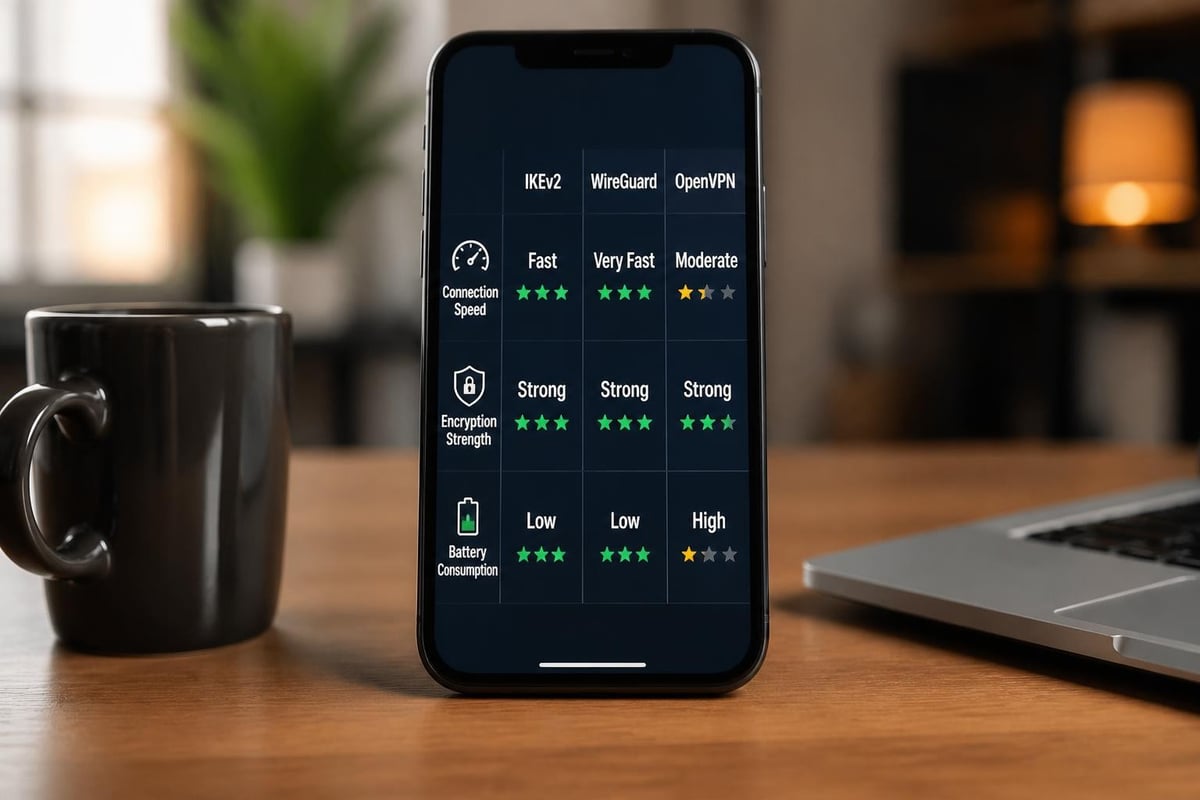
While iOS natively supports traditional VPN protocols, many security-conscious users prefer modern alternatives like WireGuard. These newer protocols require dedicated apps but offer significant performance improvements.
| Protocol | Native Support | Speed | Security | Battery Impact |
|---|---|---|---|---|
| IKEv2/IPSec | Yes | Fast | Excellent | Low |
| L2TP/IPSec | Yes | Moderate | Good | Medium |
| WireGuard | App Required | Very Fast | Excellent | Very Low |
| OpenVPN | App Required | Moderate | Excellent | Medium |
WireGuard's official setup guide provides detailed instructions for iPhone deployment, making it accessible even for users without technical expertise.
Manual VPN Configuration on iPhone
Setting up a vpn setting for iphone manually gives you complete control over your connection parameters and security settings. This approach works well for users who have received configuration details from their VPN provider or IT department.
Step-by-Step Manual Setup
Navigate to your iPhone's Settings app and follow this sequence:
- Open Settings and tap on "General"
- Select "VPN & Device Management" (or just "VPN" on older iOS versions)
- Tap "Add VPN Configuration" to begin setup
- Choose your protocol from IKEv2, IPSec, or L2TP options
- Enter configuration details including server address and credentials
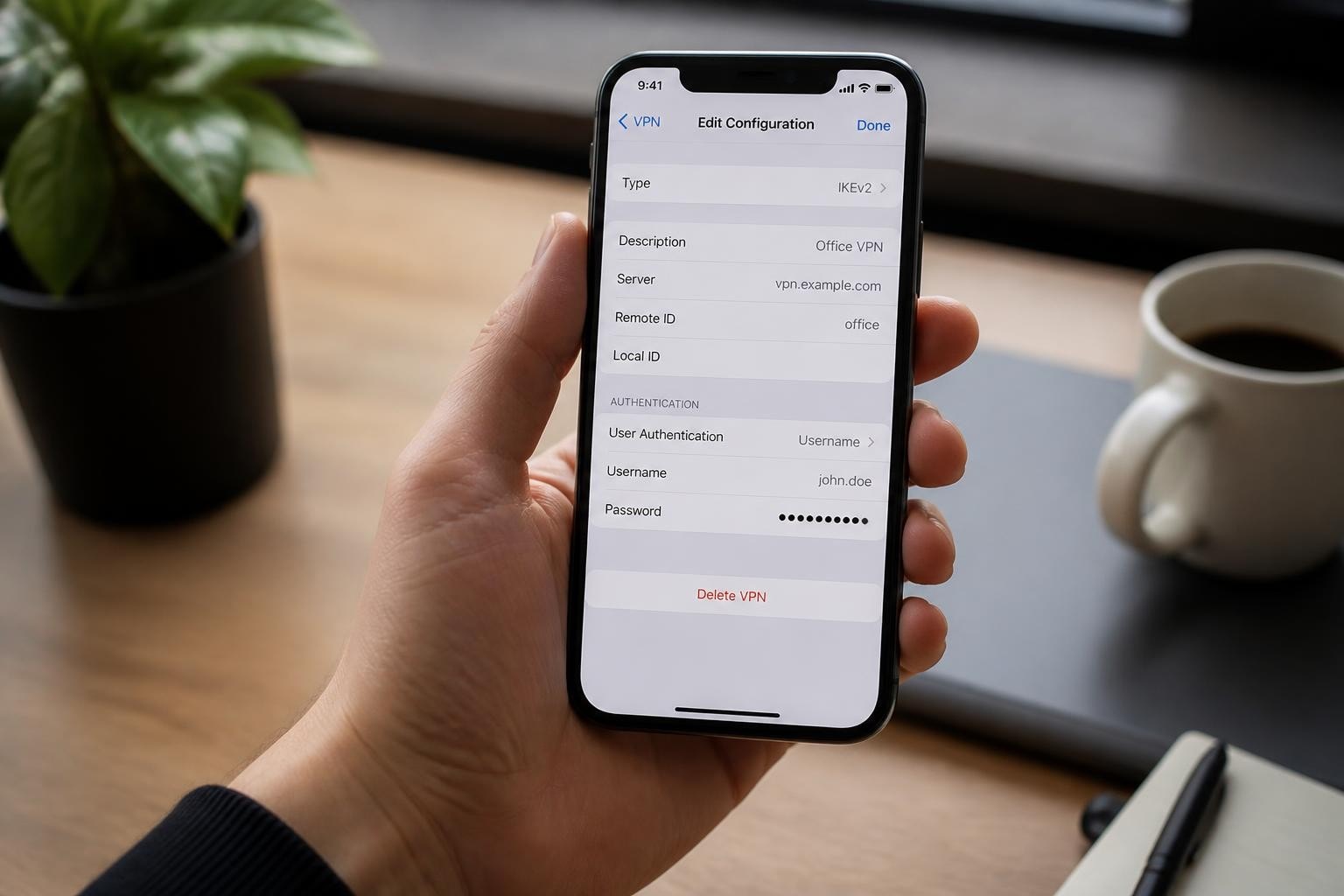
The configuration screen requires several critical pieces of information for proper vpn setting for iphone deployment:
- Description: A friendly name to identify this VPN connection
- Server address: Your VPN provider's server hostname or IP address
- Remote ID: The server's identifier (often the same as the server address)
- Local ID: Your account identifier (optional for most consumer VPNs)
- User authentication: Username and password credentials
Authentication Options
Modern vpn setting for iphone configurations support multiple authentication methods. Certificate-based authentication provides superior security compared to password-only approaches.
Authentication types:
- Username and password (most common)
- Certificate-based (highest security)
- Shared secret (legacy compatibility)
For environments requiring enhanced security, CISA's guidance on network access security recommends implementing certificate-based authentication whenever possible to prevent credential compromise.
Using VPN Configuration Profiles
Configuration profiles streamline the vpn setting for iphone process by bundling all necessary settings into a single downloadable file. This method eliminates manual data entry and reduces configuration errors.
Installing a Configuration Profile
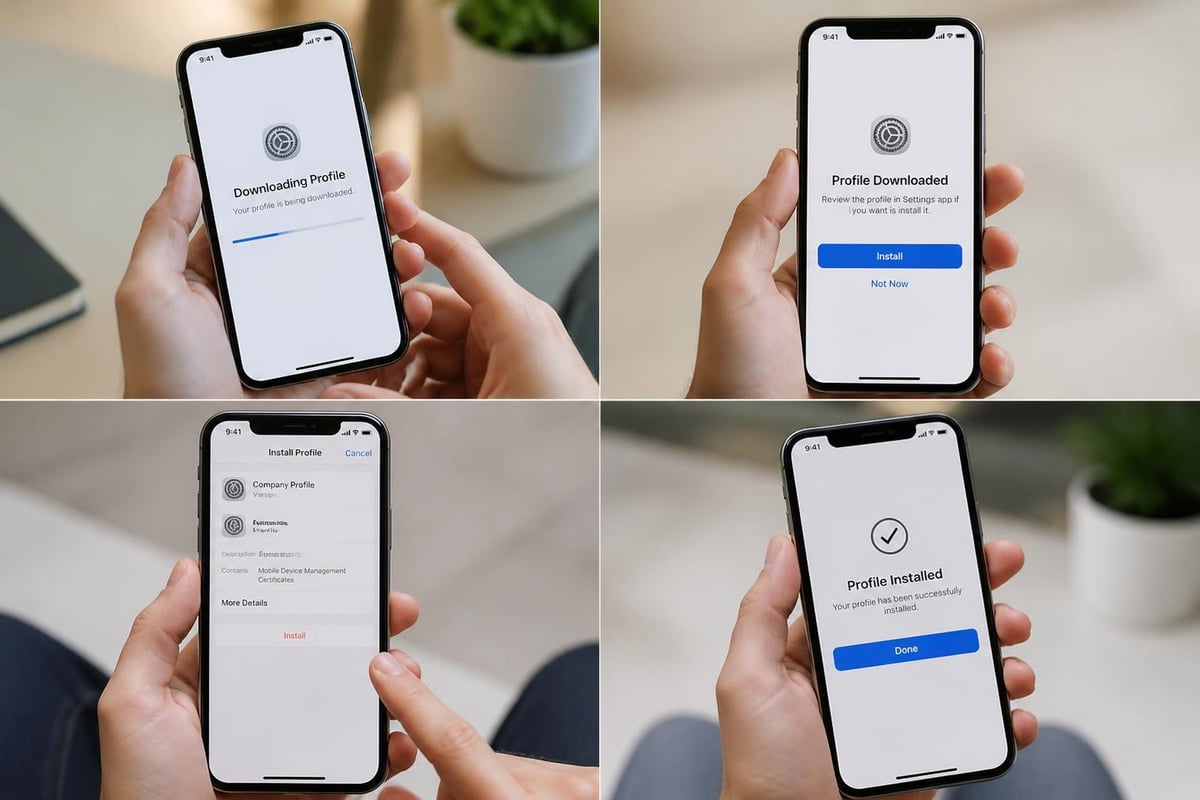
Most professional VPN services, including ZioFree, provide downloadable configuration profiles that automatically populate all required settings. The installation process takes just moments:
Profile installation steps:
- Download the .mobileconfig file from your VPN provider
- Open the downloaded file (Safari will prompt for installation)
- Navigate to Settings > Profile Downloaded
- Review the profile details and tap "Install"
- Enter your iPhone passcode when prompted
- Confirm installation and trust the VPN provider
The Apple VPN configuration documentation provides technical specifications for creating and deploying these profiles in enterprise environments.
Profile Security Considerations
Configuration profiles require explicit user consent before installation, protecting against malicious VPN configurations. Always verify the profile source before installation.
When evaluating VPN providers, prioritize those offering strict no-logs policies to ensure your browsing data remains private. ZioFree's commitment to zero logging means your connection history never leaves your device.
Automatic VPN Connection Features
iOS includes sophisticated automation features for vpn setting for iphone that enhance both security and convenience. These capabilities ensure protection activates exactly when needed without constant manual intervention.
On-Demand VPN Rules
On-Demand VPN represents one of the most powerful features available for iPhone VPN users. This functionality automatically establishes your VPN connection based on network conditions or specific triggers.
| Trigger Type | Action | Use Case |
|---|---|---|
| Network SSID | Connect/Disconnect | Auto-enable on public Wi-Fi |
| Domain Access | Connect | Activate when accessing work resources |
| Always | Connect | Maintain constant protection |
| Never | Disconnect | Disable on trusted networks |
Configuration profiles can specify multiple on-demand rules, creating sophisticated protection strategies. For example, you might configure your vpn setting for iphone to automatically connect whenever you join an unfamiliar Wi-Fi network while remaining disconnected on your home network.
Always-On VPN for Managed Devices
Enterprise environments can deploy Always-On VPN, which forces all network traffic through the VPN tunnel. This feature requires device management enrollment and prevents data leakage outside the secure tunnel.
The Microsoft Intune VPN configuration guide details how organizations can deploy these mandatory VPN policies to managed iPhones, ensuring consistent security posture across the fleet.
Optimizing VPN Performance on iPhone
A properly configured vpn setting for iphone should provide robust security without significantly degrading connection speeds. Several optimization strategies can improve performance while maintaining protection.
Server Selection Strategy
Geographic proximity to your VPN server significantly impacts connection speed. Select servers closest to your physical location for optimal performance when accessing general internet resources.
Server selection best practices:
- Choose nearby servers for general browsing
- Select specific country servers for geo-restricted content
- Use specialized servers for bandwidth-intensive activities
- Test multiple servers to identify fastest options
Fast VPN performance depends on both server quality and network infrastructure. Premium providers invest in high-capacity server networks specifically to maintain speed under load.
Protocol Performance Comparison
Different VPN protocols exhibit varying performance characteristics. WireGuard consistently delivers the fastest speeds, while IKEv2 offers the best native iOS integration.
For users who need to hide their IP address on iPhone without sacrificing speed, modern protocols like WireGuard provide excellent performance while maintaining strong encryption standards.
Battery Impact Mitigation
VPN connections consume additional battery power due to encryption overhead and constant network activity. Minimize impact through intelligent configuration:
- Disable VPN when not needed using on-demand rules
- Choose efficient protocols like WireGuard or IKEv2
- Avoid unnecessary background refreshes while connected
- Connect to nearby servers to reduce connection overhead
Troubleshooting Common Configuration Issues
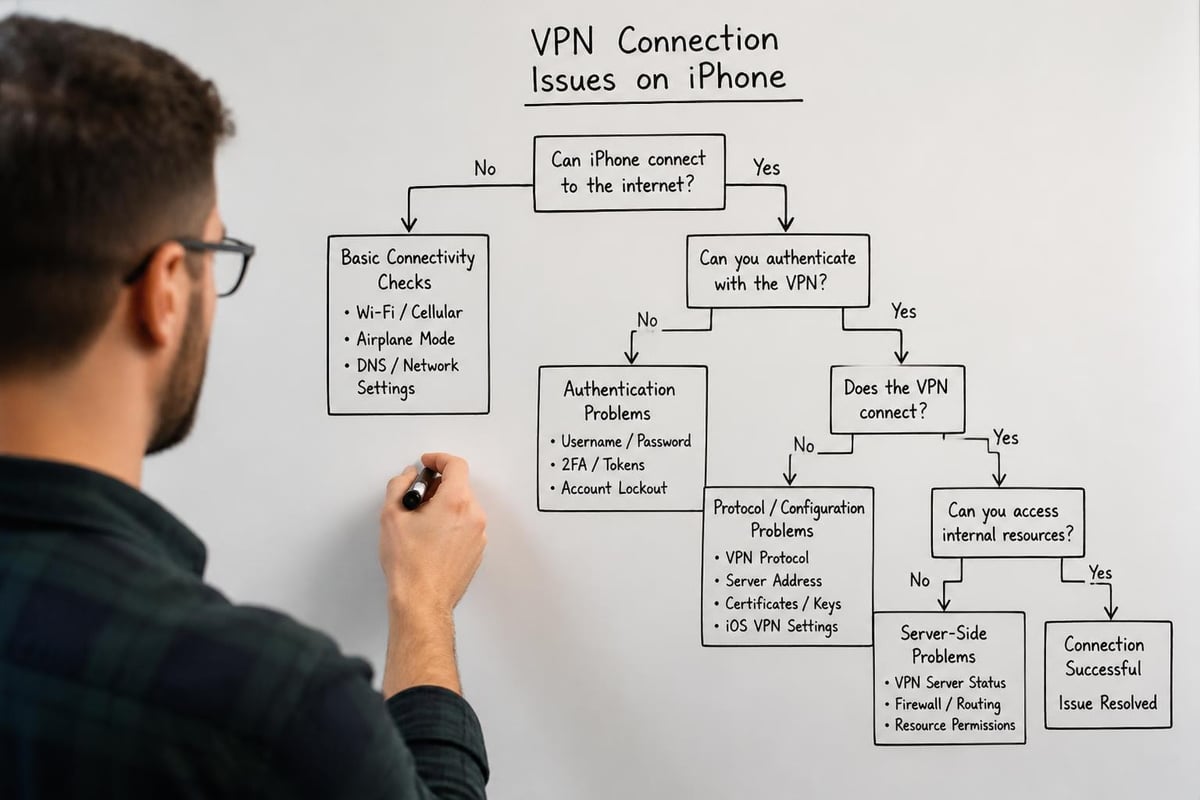
Even with careful setup, vpn setting for iphone configurations occasionally encounter problems. Understanding common issues and their solutions ensures reliable connectivity.
Connection Failures and Timeouts
Authentication errors represent the most frequent vpn setting for iphone problem. Double-check your credentials and server address before investigating deeper issues.
Common connection problems:
- Incorrect server address or port configuration
- Expired or invalid credentials
- Firewall blocking VPN protocols
- ISP throttling VPN connections
- Certificate validation failures
If you experience persistent connection failures, verify your VPN provider's server status. Temporary outages or maintenance can prevent successful connections regardless of your configuration accuracy.
DNS Leak Prevention
DNS leaks occur when your device sends DNS queries outside the VPN tunnel, potentially exposing your browsing activity. Proper vpn setting for iphone configurations should route all DNS traffic through the encrypted tunnel.
Test for DNS leaks after establishing your VPN connection by comparing your DNS resolver before and after connecting. The resolver should change to your VPN provider's DNS servers upon connection.
Advanced Security Configurations
Beyond basic connectivity, sophisticated vpn setting for iphone deployments can implement additional security layers that protect against emerging threats.
Split Tunneling Considerations
Split tunneling allows certain apps or destinations to bypass the VPN while routing other traffic through the secure tunnel. While convenient, this approach introduces security risks.
CISA's guide to securing remote access recommends avoiding split tunneling for sensitive communications, as it creates potential data leakage paths outside your protected connection.
Kill Switch Implementation
A VPN kill switch prevents internet access if your VPN connection drops, ensuring no unencrypted data transmission occurs during connection interruptions. iOS doesn't provide a native kill switch, but Always-On VPN configurations in managed environments achieve similar protection.
For maximum security against state-sponsored threats, implement multiple defensive layers. Understanding what VPNs can and cannot protect helps you make informed decisions about additional security measures.
Cipher Suite Selection
When configuring IKEv2 connections, you may have options to specify preferred encryption algorithms. Modern vpn setting for iphone configurations should prioritize strong cipher suites:
Recommended encryption settings:
- Encryption: AES-256-GCM or AES-256-CBC
- Integrity: SHA-256 or SHA-384
- Key Exchange: Diffie-Hellman Group 14 or higher
- Perfect Forward Secrecy: Enabled
The NIST SP 800-113 guidance provides authoritative recommendations for VPN cryptographic selections, helping administrators choose secure configurations.
Enterprise and MDM Deployment
Organizations deploying vpn setting for iphone configurations across multiple devices benefit from Mobile Device Management (MDM) systems that centralize configuration and policy enforcement.
Per-App VPN Capabilities
Per-app VPN restricts VPN tunnel usage to specific applications, allowing granular control over which apps receive VPN protection. This feature requires MDM enrollment and supervised devices.
Per-app VPN benefits:
- Selective protection for sensitive business apps
- Reduced bandwidth consumption
- Better performance for non-critical apps
- Compliance with data residency requirements
The per-app VPN feature integrates with iOS's NetworkExtension framework, enabling sophisticated routing policies that traditional VPNs cannot achieve.
Compliance and Audit Requirements
Regulated industries often require specific VPN configurations to meet compliance standards. Document your vpn setting for iphone deployment, including protocol choices, encryption settings, and access policies.
Maintain configuration records showing:
| Requirement | Implementation | Verification Method |
|---|---|---|
| Encryption Standard | AES-256 | Configuration audit |
| Authentication | Certificate-based | Access logs review |
| Data Retention | Zero-logs policy | Provider certification |
| Access Control | Per-user credentials | Authentication records |
Organizations concerned about data sovereignty should verify their VPN provider operates servers independent of certain jurisdictions to ensure compliance with internal security policies.
Privacy and Logging Considerations
The privacy protections offered by your vpn setting for iphone depend heavily on your VPN provider's logging policies and operational practices. Technical configuration alone cannot guarantee privacy if the service provider collects extensive user data.
Evaluating VPN Provider Privacy Policies
A comprehensive no-logs VPN maintains no records of your browsing activity, connection times, or data transferred. Review your provider's privacy policy for specific details about data retention.
Critical privacy policy questions:
- What connection metadata does the provider log?
- How long are any logs retained?
- Under what circumstances are logs shared with third parties?
- Has the no-logs policy been independently audited?
Providers committed to user privacy undergo regular third-party audits that verify their no-logs claims. These audits provide assurance that your vpn setting for iphone truly protects your privacy.
Jurisdiction and Legal Framework
The legal jurisdiction governing your VPN provider affects what data they can be compelled to collect. Services operating under privacy-friendly legal frameworks offer stronger protection against government data demands.
ZioFree's commitment to protecting users from Israeli hacking attempts reflects the growing importance of considering geopolitical factors when selecting VPN providers. A secure VPN must address both technical and jurisdictional security concerns.
Testing and Verification
After completing your vpn setting for iphone configuration, verify the connection provides the expected security and privacy protections through systematic testing.
Connection Verification Steps
Confirm your VPN functions correctly by checking several indicators:
- IP address change: Verify your public IP matches the VPN server location
- DNS resolver: Confirm DNS queries route through VPN infrastructure
- Encryption status: Check the VPN status icon in iOS
- Traffic routing: Test that all applications use the VPN tunnel
- Reconnection behavior: Verify automatic reconnection after interruptions
Performance Benchmarking
Measure your VPN's impact on connection speeds by conducting bandwidth tests before and after connecting. Quality VPN services minimize speed degradation while maintaining strong encryption.
Record baseline performance metrics:
- Download speed without VPN
- Upload speed without VPN
- Latency to common destinations
- Compare with VPN-connected performance
Significant performance degradation may indicate server overload or configuration issues requiring adjustment.
Multi-Device Synchronization
Many users maintain VPN protection across multiple devices. While this guide focuses on vpn setting for iphone, understanding how iOS VPN configurations interact with your other devices helps maintain consistent security.
Cross-Platform Considerations
VPN accounts typically support simultaneous connections across multiple devices. Configure your iPhone alongside your desktop computers, tablets, and other mobile devices for comprehensive protection.
Different platforms require platform-specific configurations, but your VPN credentials remain consistent. Android VPN software uses different configuration methods than iOS, but your account works across both platforms.
Account Management
Most VPN providers offer web portals or dedicated apps for managing your account settings, tracking device connections, and modifying your vpn setting for iphone remotely. Centralized management simplifies maintaining security across your device ecosystem.
For users requiring VPN access across multiple devices, review your provider's pricing options to ensure your plan supports your connection requirements.
Mastering vpn setting for iphone empowers you to take control of your mobile privacy and security in 2026's increasingly hostile threat landscape. From selecting appropriate protocols to implementing advanced security features, proper VPN configuration transforms your iPhone into a secure communication platform resistant to surveillance and hacking attempts. When you need reliable VPN protection backed by high-speed servers, strong encryption, and a verified no-logs policy, ZioFree delivers the security infrastructure that keeps your data safe from unauthorized access. Get started today with ZioFree's global server network and experience truly private mobile browsing.