Your iPhone constantly broadcasts your IP address to websites, apps, and network providers, creating a detailed trail of your online activity. This unique identifier reveals your location, browsing habits, and can be used to build comprehensive profiles about you. Understanding how to hide IP address on iPhone has become essential in 2026, especially as sophisticated tracking techniques and targeted surveillance tactics continue to evolve. Whether you're concerned about corporate tracking, protecting sensitive communications, or simply maintaining your right to privacy, masking your IP address provides a critical layer of security for your mobile internet activity.
Why Your iPhone IP Address Matters
Every device connected to the internet receives an IP address, functioning as a digital return address for all your online communications. This identifier allows websites to deliver content back to your device, but it simultaneously exposes valuable information about you.
Advertisers, data brokers, and malicious actors use IP addresses to:
- Track your physical location with surprising accuracy
- Monitor which websites and services you access
- Correlate your activity across different platforms
- Build behavioral profiles for targeted advertising
- Launch sophisticated phishing or hacking attempts
The Electronic Frontier Foundation's research demonstrates how IP addresses serve as persistent identifiers in corporate surveillance ecosystems. Your IP address doesn't just reveal where you are; it reveals patterns about who you are, what you do, and when you do it. For users concerned about specific threats, including state-sponsored surveillance, learning to hide IP address on iPhone becomes a fundamental security practice.
Mobile devices face unique vulnerabilities because they constantly switch between cellular networks and Wi-Fi hotspots. Each network transition potentially exposes your IP address to new observers, creating multiple opportunities for tracking and interception.

Built-in iPhone Features for IP Privacy
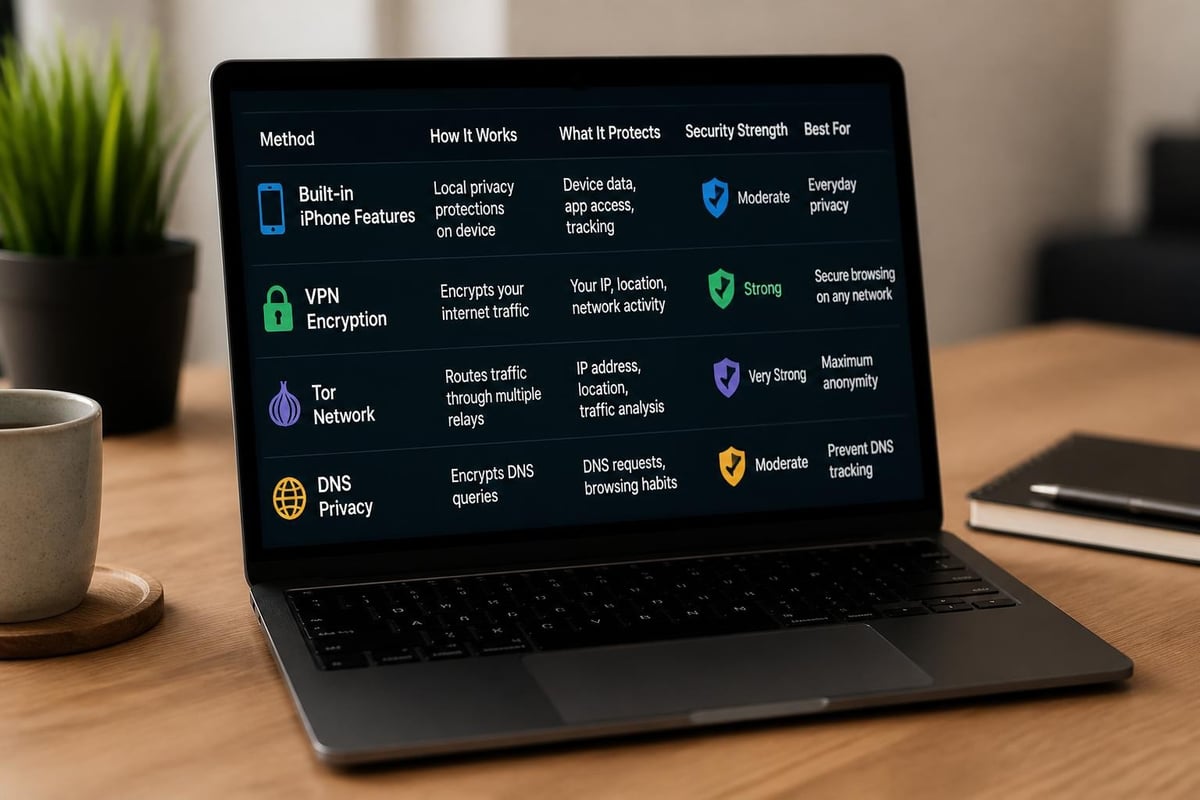
Apple has integrated several privacy features directly into iOS that help obscure your IP address in specific contexts. These native tools provide convenient protection without installing third-party applications.
iCloud Private Relay
Apple's iCloud Private Relay represents the company's most comprehensive built-in IP masking solution. Available to iCloud+ subscribers, Private Relay creates a dual-hop architecture that separates your identity from your browsing activity.
The system works by routing your Safari traffic through two separate relay servers. The first server, operated by Apple, sees your IP address but not the websites you visit. The second server, operated by a content provider, sees which websites you access but not your original IP address. Neither party can construct a complete picture of your browsing activity.
To enable iCloud Private Relay:
- Open Settings and tap your name at the top
- Select iCloud, then Private Relay
- Toggle Private Relay to the on position
- Choose your IP address location preference
Private Relay offers two location options: maintaining your general location (city-level) or using a broader location that only preserves your country and time zone. The broader setting provides enhanced privacy but may affect location-based services.
| Feature | Private Relay | Standard Browsing |
|---|---|---|
| IP visibility to websites | Hidden | Visible |
| Safari protection | Yes | No |
| Third-party app protection | Limited | No |
| Cellular data support | Yes | N/A |
| Free to use | iCloud+ required | Yes |
Important limitations exist with Private Relay. It only protects Safari browser traffic and some system-level DNS requests. Third-party browsers, apps, and services bypass Private Relay entirely, leaving your IP address exposed during those activities.
Safari Privacy Settings
Safari includes additional privacy controls that complement IP address protection efforts. The Hide IP Address feature for known trackers provides targeted protection against identified tracking domains.
Navigate to Settings > Safari > Privacy & Security to access these controls. The "Hide IP Address" section offers two modes: hiding your IP from trackers only, or hiding it from all websites when Private Relay is active. Enabling tracker protection prevents advertising networks and analytics services from collecting your IP address, even if they're embedded in legitimate websites.
Private Browsing mode adds another layer of protection by preventing Safari from storing your browsing history, cookies, and site data. While this doesn't directly hide your IP address, it complements IP masking by reducing the digital footprint you leave behind.
Private Wi-Fi Address
iOS generates unique, randomized MAC addresses for each Wi-Fi network you join. This feature prevents network operators from tracking your device across different locations by recognizing your hardware identifier.
When you hide IP address on iPhone using network-level features, combining MAC address randomization with IP masking creates stronger privacy protection. These features work together to make device identification significantly more difficult for network administrators and potential attackers.
VPN Solutions for Comprehensive IP Protection
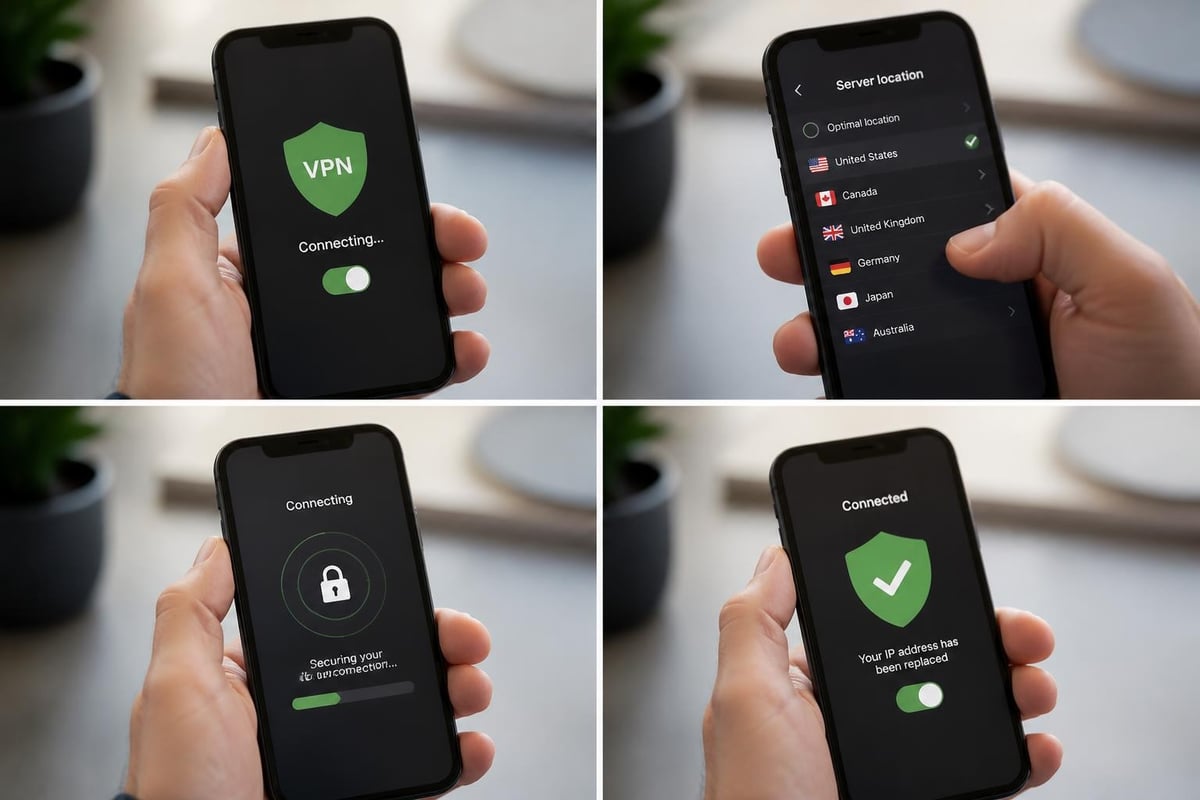
While Apple's built-in features provide valuable privacy enhancements, VPN services offer more comprehensive and flexible IP address protection. A VPN encrypts all network traffic from your iPhone and routes it through secure servers, replacing your real IP address with one from the VPN provider's network.
How VPNs Hide Your IP Address
VPN technology creates an encrypted tunnel between your iPhone and a remote server. All internet traffic flows through this tunnel, preventing your internet service provider, network administrators, and websites from seeing your actual IP address or monitoring your activities.
The Privacy Guides VPN overview explains the fundamental distinction between VPNs and other privacy tools. Unlike proxies that only redirect specific applications, VPNs protect your entire device's internet connection, including all apps, system services, and background processes.
Key advantages of VPN-based IP masking:
- Protection across all apps and browsers
- Encrypted traffic prevents content inspection
- Choice of server locations worldwide
- Consistent protection on cellular and Wi-Fi
- Defense against local network surveillance
When evaluating VPN providers, prioritize services with verifiable no-logs policies that don't record your browsing activity or connection history. Without strict privacy commitments, you're simply transferring trust from your ISP to your VPN provider.
Selecting a Privacy-Focused VPN
The VPN market includes hundreds of providers, but not all offer genuine privacy protection. Many free VPNs monetize user data through advertising partnerships or sell connection logs to third parties, defeating the purpose of hiding your IP address.
Premium services like ZioFree distinguish themselves through verifiable security practices and transparent operations. Essential criteria when choosing a VPN include jurisdiction (operating outside surveillance alliances), encryption standards (WireGuard or OpenVPN protocols), server network diversity, and independent security audits.
Connection speed matters significantly on mobile devices. A VPN that severely throttles your bandwidth makes everyday tasks frustrating and encourages disabling protection when you need it most. Look for providers with high-speed infrastructure specifically optimized for mobile connections.
| VPN Feature | Why It Matters for iPhone Users |
|---|---|
| No-logs policy | Ensures no record of your IP or activity exists |
| Kill switch | Blocks internet if VPN disconnects, preventing IP leaks |
| WireGuard support | Modern protocol optimized for mobile battery life |
| Split tunneling | Allows selective app routing for flexibility |
| Server diversity | Provides more location options and load balancing |
Configuration and Best Practices
Installing a VPN on iPhone typically requires downloading the provider's app from the App Store. Reputable services integrate with iOS's native VPN framework, providing system-level protection without requiring jailbreaking or risky modifications.
After installation, configure the VPN to connect automatically when joining untrusted networks. This setting ensures protection on public Wi-Fi hotspots where IP exposure and man-in-the-middle attacks pose significant risks. Enable the kill switch feature to prevent accidental IP leaks if your VPN connection drops unexpectedly.
Test your VPN connection regularly using IP leak detection tools. These services confirm that your real IP address remains hidden and verify that DNS requests aren't leaking outside the encrypted tunnel. Even with a VPN active, misconfigurations can expose identifying information.
Consider geographic server selection strategically. Choosing servers closer to your physical location typically provides better performance, while distant servers offer stronger anonymity by making your apparent location dramatically different from reality. Balance speed requirements with privacy needs based on your specific threat model.
Advanced Privacy Tools and Techniques
Beyond standard VPNs and Apple's native features, specialized tools provide enhanced anonymity for users facing elevated surveillance risks or seeking maximum privacy protection.
Tor Browser and Onion Browser
The Tor network routes traffic through multiple volunteer-operated relays, making it extremely difficult to trace activity back to your original IP address. While desktop Tor Browser provides comprehensive protection, iPhone users can access the Tor network through Onion Browser.
Onion Browser implements Tor's privacy features within iOS constraints, providing significantly stronger anonymity than conventional VPNs. The Tor Project's documentation explains the trade-offs: Tor excels at hiding your IP address and preventing traffic analysis, but connection speeds suffer due to multi-hop routing.
Tor works best for browsing and communication activities that don't require high bandwidth. Streaming video or large file downloads perform poorly on Tor, and the network explicitly discourages high-bandwidth usage that degrades performance for other users. For sensitive research, anonymous communications, or accessing content under restrictive networks, Tor's IP protection surpasses standard VPN capabilities.
Proxy Servers and SSH Tunnels
Proxy servers offer lightweight IP masking for specific applications or browser sessions. Unlike VPNs that protect your entire device, proxies route only configured traffic through their servers. This selective approach consumes fewer resources but requires careful configuration to avoid leaks.
SOCKS5 proxies provide flexible protocol support and can handle various traffic types. Configure proxy settings in specific apps or use system-wide configuration through iOS network settings. Remember that proxies don't encrypt traffic by default; they simply change the visible IP address without providing confidentiality protection.
SSH tunnels create encrypted connections to remote servers, allowing you to route traffic through systems you control. This self-hosted approach eliminates trust concerns inherent in third-party VPN services. However, government security guidance emphasizes proper configuration and maintenance when deploying custom tunneling solutions.
DNS Configuration for Privacy
Domain Name System (DNS) requests can leak your browsing destinations even when using VPNs or proxies. Each time you visit a website, your device queries DNS servers to translate domain names into IP addresses. These queries potentially reveal your browsing history to your ISP or network operator.
Configure encrypted DNS (DNS-over-HTTPS or DNS-over-TLS) in iOS Settings > Wi-Fi > [your network] > Configure DNS. Switch from Automatic to Manual and add privacy-respecting DNS servers that don't log queries. This configuration ensures DNS requests don't undermine your IP masking efforts.
Privacy-focused DNS providers include:
- Cloudflare 1.1.1.1
- Quad9 9.9.9.9
- Google DNS 8.8.8.8 (with privacy caveats)
Verify your VPN provider handles DNS requests internally rather than forwarding them to external servers. Quality VPN services operate their own DNS infrastructure to maintain privacy throughout the entire connection chain.
Practical Scenarios and Use Cases
Understanding when and how to hide IP address on iPhone depends on your specific activities, risk profile, and privacy requirements. Different situations demand varying levels of protection.
Public Wi-Fi and Travel
Public networks in cafes, airports, and hotels present significant security risks. These networks rarely implement encryption, allowing other users and network administrators to monitor traffic and collect IP addresses. Always activate VPN protection before connecting to public Wi-Fi.
When traveling internationally, hiding your IP address helps bypass geographic restrictions and protects against regional surveillance. A secure VPN connection maintains privacy regardless of local network conditions or government monitoring capabilities. Choose server locations strategically based on content access needs and privacy considerations.
Sensitive Communications
Journalists, activists, and professionals handling confidential information require robust IP protection. Standard privacy measures may prove insufficient against sophisticated adversaries with significant resources. Layer multiple protection methods: use a trusted VPN, enable iCloud Private Relay, and consider Tor for extremely sensitive communications.
The EFF's Surveillance Self-Defense guides provide detailed recommendations for high-risk users. Remember that IP address masking represents just one component of comprehensive operational security. Coordinate IP protection with encrypted messaging, secure authentication, and careful information handling practices.
Content Access and Research
Geographic restrictions often limit content availability based on your IP address. Streaming services, news outlets, and research databases frequently implement location-based access controls. VPNs allow you to present IP addresses from different regions, accessing content as if you were physically located elsewhere.
Academic research increasingly requires privacy protection as universities and institutions monitor network usage. Students and researchers investigating sensitive topics benefit from IP masking that prevents surveillance of research activities and protects source confidentiality.
General Daily Use
Even routine internet usage generates valuable data for advertisers and data brokers. The tracking infrastructure that relies on IP addresses spans virtually all websites and online services. Hiding your IP address during everyday browsing, social media use, and mobile app interactions reduces the digital profile companies can construct about you.
Balance privacy protection with practical usability. Constant maximum-security measures may prove unsustainable for typical users. Establish baseline protection through Safari's privacy settings and iCloud Private Relay, then activate comprehensive VPN protection for sensitive activities or when using untrusted networks.
Verifying Your IP Protection
After implementing IP masking measures, verify they function correctly. Various tools and techniques confirm whether your efforts successfully hide your IP address from potential observers.
IP Leak Testing
Online leak test services check whether your real IP address remains hidden when using privacy tools. These services examine multiple potential leak vectors: IPv4 and IPv6 addresses, DNS queries, and WebRTC connections.
Access leak testing websites using your iPhone's browser after activating protection measures. The results should display your VPN server's IP address or Private Relay's IP address, not your actual ISP-assigned address. Run tests on multiple services to ensure consistent protection across different detection methods.
Pay special attention to IPv6 leaks, which occur when websites query your device's IPv6 address while your VPN only masks IPv4. Ensure your VPN provider supports full IPv6 protection or disable IPv6 entirely in network settings if necessary. WebRTC leaks represent another common vulnerability where browser features bypass VPN tunnels and expose your real IP.
Network Traffic Analysis
Technical users can examine network traffic using packet capture tools to verify encryption and confirm proper routing through privacy services. Applications like WireShark or built-in iOS diagnostic tools reveal whether traffic flows through encrypted tunnels as expected.
Monitor connection logs in your VPN app to track active server connections and data transfer. Unexpected disconnections or failed connections indicate potential moments when your IP address was exposed. Quality VPN apps provide detailed connection status and automatically reconnect if tunnels drop.
Geolocation Checks
Location-based services and websites often display your apparent geographic location based on IP address. After activating IP masking, these services should reflect your VPN server location or a generalized region rather than your actual physical position.
Search engines, weather services, and mapping applications all infer location from IP addresses. Verify that these services place you in the expected location corresponding to your active VPN server. Inconsistent location detection may indicate IP leaks or incomplete protection.
Maintaining Privacy Over Time
IP protection requires ongoing attention and periodic review. Privacy tools and techniques evolve constantly, as do surveillance methods and tracking technologies. Establish regular practices to maintain effective IP masking.
Regular Updates and Patches
Keep iOS updated to the latest version to receive security patches and privacy enhancements. Apple's platform security guide documents the continuous improvements Apple makes to networking privacy and IP protection features. Delayed updates leave vulnerabilities unpatched and may prevent newer privacy features from functioning correctly.
VPN applications require similar update vigilance. Providers regularly release new versions addressing security issues, improving protocol implementations, and optimizing performance. Enable automatic updates for critical security applications while monitoring change logs for significant modifications.
Threat Model Assessment
Periodically reassess your privacy requirements and threat model. Personal circumstances change, and new risks emerge as technology and surveillance capabilities advance. What seemed like adequate protection last year may prove insufficient against current threats.
Consider who might target you and their capabilities. Corporate advertisers have different resources than state-sponsored actors. Casual privacy seekers face different risks than journalists working in hostile environments. Adjust your IP protection strategy to match realistic threats rather than implementing either inadequate or excessively burdensome measures.
Privacy Hygiene Practices
IP masking delivers maximum benefit when combined with comprehensive privacy practices. Use strong unique passwords, enable two-factor authentication, minimize data sharing with apps and services, and review privacy settings regularly. These complementary measures prevent alternative tracking methods from undermining your IP protection efforts.
Diversify your privacy tools rather than relying exclusively on single solutions. Understanding the relationship between VPNs and other privacy methods helps build layered defenses. Combine built-in iPhone features with trusted VPN services and privacy-focused browsing habits for comprehensive protection.
Regular privacy audits identify areas where your IP address or other identifying information might leak. Review app permissions, examine account settings across services, and assess which platforms collect and share your data. Minimize unnecessary data exposure while focusing IP protection efforts on highest-risk activities.
Protecting your digital privacy requires understanding how to hide IP address on iPhone through built-in features, trusted VPN services, and specialized privacy tools. While Apple provides valuable native protection, comprehensive security demands layered defenses appropriate to your specific needs and threat environment. ZioFree delivers the high-speed encrypted connections and global server network you need to maintain privacy without compromising performance, backed by our strict no-logs commitment and advanced security protocols specifically designed to protect against sophisticated surveillance threats.