When you connect to a VPN service, understanding your actual connection speed becomes essential for determining whether your provider delivers the performance they promise. A vpn bandwidth test measures the data transfer capacity of your encrypted tunnel, revealing how much throughput you're actually getting compared to your baseline internet connection. This measurement helps you identify performance bottlenecks, verify your provider's claims, and ensure your VPN configuration supports your daily activities without unnecessary slowdowns. Whether you're streaming content, participating in video conferences, or transferring sensitive files, knowing how to properly test and interpret VPN bandwidth results empowers you to make informed decisions about your privacy solution.
Understanding VPN Bandwidth and Why It Matters
VPN bandwidth represents the amount of data your encrypted connection can transfer per unit of time, typically measured in megabits per second (Mbps) or gigabits per second (Gbps). Unlike your raw internet speed, VPN bandwidth accounts for the overhead introduced by encryption protocols, routing through remote servers, and the distance your data travels to reach its destination.
The encryption process itself consumes computational resources and adds extra bytes to each packet. Modern protocols like WireGuard and OpenVPN use strong ciphers that transform your plain data into encrypted packets, adding authentication headers and encryption wrappers. This necessary security layer typically reduces available bandwidth by 10-30% compared to an unencrypted connection, though the exact impact varies based on your hardware capabilities and the protocol implementation.
The Impact of Server Distance and Load
Physical distance between your location and the VPN server directly affects latency and throughput. Data packets traveling from New York to Singapore must traverse significantly more network infrastructure than packets routed to a nearby server in Virginia. Each router hop, undersea cable, and peering point introduces microseconds of delay that accumulate into measurable latency.
Server load creates another dimension of performance variation. A VPN server handling 500 concurrent users will allocate fewer resources per connection than one serving 50 users. Conducting regular vpn bandwidth test sessions helps you identify whether poor performance stems from server congestion or other factors like your local network conditions.

Essential Tools for VPN Bandwidth Testing
Professional network administrators rely on specialized measurement tools that provide more accurate and detailed results than simple web-based speed tests. These tools control testing parameters, eliminate browser overhead, and generate standardized traffic patterns that reveal your connection's true capabilities.
Command-Line Testing with iperf3
The iperf3 network testing tool serves as the gold standard for measuring TCP and UDP throughput in professional environments. Unlike browser-based tests that introduce JavaScript overhead and HTTP protocol limitations, iperf3 generates pure data streams that accurately measure your connection's raw capacity.
Setting up an iperf3 test requires a server endpoint (which you or your testing partner controls) and a client that connects to it. The tool measures bidirectional throughput, reports packet loss, and calculates jitter for UDP streams. You can use ESnet's practical iperf guide to learn specific invocation patterns and interpretation techniques.
Key iperf3 testing parameters include:
- TCP window size (affects maximum throughput)
- Parallel streams (tests connection aggregation)
- Test duration (longer tests reveal stability)
- Reverse mode (measures download vs. upload separately)
- UDP mode with bandwidth targets (tests packet loss under load)
Web-Based Speed Testing Platforms
Browser-based speed tests offer convenience and immediate results without software installation. Services like Speedtest by Ookla, Fast.com, and Google's speed test measure your connection by downloading and uploading test files through your browser. While less precise than dedicated tools, they provide quick snapshots useful for basic comparisons.
When using web-based tests for vpn bandwidth test purposes, always run multiple tests to different server locations and calculate averages. Single measurements can be skewed by temporary network congestion, server-side rate limiting, or local background processes consuming bandwidth.
Automated Monitoring Solutions
Organizations requiring continuous performance visibility implement automated testing frameworks. The perfSONAR measurement toolkit enables scheduled, repeatable bandwidth tests across distributed sites, building historical baselines and alerting administrators to degradation. These systems typically combine iperf3 with one-way latency measurements, traceroute path analysis, and packet loss monitoring.
Conducting an Accurate VPN Bandwidth Test
Proper testing methodology separates meaningful results from misleading numbers. Your measurement approach should isolate VPN performance from other variables like Wi-Fi interference, background applications, or peak-hour internet congestion. Following a structured process ensures reproducible results you can trust when evaluating your VPN service performance.
Establishing Your Baseline
Before connecting to any VPN, measure your raw internet speed to establish a baseline for comparison. Run at least three consecutive tests to different geographic locations and record the results. This baseline represents your maximum possible speed, the ceiling against which VPN performance will be measured.
Baseline testing checklist:
- Disconnect from all VPN services
- Close bandwidth-intensive applications
- Use a wired Ethernet connection if possible
- Test during off-peak hours for consistency
- Record download speed, upload speed, and latency
- Calculate average values across multiple tests
Testing with VPN Connected
Connect to your VPN server and wait 30-60 seconds for the tunnel to fully establish before beginning tests. Network stacks need time to negotiate encryption parameters, establish routing tables, and stabilize connection state. Immediate testing after connection often produces artificially low results due to this initialization period.
Run the same test sequence you performed for your baseline, using identical servers and parameters. Consistency in methodology allows valid before-and-after comparison. Testing to servers in the same geographic region as your VPN endpoint reduces variables introduced by different routing paths.
| Test Scenario | Download (Mbps) | Upload (Mbps) | Latency (ms) | Packet Loss (%) |
|---|---|---|---|---|
| Baseline (No VPN) | 500 | 250 | 12 | 0.0 |
| VPN - Nearest Server | 425 | 210 | 18 | 0.0 |
| VPN - Mid Distance | 380 | 190 | 45 | 0.1 |
| VPN - Far Distance | 320 | 165 | 128 | 0.3 |
Comparing Results Across Protocols
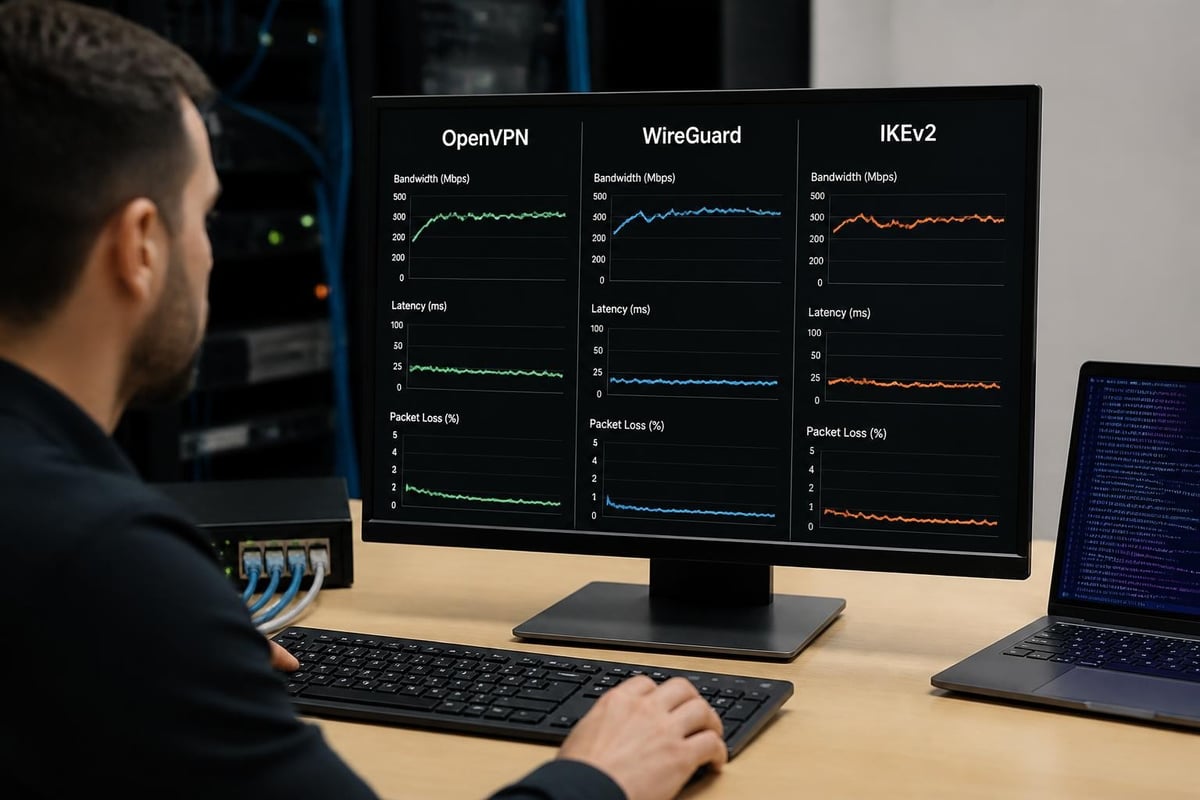
Modern VPN services support multiple protocols including OpenVPN, WireGuard, IKEv2, and proprietary solutions. Each protocol balances security, speed, and compatibility differently. Running vpn bandwidth test sessions across available protocols reveals which option delivers optimal performance for your specific network conditions and hardware capabilities.
WireGuard typically achieves higher throughput than OpenVPN on equivalent hardware due to its streamlined codebase and modern cryptographic primitives. However, some networks block WireGuard traffic or exhibit routing inefficiencies that favor OpenVPN's more mature infrastructure integration. Testing both protocols provides empirical data for protocol selection rather than relying on theoretical advantages.
Interpreting Your Test Results
Raw numbers tell only part of the performance story. Understanding what your measurements reveal about connection quality, server health, and network path efficiency enables actionable decisions about server selection, protocol configuration, and provider evaluation.
Acceptable Performance Thresholds
A well-performing VPN connection typically retains 70-90% of your baseline bandwidth, depending on encryption strength and server distance. Connections preserving less than 60% of baseline speed warrant investigation unless you've deliberately chosen maximum-security settings that prioritize encryption over speed.
Latency increases of 5-20 milliseconds for nearby servers (same country) represent normal overhead. Distant international servers naturally add 50-200+ milliseconds based purely on physical distance and routing path complexity. Understanding these metrics helps you set realistic expectations aligned with geographic and security requirements.
Performance interpretation framework:
- Excellent: 85%+ bandwidth retention, <20ms added latency, zero packet loss
- Good: 70-84% bandwidth retention, 20-50ms added latency, <0.2% packet loss
- Acceptable: 60-69% bandwidth retention, 50-100ms added latency, <0.5% packet loss
- Poor: <60% bandwidth retention, >100ms added latency, >0.5% packet loss
Identifying Bottlenecks and Issues
Asymmetric performance where download speeds remain strong but upload speeds drop dramatically often indicates CPU limitations on client devices. Encryption processes require computational power, and underpowered devices struggle to encrypt outbound traffic at full wire speed while maintaining decryption throughput.
Inconsistent results varying by 30%+ between identical tests suggest server-side congestion or routing instability. Oversubscribed VPN servers exhibit high performance variance as user loads fluctuate throughout the day. Providers committed to quality, like those offering high-speed VPN access, maintain sufficient infrastructure capacity to deliver consistent results.
Cloud VPN Performance Considerations
Organizations running VPN endpoints in cloud environments face additional performance factors. AWS Client VPN throughput guidelines document connection limits and per-tunnel bandwidth caps that constrain maximum achievable speeds regardless of your internet capacity. Similarly, Google Cloud VPN troubleshooting documentation explains how tunnel MTU settings, routing complexity, and regional peering arrangements affect bandwidth testing outcomes.
Cloud-based VPN endpoints benefit from massive backbone connectivity but introduce virtualization overhead and shared infrastructure constraints. Testing these connections requires understanding platform-specific limitations that differ from dedicated VPN server infrastructure.
Advanced Testing Methodologies
Professional environments requiring rigorous performance validation employ sophisticated measurement approaches that capture connection behavior under realistic load conditions and extended time periods. These methods provide deeper insights than simple point-in-time speed snapshots.
Sustained Load Testing
Short-duration tests measure burst capacity rather than sustained throughput. A five-second speed test reveals how fast your connection can transfer data briefly, but many applications require consistent bandwidth over minutes or hours. Streaming a two-hour movie, participating in an eight-hour work video conference, or uploading a large project backup demands sustained performance.
Extended vpn bandwidth test sessions running 10-60 minutes expose thermal throttling on underpowered devices, server-side fair-use policies that rate-limit long transfers, and network path congestion that appears only under sustained load. Configure iperf3 with longer test durations and monitor results for degradation over time.
Multi-Stream Concurrent Testing
Single TCP streams rarely saturate modern high-bandwidth connections due to protocol window limitations and congestion control algorithms. Real-world applications like web browsing, video conferencing, and cloud file sync generate multiple simultaneous connections that aggregate bandwidth.
Testing with parallel streams (iperf3's -P flag) reveals your connection's ability to handle concurrent traffic efficiently. Some VPN implementations struggle with connection multiplexing, performing well with single large transfers but poorly with many small concurrent streams. The NIST guidance on communications performance provides frameworks for interpreting multi-stream test results and relating them to quality of service requirements.
Packet Loss and Jitter Measurement
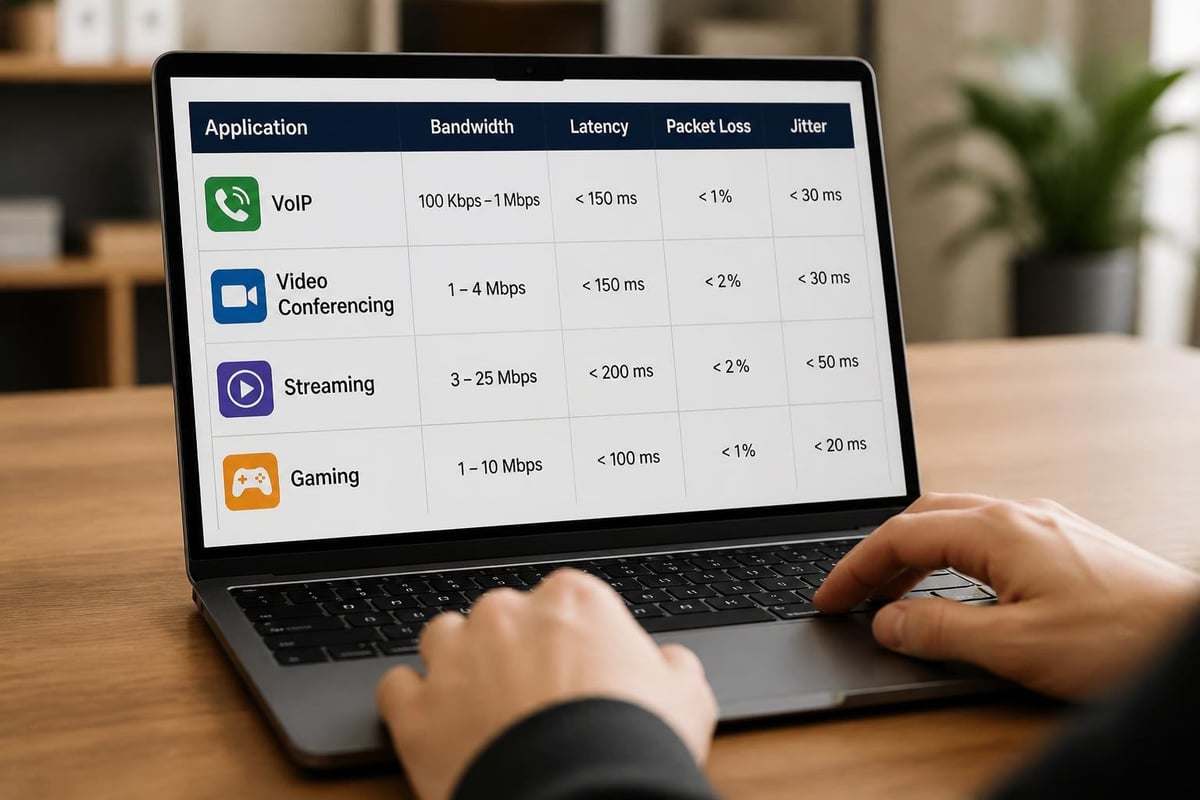
Bandwidth alone doesn't determine connection quality for real-time applications. Voice and video calls tolerate moderate bandwidth reduction but fail completely with excessive packet loss or jitter. UDP-based testing reveals these characteristics invisible to TCP tests.
Configure iperf3 in UDP mode with target bandwidth settings matching your application requirements. VoIP calls typically need 100-200 kbps per direction with <1% packet loss and <30ms jitter. Video conferencing demands 2-5 Mbps with similar loss and jitter constraints. Testing these specific scenarios validates whether your VPN connection supports critical applications.
| Application Type | Bandwidth Need | Max Latency | Max Packet Loss | Max Jitter |
|---|---|---|---|---|
| VoIP Calls | 100-200 kbps | 150 ms | 1% | 30 ms |
| HD Video Conference | 2-5 Mbps | 200 ms | 0.5% | 30 ms |
| 4K Streaming | 25+ Mbps | 500 ms | 0.1% | 50 ms |
| File Transfer | Variable | Any | 0% | N/A |
| Gaming | 3-6 Mbps | 50 ms | 0.05% | 10 ms |
Optimization Strategies Based on Test Results
Measurement without action provides little value. Test results should guide concrete optimization steps that improve your VPN experience, whether through configuration changes, server selection, or provider evaluation.
Protocol and Cipher Selection
Modern VPN protocols offer configuration flexibility that trades security margin for performance. While maximum-security settings using AES-256-GCM encryption provide excellent protection, many users find AES-128-GCM delivers equivalent practical security with 10-15% better throughput on older hardware.
WireGuard eliminates cipher selection entirely by mandating ChaCha20-Poly1305, optimizing for modern CPU architectures with built-in cryptographic acceleration. If your vpn bandwidth test results show poor OpenVPN performance but improved WireGuard speeds, switching protocols may solve performance issues without changing providers.
Server Selection and Routing
Geographic proximity generally predicts performance, but network topology creates exceptions. A server 500 miles away connected via direct fiber may outperform a server 100 miles away reached through congested peering points. Testing multiple servers in your region identifies high-performance endpoints.
Some providers operate servers in multiple data centers within single cities, each connected to different upstream carriers. Testing these alternatives reveals which facilities provide optimal routing to your most frequently accessed destinations. Providers like ZioFree with global server networks give users flexibility to optimize connections through server selection.
Client-Side Hardware Considerations
Encryption demands computational resources. Older smartphones, budget tablets, and legacy computers struggle to maintain wire-speed VPN throughput even when connected to fast internet. Testing on multiple devices isolates whether performance limitations stem from server-side, network-path, or client-side bottlenecks.
Recent research on high-throughput VPN implementations demonstrates that modern processors with AES-NI acceleration achieve 10+ Gbps encrypted throughput, while older systems without hardware crypto support struggle to exceed 200-300 Mbps. If testing reveals your device as the bottleneck, upgrading hardware may deliver more improvement than switching providers.
Regulatory and Security Considerations
Performance testing inherently involves sending significant traffic through your connection, which may trigger attention from network administrators or consume limited data allocations. Understanding the security and operational implications prevents unintended consequences.
Testing on Managed Networks
Corporate and institutional networks often implement traffic shaping, deep packet inspection, and security policies that affect VPN connections. Some organizations explicitly prohibit VPN usage or rate-limit encrypted traffic classified as non-business activity. Running bandwidth tests on managed networks without authorization may violate acceptable use policies.
The ENISA security measures guidance discusses how network security controls interact with encrypted traffic, affecting both performance and measurement accuracy. Organizations implementing these controls should coordinate vpn bandwidth test activities with network operations teams to avoid triggering security alerts or exceeding allocated bandwidth quotas.
Data Cap Implications
Bandwidth tests consume real data against your internet service provider's monthly allocation. A comprehensive 60-minute iperf3 test at 100 Mbps utilizes approximately 45 GB of bandwidth. Users with capped connections should factor test consumption into their monthly budgets or conduct abbreviated tests that provide adequate information with reduced data usage.
Mobile connections with expensive per-gigabyte overage charges require particular caution. A single comprehensive test suite could generate $50-100 in unexpected charges on some cellular plans. Testing over Wi-Fi or limiting mobile tests to short duration confirms basic functionality without excessive cost.
Emerging Bandwidth Measurement Techniques
Network measurement methodology continues evolving as researchers develop more accurate estimation techniques and automated tools that reduce testing complexity. Recent advances in bandwidth estimation research demonstrate machine learning approaches that passively measure available bandwidth without generating test traffic, enabling continuous performance monitoring with zero overhead.
These passive measurement techniques analyze inter-packet arrival times, queue buildup indicators, and one-way delay variations to estimate available bandwidth. While still primarily research tools, they preview future VPN client capabilities that could automatically select optimal servers based on real-time performance measurement rather than requiring manual testing.
Integration with Privacy Protection
Advanced VPN services increasingly integrate performance monitoring into their client applications, running periodic background tests and automatically switching servers when performance degrades. These systems balance measurement accuracy against privacy concerns, ensuring that testing traffic doesn't expose user behavior patterns or enable traffic correlation attacks.
Proper implementation uses dedicated measurement protocols that don't leak application-level information, maintains strict no-logs policies covering test traffic, and aggregates results to prevent individual connection fingerprinting. Users should verify their provider implements privacy-preserving measurement rather than assuming all testing approaches protect anonymity equally.
Building a Testing Schedule
One-time measurements provide snapshots, but connection performance varies by time of day, day of week, and seasonal usage patterns. Establishing a regular testing schedule builds baseline understanding and detects degradation before it severely impacts your experience.
Recommended testing frequency:
- Daily quick tests during regular usage hours
- Weekly comprehensive tests to primary servers
- Monthly tests across all available servers in your region
- Quarterly tests to international servers and alternate protocols
- Ad-hoc tests when experiencing perceived performance issues
Documenting results in a simple spreadsheet enables trend analysis that reveals patterns invisible in individual measurements. You might discover that performance degrades every evening at 7 PM due to neighborhood congestion, or that certain servers experience weekend slowdowns indicating inadequate capacity provisioning.
Automated Testing Scripts
Technical users can automate vpn bandwidth test routines with shell scripts that connect to VPN servers, run iperf3 tests, disconnect, and log results. These scripts eliminate manual effort while ensuring consistent methodology across all test runs.
Basic automation requires combining VPN client command-line interfaces with iperf3 invocations and simple result parsing. More sophisticated implementations integrate with time-series databases and visualization tools to track performance trends over months or years, providing objective data for provider comparisons and service level discussions.
Regular vpn bandwidth test sessions provide the objective data needed to verify your VPN delivers the performance you're paying for and supports your specific usage requirements. By combining proper testing methodology with systematic result interpretation, you gain visibility into connection quality that guides optimization decisions and ensures your privacy solution doesn't compromise productivity. ZioFree delivers consistently high-speed performance across our global server network, backed by strong encryption and a strict no-logs policy that protects your privacy without sacrificing the bandwidth you need for seamless browsing, streaming, and secure communications.