
An openvpn server list is the backbone of any resilient VPN infrastructure, enabling automatic failover, load distribution, and geographic flexibility for client connections. Whether you're deploying a self-hosted VPN network, managing enterprise access points, or evaluating commercial VPN services, understanding how OpenVPN clients interact with multiple server endpoints is essential for maintaining continuous, secure connectivity. The configuration and maintenance of server lists directly impacts connection reliability, performance, and the overall security posture of your VPN deployment.
Understanding OpenVPN Server Lists
An openvpn server list in its simplest form consists of multiple remote directives within a client configuration file. Each directive specifies a server hostname or IP address, port, and protocol (TCP or UDP). When a client encounters multiple remote entries, it processes them sequentially, attempting connections in the order listed until a successful handshake is established.
The OpenVPN 2.6 manual provides authoritative documentation on how clients handle multiple remote entries. By default, OpenVPN clients will try each server in sequence, moving to the next entry only when a connection attempt fails or times out. This behavior creates a natural failover mechanism without requiring additional client-side logic.
Client-Side Server List Syntax
The basic syntax for defining an openvpn server list uses the remote directive:
remote vpn1.example.com 1194 udp
remote vpn2.example.com 1194 udp
remote vpn3.example.com 443 tcp
Key configuration parameters:
- Hostname or IP: Can be fully qualified domain names, subdomains, or IPv4/IPv6 addresses
- Port number: Standard OpenVPN uses 1194, but 443 and 80 are common for firewall traversal
- Protocol: UDP offers better performance, TCP provides reliability through restrictive networks
- Directive order: Determines connection attempt sequence unless randomization is enabled
The remote-random directive shuffles the openvpn server list order on each connection attempt, distributing client load across servers rather than concentrating connections on the first available endpoint.

Building a Reliable Server List
Creating an effective openvpn server list requires strategic planning around geographic distribution, protocol diversity, and infrastructure resilience. Commercial providers like ZioFree maintain extensive server networks to ensure users always have multiple connection options, but self-hosted deployments need careful architecture.
Geographic Distribution Strategy
Deploying servers across multiple geographic regions provides several advantages:
- Latency optimization: Clients can connect to the nearest server, reducing round-trip times
- Regulatory compliance: Different jurisdictions offer varying privacy protections
- Infrastructure diversity: Multiple hosting providers reduce single-point-of-failure risks
- Content access: Different server locations bypass different geographic restrictions
When building your openvpn server list, consider placing servers in at least three distinct geographic regions. The DigitalOcean OpenVPN tutorials collection offers practical guidance on deploying OpenVPN instances across cloud regions, making it straightforward to establish a distributed server network.
Protocol and Port Diversification
Network environments vary dramatically in their filtering policies. A comprehensive openvpn server list should include multiple protocol and port combinations:
| Protocol | Port | Use Case | Firewall Compatibility |
|---|---|---|---|
| UDP | 1194 | Default, best performance | Good on open networks |
| TCP | 443 | HTTPS masquerade | Excellent, bypasses most filters |
| TCP | 80 | HTTP port fallback | Very good for restrictive networks |
| UDP | 53 | DNS port option | Good for specific scenarios |
Including both UDP and TCP options in your openvpn server list ensures clients can establish connections even through aggressive corporate firewalls or censorship infrastructure. For users concerned with privacy and security, services offering secure VPN connections with multiple protocol options provide greater reliability.
Server List Maintenance and Updates
An openvpn server list is not a set-it-and-forget-it configuration element. Regular maintenance ensures optimal performance, security, and availability as infrastructure evolves.
Dynamic DNS and Server Rotation
Rather than hardcoding IP addresses in your openvpn server list, use DNS hostnames that can be updated centrally. This approach allows you to:
- Rotate server IPs without redistributing client configurations
- Implement load balancing through DNS round-robin or weighted responses
- Respond quickly to infrastructure changes or security incidents
- Simplify deployment with a single DNS name pointing to multiple A/AAAA records
The Cloudflare Load Balancing documentation explains how DNS-based approaches can distribute OpenVPN client connections intelligently. For high-availability deployments, consider using multiple DNS records for a single hostname, allowing clients to receive different IP addresses based on health checks and geographic proximity.
Security Patching and Deprecation
Maintaining an openvpn server list requires vigilance around security updates and deprecated configurations. Recent NDSS research analyzing VPN configurations identified several common pitfalls that compromise security, including outdated cipher suites and weak authentication mechanisms.
Essential maintenance tasks:
- Monitor OpenVPN security advisories and apply patches within 48 hours of release
- Review server configurations quarterly to remove deprecated directives
- Audit cipher and authentication settings against current best practices
- Implement automated health checks to detect failing servers before clients experience issues
- Rotate server certificates before expiration to prevent connection failures
The CISA guidance on communications infrastructure provides comprehensive recommendations for hardening VPN gateways, which should inform your openvpn server list maintenance procedures.
High Availability Architecture
For production environments where VPN connectivity is critical, a basic openvpn server list provides only rudimentary failover. Advanced architectures incorporate load balancing, health monitoring, and automated recovery.
Load Balancer Integration
Placing a load balancer in front of your OpenVPN servers transforms your openvpn server list from a simple failover mechanism into an intelligent distribution system. Two primary approaches exist:
DNS-based load balancing distributes clients across servers at the name resolution level. Clients receive different IP addresses for the same hostname, spreading connections without requiring a single point of entry.
Proxy-based load balancing uses dedicated infrastructure (HAProxy, NGINX) to accept client connections and forward them to backend OpenVPN servers. The NGINX stream module documentation describes TCP/UDP proxying capabilities suitable for OpenVPN traffic.
| Approach | Advantages | Disadvantages | Best For |
|---|---|---|---|
| DNS-based | No single point of failure, simple setup | Limited health awareness, TTL caching issues | Geographic distribution |
| HAProxy (TCP) | Advanced health checks, session persistence | Single entry point, requires PROXY protocol | Centralized deployments |
| NGINX stream | Flexible routing, port sharing | Configuration complexity | Mixed-protocol environments |
For TCP-based OpenVPN servers, the HAProxy PROXY protocol allows frontend load balancers to preserve original client IP addresses, critical for logging and security analysis.
Automated Health Monitoring
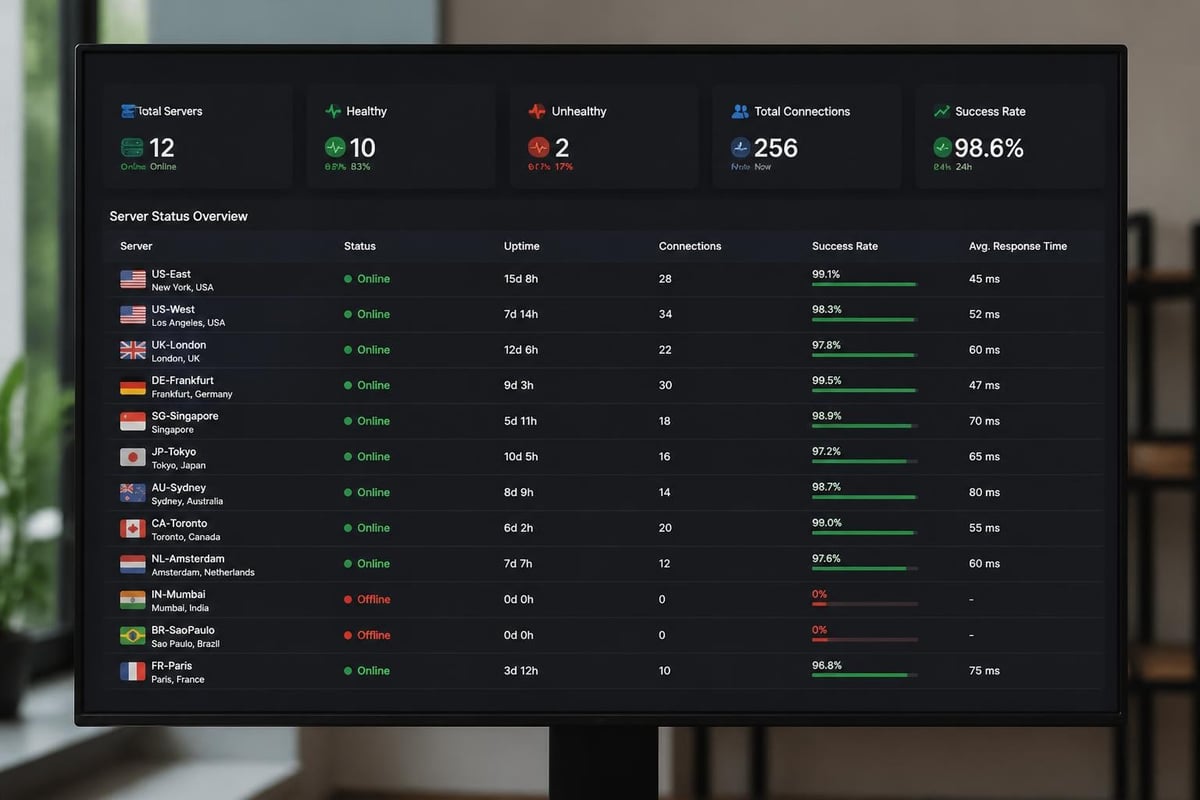
An openvpn server list loses value if clients attempt connections to failed servers. Implement active monitoring that:
- Tests actual OpenVPN handshakes, not just port availability
- Validates certificate chain integrity and expiration dates
- Measures connection establishment latency and throughput
- Removes unhealthy servers from DNS rotation or load balancer pools
- Alerts administrators when server capacity thresholds are exceeded
Automated health checks should run at intervals shorter than client connection retry timeouts, ensuring failed servers are detected and removed before significant client impact occurs.
Client Configuration Distribution
Once you've built a robust openvpn server list, distributing configurations to clients while maintaining security and flexibility presents its own challenges.
Configuration File Management
OpenVPN client configurations can embed all necessary details, including server lists, certificates, and routing policies, into a single .ovpn file. This approach simplifies deployment but creates challenges for updates:
Embedded server list advantages:
- Single file contains everything clients need
- No external dependencies or separate certificate files
- Easy to distribute via email, web download, or mobile provisioning
- Works consistently across platforms (Windows, macOS, Linux, mobile)
Embedded server list disadvantages:
- Updating the openvpn server list requires redistributing entire configurations
- No dynamic server discovery or automatic failover to new endpoints
- Certificate rotation requires configuration reissuance
For organizations managing many clients, consider using configuration management tools that can update openvpn server lists remotely or implement a unified configuration server that clients query for current connection parameters.
Platform-Specific Considerations
Different OpenVPN clients handle server lists with varying capabilities:
- OpenVPN Connect (official): Full support for multiple remote entries and all standard directives
- Tunnelblick (macOS): Complete implementation with GUI for server selection
- OpenVPN for Android: Supports server lists with automatic retry and manual override
- Windows OpenVPN GUI: Standard support, visual feedback during failover attempts
Test your openvpn server list across all platforms your users employ to ensure consistent behavior and user experience. The Linux man page for openvpn provides a concise technical reference for client behavior, which forms the foundation for all platform implementations.

Security Considerations for Server Lists
An openvpn server list can introduce security vulnerabilities if not properly managed. Understanding these risks enables you to implement appropriate safeguards.
DNS Hijacking and Spoofing
When your openvpn server list uses DNS hostnames rather than IP addresses, clients become vulnerable to DNS manipulation attacks. Malicious actors controlling DNS responses could redirect VPN connection attempts to rogue servers designed to intercept traffic or steal credentials.
Mitigation strategies:
- Implement DNSSEC validation on client systems
- Use DNS-over-HTTPS (DoH) or DNS-over-TLS (DoT) for resolution
- Configure clients to verify server certificates strictly, rejecting self-signed or untrusted chains
- Enable TLS authentication (tls-auth or tls-crypt) to prevent connection attempts to non-authentic servers
- Monitor for certificate validation failures that might indicate interception attempts
Understanding what is a VPN and why you need one in 2026 helps users appreciate these security considerations and why proper configuration matters for privacy protection.
Certificate Pinning
For maximum security, implement certificate pinning in your openvpn server list configurations. The verify-x509-name directive ensures clients only connect to servers presenting certificates with specific subject names:
verify-x509-name vpn.example.com name
This prevents man-in-the-middle attacks even if an attacker obtains a valid certificate from a trusted CA. When combined with tls-auth or tls-crypt, certificate pinning provides defense-in-depth against connection hijacking.
Performance Optimization
A well-configured openvpn server list doesn't just provide redundancy; it can significantly improve connection performance through intelligent server selection and optimization.
Latency-Based Selection
While OpenVPN doesn't natively support latency-based server selection, you can implement this functionality through:
- Client-side scripting: Measure RTT to each server in your openvpn server list before connection attempts
- Management interface: Use OpenVPN's management interface to programmatically select servers based on performance metrics
- Custom connection managers: Build wrapper applications that test server responsiveness and generate dynamic configurations
For users seeking the fastest VPN performance, services that automatically route connections through optimal servers deliver superior experience compared to static server lists.
Connection Caching and Persistence
OpenVPN clients can cache successful server selections, reducing connection time on subsequent attempts:
Configuration options for connection optimization:
persist-tun: Maintains tunnel interface across reconnections, reducing setup timepersist-key: Avoids re-reading keys and certificates after initializationexplicit-exit-notify: Enables faster reconnection by properly closing previous sessions- Connection profiles: Create separate configurations for different use cases (streaming, security, speed)
When maintaining an openvpn server list for mobile users who frequently switch networks, these persistence options dramatically improve reconnection reliability and speed.
Enterprise Deployment Patterns
Organizations deploying OpenVPN at scale employ specialized openvpn server list patterns that address unique requirements around access control, compliance, and resource segmentation.
Role-Based Server Assignment
Rather than providing all users with an identical openvpn server list, enterprise deployments often segment access:
- Executive access: Dedicated high-security servers with enhanced logging and monitoring
- Remote employees: General access servers with standard security profiles
- Contractors: Limited-access servers with network segmentation and time restrictions
- Regional offices: Local servers optimized for specific geographic areas
This segmentation approach allows granular control over who can access which network resources while maintaining separate openvpn server lists for different user populations.
Compliance and Logging Requirements
Financial services, healthcare, and government organizations face stringent requirements around VPN logging and auditing. Your openvpn server list architecture must support:
- Connection attempt logging with timestamps and client identification
- Session recording including bandwidth consumption and duration
- Geographic tracking of connection endpoints
- Failed authentication attempt detection and alerting
- Compliance reporting showing who accessed what resources when
Services implementing no-logs policies like ZioFree's no-log VPN prioritize privacy over surveillance, making them suitable for users who require confidentiality rather than compliance monitoring.
Troubleshooting Common Issues
Even well-configured openvpn server lists encounter problems. Understanding common failure modes accelerates diagnosis and resolution.
Connection Timeouts and Retry Behavior
When clients cycle through your openvpn server list without successful connections, several factors might be responsible:
Network-level issues:
- Firewall rules blocking outbound connections on configured ports
- ISP traffic shaping or VPN protocol detection blocking OpenVPN traffic
- MTU/MSS mismatches causing packet fragmentation and dropped connections
- Asymmetric routing preventing return traffic from reaching clients
Server-side problems:
- Certificate expiration preventing TLS handshake completion
- Overloaded servers unable to accept additional connections
- Misconfigured routing preventing clients from accessing intended networks
- Authentication backend failures (RADIUS, LDAP) timing out connection attempts
Enable verbose logging (verb 4 or higher) when troubleshooting openvpn server list connection failures. The logs reveal exactly where connection attempts fail, whether during DNS resolution, TCP handshake, TLS negotiation, or authentication.
DNS Resolution Failures
If your openvpn server list uses hostnames and clients report "Could not resolve host" errors:
- Verify DNS servers are accessible from the client network
- Check whether DNS filtering or blocking prevents VPN-related hostname resolution
- Test resolution using alternative DNS providers (8.8.8.8, 1.1.1.1)
- Consider embedding IP addresses as backup remote entries in critical configurations
For environments with sophisticated censorship or blocking, using IP addresses instead of hostnames in your openvpn server list trades update flexibility for connection reliability.
Comparing Commercial and Self-Hosted Options
Organizations deciding between building their own openvpn server list infrastructure versus subscribing to commercial VPN services face different tradeoffs in cost, control, and capabilities.
Self-Hosted Infrastructure
Advantages of maintaining your own openvpn server list:
- Complete control over server locations, configurations, and security policies
- No third-party trust requirements or privacy concerns
- Customizable routing, DNS, and network policies
- Integration with existing identity and access management systems
- Potential cost savings at scale
Challenges with self-hosted deployments:
- Operational overhead for monitoring, patching, and maintaining servers
- Infrastructure costs for hosting, bandwidth, and administration
- Technical expertise requirements for secure configuration and troubleshooting
- Limited geographic reach compared to commercial providers
- Responsibility for security incidents and breaches
Commercial VPN Services
Commercial providers maintain extensive openvpn server lists spanning dozens or hundreds of locations globally. Services like ZioFree offer professionally managed infrastructure with:
- Pre-configured client applications handling server selection automatically
- Regular security updates and infrastructure maintenance
- High-availability architecture with automated failover
- Geographic diversity across continents and countries
- Professional support for troubleshooting and configuration assistance
For users seeking cheap VPN options that don't sacrifice security, commercial providers often deliver better value than self-hosting when factoring in administrative overhead. The decision ultimately depends on specific requirements around data sovereignty, compliance obligations, and technical capabilities.
Building and maintaining an effective openvpn server list requires balancing redundancy, performance, security, and operational simplicity across your VPN infrastructure. Whether you're deploying self-hosted servers or evaluating commercial options, understanding how clients interact with multiple server endpoints enables you to design resilient, high-performance connectivity. ZioFree delivers professionally managed OpenVPN infrastructure with global server coverage, strong encryption, and a strict no-logs policy, eliminating the complexity of server list management while protecting your privacy from sophisticated threats including Israeli hacking attempts.