Understanding how VPN protocol port assignments work is essential for anyone managing network security, configuring firewalls, or troubleshooting connection issues. Each VPN protocol relies on specific ports to establish and maintain encrypted connections, and knowing these technical details helps you optimize performance, bypass restrictive networks, and ensure your privacy remains protected. Whether you're a network administrator, privacy-conscious user, or someone evaluating VPN services, grasping the relationship between protocols and their ports gives you greater control over your security infrastructure.
What Is a VPN Protocol Port
A vpn protocol port represents the specific communication endpoint that VPN software uses to send and receive encrypted data packets. Think of ports as numbered doorways on a server-each service uses designated port numbers so routers and firewalls know where to direct incoming traffic.
When you connect to a VPN, your device initiates contact through a particular port number associated with the protocol you're using. The server listens on that same port, ready to accept the connection request. This handshake happens in milliseconds, establishing the secure tunnel through which all your internet traffic flows.
Why Port Numbers Matter for VPN Connections
Port assignments aren't arbitrary. The Internet Assigned Numbers Authority (IANA) maintains an official registry of port numbers, with ranges 0-1023 reserved for well-known services and 1024-49151 designated for registered applications. VPN protocols operate across both ranges depending on their design and standardization status.
Network administrators often block specific ports to control bandwidth or enforce security policies. Corporate networks might permit HTTPS traffic on port 443 while blocking common VPN ports, making protocol selection critical for connectivity. Understanding which vpn protocol port your service uses helps you anticipate and solve connection problems before they disrupt your workflow.
OpenVPN Port Configuration
OpenVPN remains one of the most flexible and widely deployed VPN protocols in 2026. Unlike proprietary solutions, OpenVPN allows administrators to configure it on virtually any port, though it defaults to specific assignments for convenience.
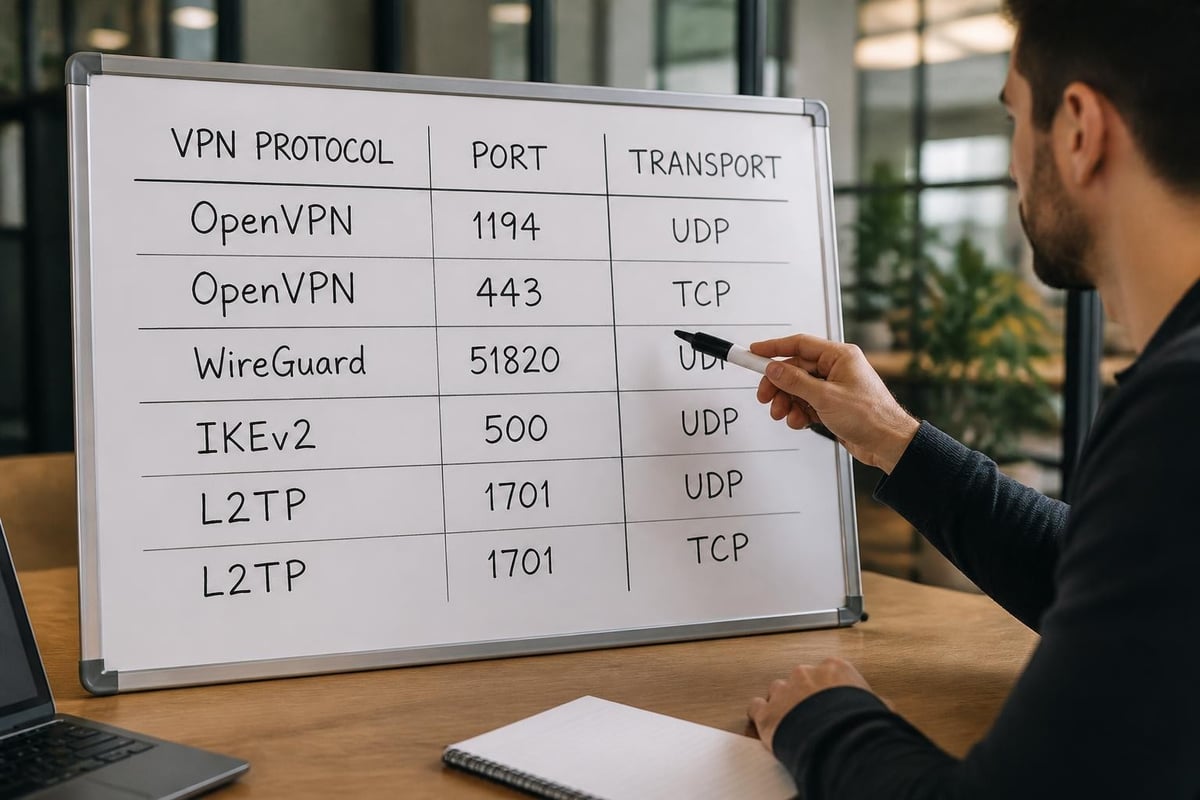
The official OpenVPN documentation specifies UDP port 1194 as the standard configuration. This choice reflects OpenVPN's registration in the IANA service registry, giving it a semi-official port assignment that routers and firewalls recognize.
UDP vs TCP for OpenVPN
OpenVPN supports both UDP and TCP transport protocols, each with distinct advantages:
- UDP 1194 provides lower latency and better performance for streaming and real-time applications
- TCP 443 offers superior reliability on unstable networks and bypasses most firewall restrictions
- TCP 80 serves as a fallback option when only basic web traffic is permitted
- Custom ports enable advanced obfuscation to avoid VPN detection systems
UDP excels for general use because it doesn't wait for packet acknowledgments, reducing overhead and improving speed. However, TCP variants prove invaluable when UDP traffic gets throttled or blocked entirely. Many services, including those focused on fast VPN performance, offer multiple port options to maximize connection success rates.
Organizations requiring guaranteed delivery choose TCP despite the performance penalty. The protocol's error-checking mechanisms ensure every packet arrives intact, which matters for file transfers and applications intolerant of data loss. The vpn protocol port you select should align with your specific use case and network environment.
| Transport | Default Port | Best Use Case | Firewall Bypass |
|---|---|---|---|
| UDP | 1194 | General browsing, streaming | Moderate |
| TCP | 443 | Restrictive networks, reliability | Excellent |
| TCP | 80 | Maximum compatibility | Good |
WireGuard Port Behavior
WireGuard represents the modern generation of VPN protocols, designed from scratch with simplicity and speed as core principles. Unlike OpenVPN's extensive configuration options, WireGuard embraces minimalism in both code and setup.
The WireGuard quick start guide demonstrates that the protocol doesn't mandate a specific port number. Administrators commonly use UDP port 51820 as a convention, but WireGuard operates successfully on any available UDP port between 1024 and 65535.
Why WireGuard Uses UDP Exclusively
WireGuard's architecture eliminates TCP support entirely, relying on UDP for all communications. This design decision stems from performance optimization-the protocol implements its own reliability mechanisms at the cryptographic layer, making TCP's overhead redundant.
The flexibility in port selection offers security advantages. Changing your WireGuard vpn protocol port from the default 51820 to an obscure number makes automated scanning and blocking more difficult. Network administrators attempting to restrict VPN usage must explicitly identify WireGuard traffic through deep packet inspection rather than simple port filtering.
Organizations deploying WireGuard should document their chosen ports carefully. Unlike protocols with standardized assignments, WireGuard configurations require manual coordination between client and server port settings. This customization capability supports advanced deployment scenarios where multiple WireGuard instances run on a single server, each listening on distinct ports.
IKEv2 and IPsec Port Requirements
Internet Key Exchange version 2 (IKEv2) combined with IPsec provides enterprise-grade security with excellent mobile device support. The protocol's port usage follows rigorous standards defined in RFC 7296, ensuring consistent behavior across implementations.
IKEv2/IPsec requires multiple ports for different phases of connection establishment:
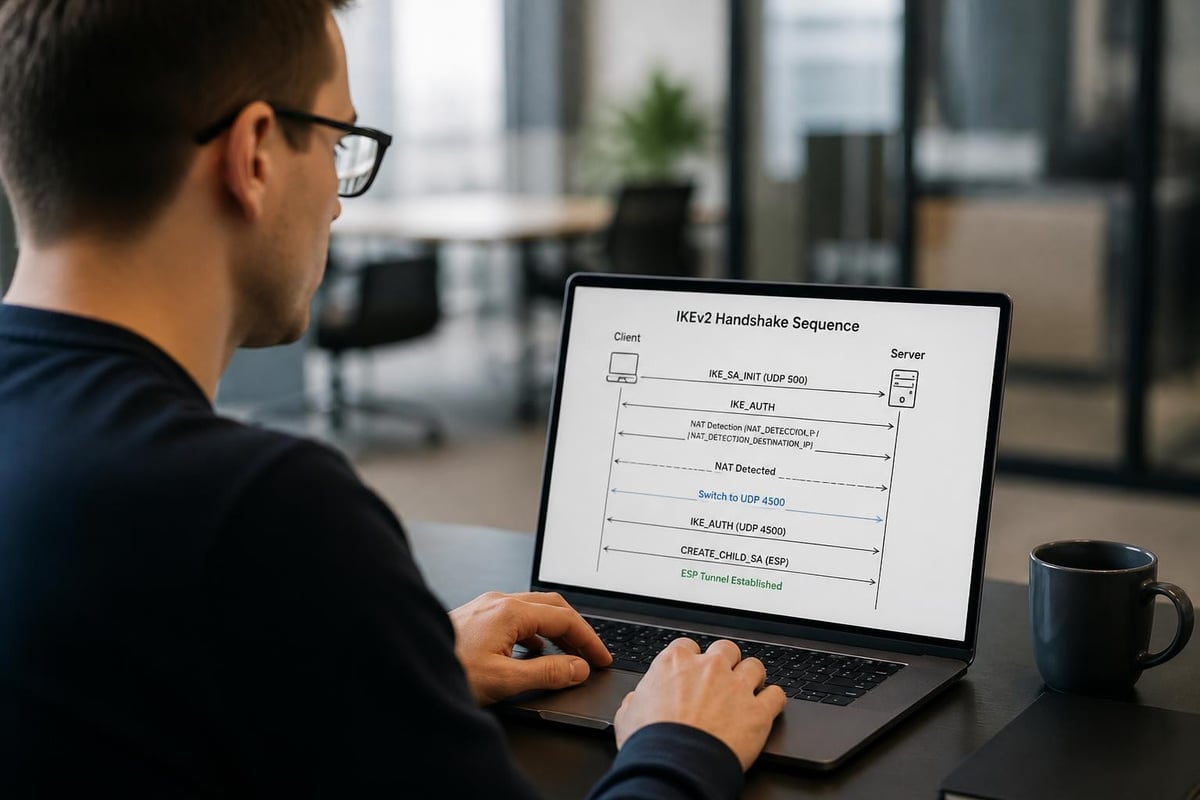
- UDP 500 handles initial IKE negotiation and key exchange
- UDP 4500 enables NAT traversal when routers modify source addresses
- ESP (Protocol 50) carries the actual encrypted data payload
- AH (Protocol 51) provides authentication headers in some configurations
Understanding NAT Traversal
Network Address Translation (NAT) complicates VPN connections by modifying packet headers as they traverse routers. When IKEv2 detects NAT devices in the path, it automatically switches from UDP 500 to UDP 4500, encapsulating ESP packets within UDP to preserve routing information.
This NAT-T (NAT Traversal) mechanism exemplifies why the vpn protocol port landscape extends beyond simple port numbers. Microsoft's Azure VPN documentation explains how cloud environments handle these complexities, automatically configuring appropriate firewall rules for IKEv2 connectivity.
ESP operates at the network layer rather than the transport layer, meaning it doesn't use traditional port numbers at all. Instead, it's identified by IP protocol number 50 in packet headers. Firewalls must explicitly permit ESP traffic in addition to the UDP ports for complete IKEv2 functionality.
L2TP/IPsec Port Configuration
Layer 2 Tunneling Protocol paired with IPsec provides backward compatibility with older systems while maintaining reasonable security. Though less common in 2026 than modern alternatives, L2TP/IPsec remains deployed in enterprise environments with legacy infrastructure requirements.
This protocol combination demands three distinct port openings:
- UDP 500 for IPsec IKE negotiation
- UDP 4500 for IPsec NAT traversal
- UDP 1701 for L2TP tunnel establishment
The complexity arises because L2TP itself provides no encryption-it merely creates the tunnel structure. IPsec wraps around L2TP to add confidentiality and authentication, requiring both protocol stacks to function simultaneously.
Firewall Configuration Challenges
Network administrators configuring firewalls for L2TP/IPsec must understand the interaction between these components. Palo Alto Networks documentation provides detailed guidance on creating rules that accommodate both the initial IPsec setup and subsequent L2TP encapsulation.
The dual-protocol nature makes L2TP/IPsec more susceptible to blocking than streamlined alternatives. Corporate networks often permit the required UDP ports for legitimate business VPN use, but the distinctive traffic pattern aids detection systems. Users requiring secure VPN access in restrictive environments typically achieve better results with protocols designed for obfuscation.
Port forwarding complications multiply when multiple devices behind a single NAT router attempt simultaneous L2TP/IPsec connections. The protocol wasn't designed with this scenario in mind, leading to connection failures that frustrate home users and small offices alike.
SSTP and Port 443 Advantage
Secure Socket Tunneling Protocol (SSTP) leverages TCP port 443, the same port used by HTTPS web traffic. This design choice makes SSTP exceptionally difficult to block without disrupting normal web browsing.
SSTP encapsulates VPN traffic within SSL/TLS, the encryption standard protecting sensitive websites. To network inspection systems, SSTP connections appear identical to secure web sessions, allowing them to traverse even the most restrictive firewalls.
Windows Integration Benefits
Microsoft developed SSTP primarily for Windows environments, providing native support without third-party software. The protocol integrates seamlessly with Windows authentication systems and group policies, simplifying deployment in corporate settings.
The vpn protocol port limitation to 443 TCP means SSTP sacrifices some performance compared to UDP-based alternatives. TCP's connection-oriented nature introduces latency as the protocol waits for packet acknowledgments. However, the reliability guarantees prove valuable on unstable mobile networks where packet loss would trigger repeated retransmissions anyway.
Linux and mobile platforms require additional software to support SSTP, limiting its cross-platform appeal. Organizations standardized on Windows infrastructure appreciate the native integration, while mixed environments typically choose protocols with broader device support.
Port Selection for Firewall Bypass
Restrictive networks employ various techniques to identify and block VPN traffic. Understanding how firewalls analyze connections helps you select the optimal vpn protocol port configuration for your situation.
Deep Packet Inspection Challenges
Modern firewalls examine packet contents beyond port numbers, using Deep Packet Inspection (DPI) to identify protocol signatures. Even when using port 443, distinctive OpenVPN handshakes can trigger blocking rules on sophisticated systems.
Strategies for overcoming DPI include:
- Port 443 with TCP for protocols that mimic HTTPS traffic patterns
- Obfuscation plugins that scramble packet headers to remove protocol fingerprints
- Protocol switching to test multiple options when connections fail
- Stealth modes available in advanced VPN clients
The balance between security and accessibility drives port selection. Services committed to privacy protection must provide multiple protocol options, allowing users to adapt to changing network conditions without compromising encryption standards.
Enterprise Port Planning
Organizations deploying VPN infrastructure must coordinate port usage with existing security policies and network architecture. Proper planning prevents conflicts and ensures reliable connectivity for remote workers.
| Consideration | Planning Steps | Common Pitfalls |
|---|---|---|
| Port conflicts | Audit existing services, document assignments | Overlapping port usage causing connection failures |
| Firewall rules | Create explicit allow rules for required protocols | Overly permissive rules compromising security |
| Load balancing | Distribute traffic across multiple ports/servers | Single point of failure affecting all users |
| Monitoring | Implement logging for connection attempts | Insufficient visibility into connection issues |
Network teams should maintain documentation mapping each vpn protocol port to its purpose, update schedule, and responsible administrator. This reference proves invaluable during incident response and capacity planning.
High-availability deployments often run identical VPN services on multiple ports, with client software configured to attempt failover connections if the primary port becomes unavailable. This redundancy protects against both network failures and targeted blocking attempts.
Mobile Network Considerations
Mobile carriers implement various traffic management policies that affect VPN performance and reliability. Understanding these limitations helps you configure protocols that work consistently across cellular networks.
Carrier-grade NAT (CGNAT) systems used by mobile providers complicate VPN connections by placing multiple subscribers behind shared public IP addresses. Protocols relying on IP address stability may experience frequent disconnections as the carrier reassigns addresses during normal operation.
UDP vs TCP on Cellular Networks
Cellular networks exhibit higher packet loss rates than wired connections, particularly during handoffs between towers or transitions between 4G and 5G. This instability impacts different protocols variably:
- UDP protocols tolerate packet loss gracefully but may require connection reestablishment
- TCP protocols trigger aggressive retransmission timers, potentially stalling connections
- IKEv2 with MOBIKE handles network changes seamlessly, making it ideal for mobile devices
Battery consumption varies significantly based on the vpn protocol port and transport mechanism. UDP's stateless nature requires periodic keepalive packets to maintain NAT mappings, draining battery faster than some TCP implementations. Modern protocols like WireGuard minimize this overhead through clever timer design.
Custom Port Configuration Security
Running VPN services on non-standard ports provides security through obscurity, making automated attacks and casual scanning less likely to succeed. However, this approach shouldn't replace proper encryption and authentication mechanisms.
Benefits of custom port selection include:
- Reduced automated attacks targeting default port numbers
- Easier traffic attribution when analyzing network logs
- Simplified multi-instance deployments on single servers
- Bypass of simplistic port-based blocks in certain jurisdictions
The security improvement remains modest since determined attackers perform comprehensive port scans regardless of defaults. Organizations should view custom ports as one component of defense-in-depth strategies rather than primary security controls.
Documentation becomes critical when deviating from standards. Teams must maintain clear records of custom port assignments to support troubleshooting, onboarding new staff, and migrating infrastructure. The operational overhead of non-standard configurations sometimes outweighs their security benefits in large deployments.
Protocol Selection Criteria
Choosing the right VPN protocol involves balancing security requirements, performance needs, and compatibility constraints. The vpn protocol port characteristics play a significant role in this decision-making process.
Security Priority Matrix
When security takes precedence over all other factors, protocol selection should focus on:
- Modern cryptography using WireGuard or IKEv2 with strong cipher suites
- Resistance to traffic analysis through consistent packet sizes and timing
- Perfect forward secrecy ensuring past sessions remain secure if keys compromise
- Authentication strength preventing unauthorized access to VPN infrastructure
Users seeking the safest VPN options should prioritize protocols with active development and security auditing. Legacy protocols like PPTP offer no meaningful security in 2026 and should be avoided regardless of their port simplicity.
Performance Optimization
Speed-sensitive applications demand protocols minimizing overhead and latency. The transport mechanism significantly impacts perceived performance:
- WireGuard on UDP delivers excellent throughput with minimal CPU usage
- OpenVPN on UDP provides good performance with wider compatibility
- IKEv2 on UDP offers strong mobile performance and fast reconnection
- Any protocol on TCP introduces latency penalties but improves reliability
Streaming video and online gaming benefit from UDP-based protocols that prioritize low latency over guaranteed delivery. The occasional dropped packet affects these applications less than the delays introduced by TCP's retransmission mechanisms.
Advanced Port Forwarding
Some VPN use cases require port forwarding to allow incoming connections through the VPN tunnel. This scenario inverts the typical security model, opening specific ports on the VPN server that route to the client device.
Port forwarding enables:
- Remote access to home servers and network devices
- Peer-to-peer applications requiring direct connectivity
- Self-hosted services accessible through the VPN provider's IP address
- Gaming servers hosted on residential connections
The vpn protocol port used for the VPN itself operates independently from forwarded ports. A WireGuard connection on UDP 51820 might forward TCP port 22 for SSH access or UDP port 19132 for Minecraft servers.
Security implications require careful consideration. Each forwarded port represents a potential attack surface, exposing services to internet-wide scanning. Services should implement their own authentication and only forward ports for actively used applications.
Port Blocking Detection
Identifying which ports your network blocks helps troubleshoot connection failures and select appropriate protocol configurations. Several approaches reveal port availability.
Online port checking tools test connectivity to specific destinations, though results only confirm blocking between your location and the test server. VPN-specific tests should target your provider's servers directly using their published port numbers.
Command-line tools provide more detailed diagnostics:
- Telnet attempts TCP connections to specific ports, reporting success or timeout
- Netcat tests both TCP and UDP ports with greater flexibility
- Traceroute reveals where packets get dropped along the network path
- VPN client logs often indicate which ports succeeded or failed during connection attempts
Systematic testing across all supported protocols identifies working configurations. Start with the most restrictive option (typically TCP 443) and work toward more performance-oriented choices if multiple ports function correctly.
Understanding vpn protocol port relationships empowers you to optimize your VPN configuration for security, performance, and reliability across diverse network environments. The technical knowledge of how different protocols use specific ports helps you troubleshoot connection issues, bypass restrictive firewalls, and make informed decisions about which protocol best serves your needs. ZioFree provides flexible protocol support with multiple port options, ensuring you maintain secure, high-speed connections regardless of network restrictions while protecting your privacy with advanced encryption and a strict no-logs policy.