iPhone users increasingly encounter the term "VPN" in their device settings, privacy discussions, and security recommendations. Understanding what is a VPN in iPhone has become essential knowledge for anyone concerned about digital privacy, data security, or unrestricted internet access. A Virtual Private Network on your iPhone creates an encrypted connection between your device and the internet, shielding your online activities from prying eyes, hackers, and surveillance. This comprehensive guide explores every aspect of iPhone VPN technology, from basic concepts to advanced security considerations.
Understanding VPN Technology on iOS Devices
What is a VPN in iPhone starts with understanding the fundamental technology behind Virtual Private Networks. At its core, a VPN creates a secure, encrypted tunnel between your iPhone and a remote server operated by your VPN provider. All internet traffic from your device flows through this tunnel, making it unreadable to anyone attempting to intercept it.
When you activate a VPN on your iPhone, several important changes occur simultaneously:
- Your real IP address becomes hidden and replaced with the VPN server's IP address
- All data transmissions become encrypted using military-grade protocols
- Your internet service provider cannot see which websites you visit or applications you use
- Geographic restrictions and censorship barriers become bypassable
- Public Wi-Fi networks transform from dangerous to reasonably safe
The Apple Platform Security guide provides detailed technical documentation on how iOS handles VPN connections at the system level. Apple has built robust VPN support directly into iOS, supporting multiple industry-standard protocols that balance security and performance.
How iPhone VPN Architecture Works
The iOS operating system provides native VPN framework support, allowing both manual configurations and third-party VPN applications. When considering what is a VPN in iPhone from an architectural perspective, it's important to understand that iOS manages VPN connections at the network extension level.
This architecture ensures that VPN connections receive priority treatment and can operate reliably even when apps are backgrounded. The system maintains VPN connectivity across app switches, screen locks, and network transitions between cellular and Wi-Fi.
| VPN Component | Function | Security Benefit |
|---|---|---|
| Encryption Protocol | Scrambles data packets | Prevents interception and reading |
| Authentication | Verifies user identity | Blocks unauthorized access |
| Server Network | Routes traffic globally | Masks location and bypasses restrictions |
| Kill Switch | Blocks unprotected traffic | Prevents data leaks if VPN drops |
Supported VPN Protocols on iPhone
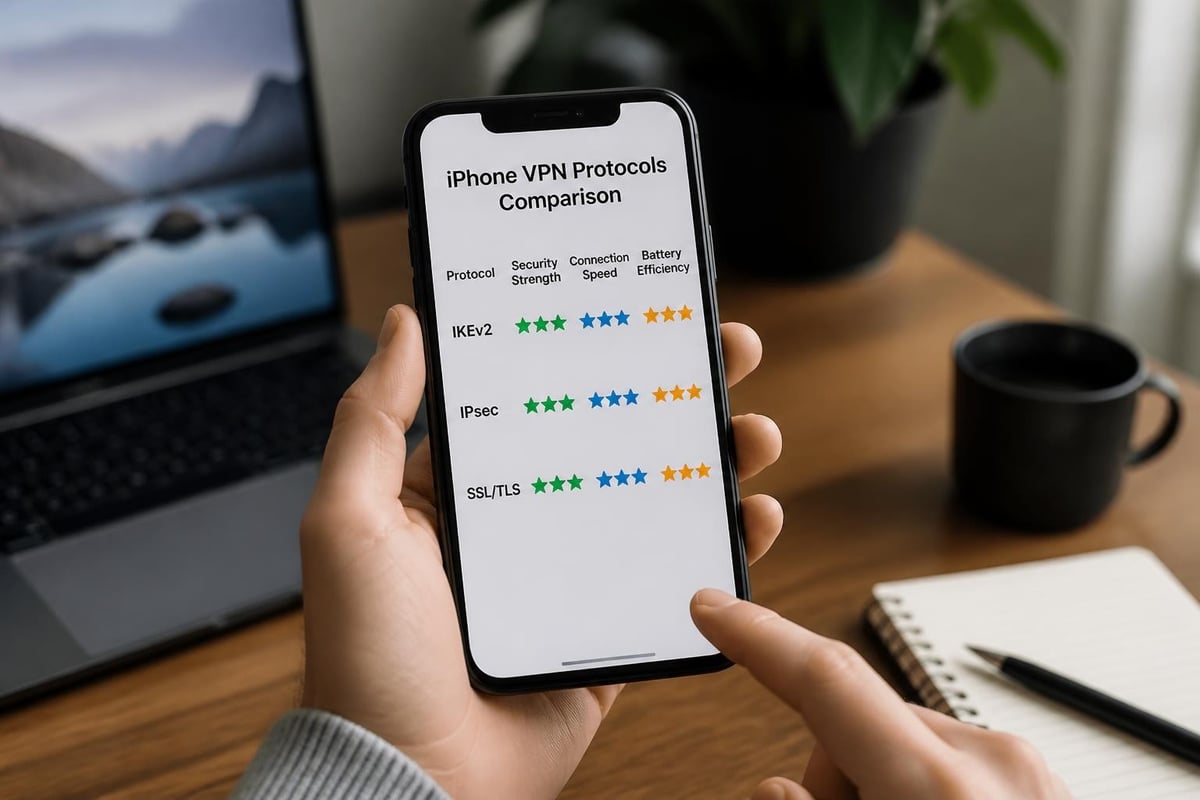
Apple devices support several VPN protocols, each offering different balances of security, speed, and compatibility. Understanding these protocols is crucial when evaluating what is a VPN in iPhone and selecting the right configuration.
IKEv2/IPsec: The iOS Standard
IKEv2 (Internet Key Exchange version 2) combined with IPsec represents the gold standard for iPhone VPN connections. Apple recommends this protocol for most use cases because it delivers excellent security while maintaining strong performance and battery efficiency.
Key advantages of IKEv2/IPsec include:
- Automatic reconnection when switching between Wi-Fi and cellular networks
- Strong cryptographic algorithms that meet government security standards
- Minimal battery drain compared to older protocols
- Built-in support without requiring third-party apps
The UK National Cyber Security Centre provides technical guidance on proper IPsec configuration, emphasizing the importance of strong cryptographic parameters for VPN deployments.
L2TP/IPsec and PPTP Considerations
While iOS technically supports L2TP/IPsec, this protocol has largely been superseded by IKEv2. L2TP provides adequate security for basic privacy needs but lacks the seamless reconnection features that make IKEv2 ideal for mobile devices.
PPTP, once common on older devices, is now considered obsolete and insecure. Modern iPhone VPN implementations should avoid PPTP entirely, as its encryption can be compromised relatively easily.
Setting Up a VPN on Your iPhone
Learning what is a VPN in iPhone includes understanding the practical setup process. Apple has designed iOS to make VPN configuration straightforward, whether you're using a commercial service or connecting to a corporate network.
Manual VPN Configuration Steps
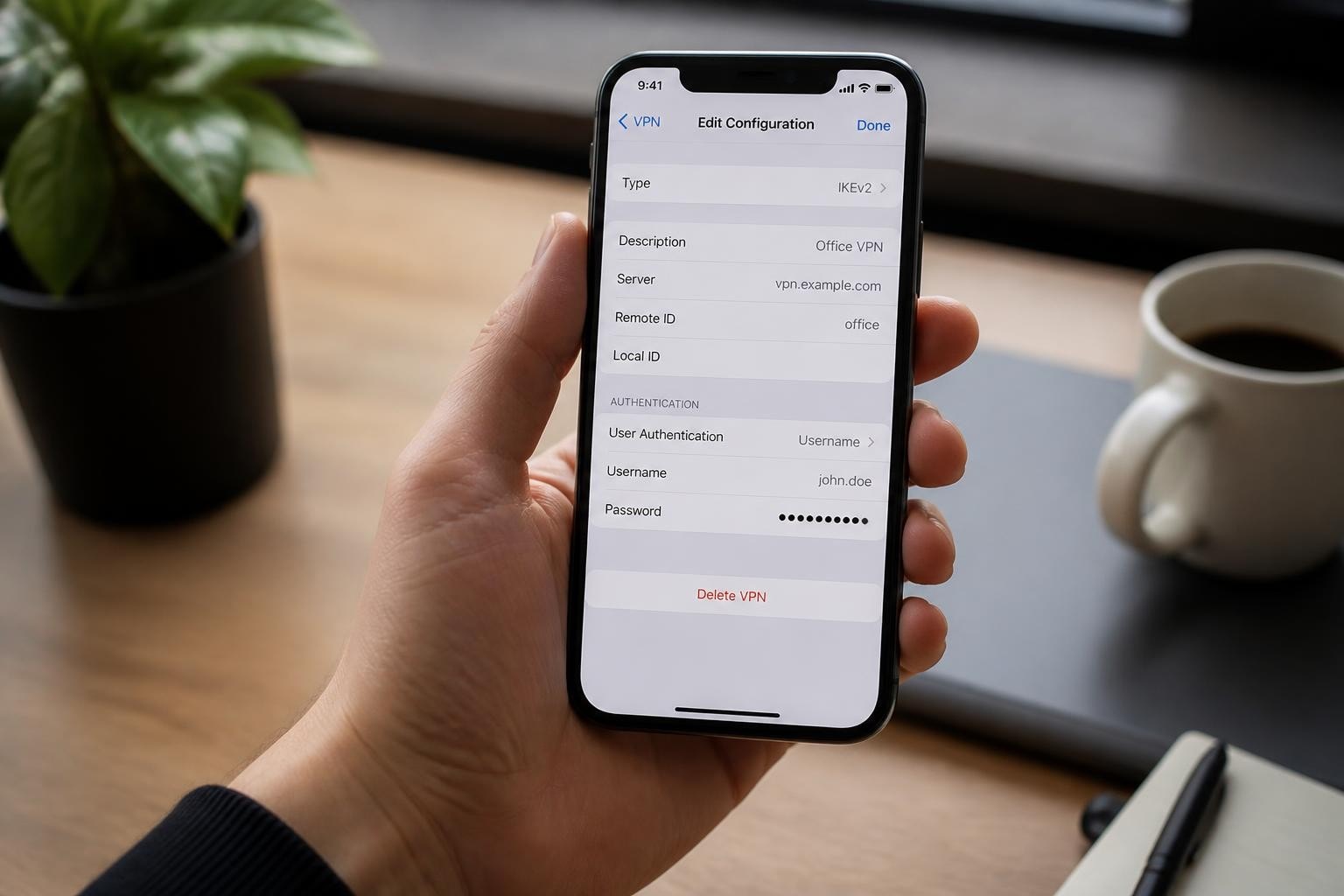
For those who prefer manual setup or need to connect to specific enterprise systems, iOS provides built-in configuration options:
- Open the Settings app on your iPhone
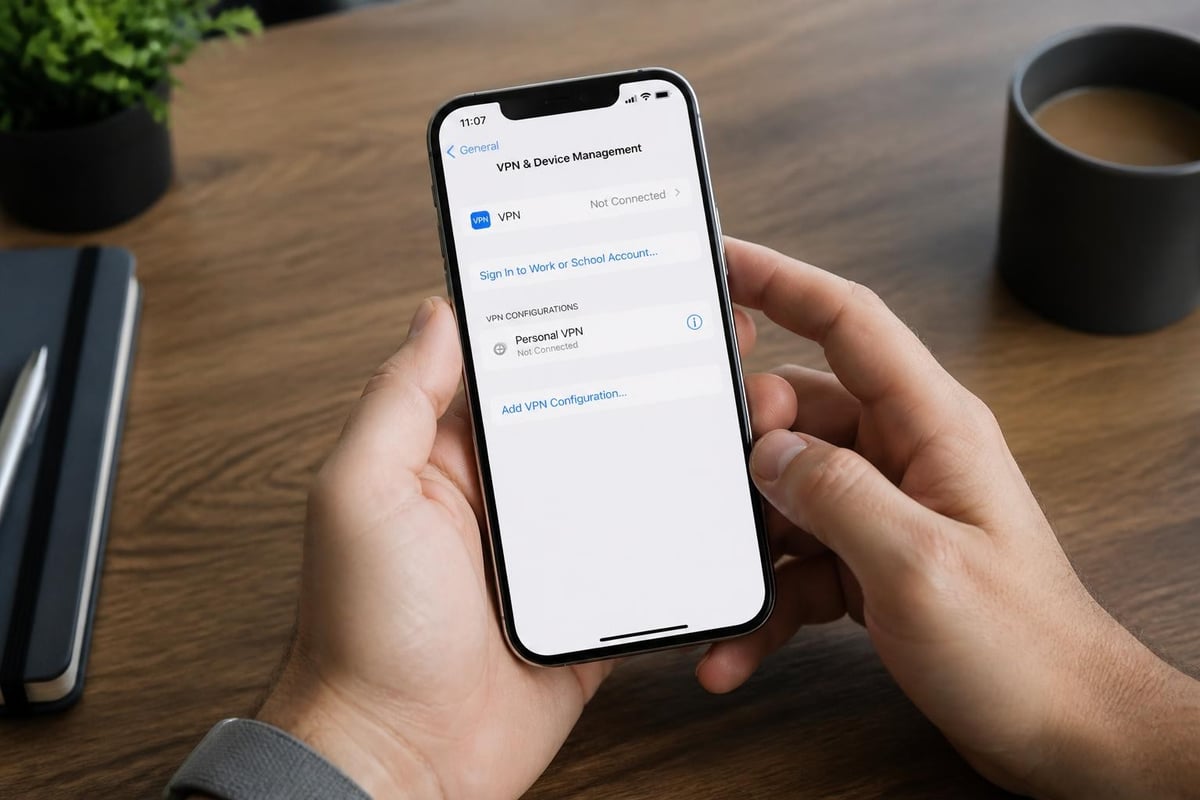
- Navigate to General and select VPN & Device Management
- Tap VPN and then Add VPN Configuration
- Choose your protocol type (typically IKEv2 or IPsec)
- Enter server address, remote ID, and authentication credentials
- Save the configuration and toggle the VPN switch to connect
The official Apple Support documentation provides comprehensive guidance on VPN configuration options, including Always-On VPN settings for managed devices.
Using VPN Apps for Simplified Setup
Most iPhone users find that dedicated VPN applications offer the simplest setup experience. Quality VPN services like ZioFree provide native iOS apps that handle all technical configuration automatically.
When installing a VPN app, the process typically involves:
- Downloading the app from the App Store
- Creating an account or signing in
- Granting the app permission to add VPN configurations
- Selecting a server location
- Tapping a connect button
Important consideration: Always download VPN apps only from the official App Store. Third-party app sources pose significant security risks and may install malicious software disguised as legitimate VPN services.
Why iPhone Users Need VPN Protection
Understanding what is a VPN in iPhone goes beyond technical mechanics to practical security benefits. In 2026, digital threats have evolved significantly, making VPN protection essential rather than optional for privacy-conscious users.
Protection on Public Wi-Fi Networks
Public Wi-Fi networks at coffee shops, airports, hotels, and restaurants represent one of the most significant security vulnerabilities for iPhone users. These networks often lack proper encryption, allowing attackers to intercept unprotected traffic easily.
Without VPN protection, your iPhone transmits data in ways that nearby attackers can capture and read. This includes login credentials, financial information, private messages, and browsing history. Sophisticated attackers deploy fake Wi-Fi access points that mimic legitimate networks, intercepting everything transmitted through them.
A VPN encrypts all traffic before it leaves your iPhone, rendering intercepted data useless to attackers. Even if someone captures your data packets on public Wi-Fi, they cannot decrypt the contents without your encryption keys.
Privacy from ISPs and Network Operators
Your cellular carrier and internet service provider can see detailed information about your online activities when you browse without VPN protection. This includes which websites you visit, when you access them, and how much time you spend on each site.
ISPs increasingly monetize this data by selling it to advertisers, sharing it with government agencies, or using it to implement selective throttling of certain services. When considering what is a VPN in iPhone from a privacy perspective, the ability to prevent ISP surveillance represents one of the most valuable benefits.
Advanced Security Features in iPhone VPNs
Modern VPN implementations offer sophisticated security features beyond basic encryption. Understanding these features helps clarify what is a VPN in iPhone at the advanced level.
Kill Switch Functionality
A VPN kill switch monitors your connection status and blocks all internet traffic if the VPN connection drops unexpectedly. This critical feature prevents data leaks that could expose your real IP address or unencrypted traffic during connection interruptions.
Quality VPN providers implement kill switches at the operating system level, ensuring protection even if the VPN app crashes or loses connectivity. When evaluating secure VPN options, verify that kill switch functionality is included and enabled by default.
Split Tunneling Capabilities
Split tunneling allows you to route some apps through the VPN while others connect directly to the internet. This feature proves useful when you need VPN protection for sensitive activities while allowing local network access for other services.
For example, you might route your web browser and messaging apps through the VPN while allowing banking apps to connect directly. However, split tunneling requires careful configuration to avoid accidentally exposing sensitive data.
DNS Leak Prevention
DNS (Domain Name System) queries can reveal your browsing activity even when using a VPN if not properly configured. A DNS leak occurs when your iPhone sends DNS requests outside the encrypted VPN tunnel, allowing your ISP or network operator to see which websites you're visiting.
Professional VPN services prevent DNS leaks by routing all DNS queries through their own encrypted servers. This ensures complete privacy protection without configuration complexity for users.
| Security Feature | Protection Provided | User Benefit |
|---|---|---|
| Kill Switch | Blocks traffic if VPN drops | Prevents accidental exposure |
| DNS Leak Protection | Routes DNS through VPN | Hides browsing history |
| Multi-hop | Routes through multiple servers | Enhanced anonymity |
| Obfuscation | Disguises VPN traffic | Bypasses VPN blocking |
VPN Performance Considerations on iPhone
When examining what is a VPN in iPhone, performance impact represents an important practical consideration. VPN connections introduce some overhead due to encryption processing and routing through remote servers.
Speed and Latency Factors
Several factors influence VPN performance on your iPhone:
- Server distance: Connecting to geographically closer servers typically provides faster speeds
- Server load: Overcrowded servers deliver slower performance than lightly-loaded ones
- Protocol choice: IKEv2 generally offers better mobile performance than older protocols
- Encryption strength: Stronger encryption requires more processing but provides better security
Modern VPN services like those offered through fast VPN providers use high-capacity servers and optimized routing to minimize performance impact. Many users experience minimal speed degradation with properly configured connections.
Battery Life Impact
VPN connections do consume additional battery power due to encryption processing and maintaining persistent connections. However, well-designed VPN implementations optimize for mobile efficiency.
To minimize battery drain while using what is a VPN in iPhone:
- Connect to nearby servers when maximum speed isn't critical
- Use IKEv2 protocol, which offers better power efficiency
- Disconnect when VPN protection isn't needed
- Choose VPN providers with optimized mobile apps
Regulatory and Security Guidance
Understanding what is a VPN in iPhone includes awareness of authoritative security guidance from cybersecurity organizations. The UK NCSC provides comprehensive device security guidance that covers VPN deployment considerations and organizational security practices.
For users concerned about privacy and surveillance, the Electronic Frontier Foundation offers practical guidance on choosing VPN services that prioritize user privacy. Their Surveillance Self-Defense project emphasizes the importance of selecting providers with transparent privacy policies and no-logs commitments.
The CISA enhanced visibility guidance includes recommendations for hardening VPN configurations and implementing secure VPN gateway practices, particularly relevant for enterprise iPhone deployments.
Common VPN Misconceptions on iPhone
Several misconceptions about what is a VPN in iPhone persist among users, leading to either overconfidence or unnecessary avoidance of VPN technology.
What VPNs Don't Protect Against
VPNs do not make you completely anonymous online. While they hide your IP address and encrypt your traffic, websites can still track you through cookies, browser fingerprinting, and login credentials. Using a VPN doesn't eliminate the need for other privacy practices like cookie management and tracker blocking.
VPNs cannot protect against malware or phishing. If you click a malicious link or download infected files, a VPN won't prevent the compromise. Combining VPN protection with robust security software and cautious browsing habits provides comprehensive protection.
VPNs don't guarantee access to all geo-restricted content. While VPNs can bypass many geographic restrictions, some streaming services actively block known VPN servers. Success rates vary among providers and change over time.
VPN Limitations and Realistic Expectations
The Privacy International guide to VPN use explains that VPNs have inherent limitations, particularly for high-risk users like activists and journalists. While VPNs provide valuable protection, they represent one component of a comprehensive security strategy rather than a complete solution.
Understanding these limitations helps users make informed decisions about when and how to use what is a VPN in iPhone technology effectively.
Choosing the Right VPN Service for iPhone
With hundreds of VPN services available, selecting the right one requires careful evaluation of several critical factors. Understanding what is a VPN in iPhone includes knowing how to identify quality providers.
Essential Selection Criteria
When evaluating VPN services for your iPhone, prioritize these characteristics:
- Strong encryption standards using modern protocols like IKEv2/IPsec
- Strict no-logs policy verified through independent audits
- Global server network providing options across multiple countries
- Reliable performance with high-speed servers and minimal downtime
- Transparent privacy policy clearly explaining data handling practices
- Responsive customer support available to troubleshoot connection issues
Services that maintain a genuine no-logs policy cannot provide your browsing data to third parties even if legally compelled, offering the strongest privacy protection.
Red Flags to Avoid
Certain warning signs indicate VPN services that may compromise your security or privacy:
- Free VPN services with unclear business models often monetize through data collection and ad injection
- Providers based in surveillance-friendly jurisdictions may face pressure to collect and share user data
- Services with vague privacy policies that don't clearly explain logging practices
- Overpromising marketing claiming absolute anonymity or unrealistic capabilities
- Poor App Store ratings with complaints about connection issues or billing problems
Enterprise and Personal Use Cases
What is a VPN in iPhone varies slightly between personal privacy use and enterprise deployment scenarios. Both contexts benefit from VPN technology but emphasize different features and configurations.
Corporate VPN Deployments
Organizations deploy VPNs on employee iPhones to secure access to internal resources and protect sensitive business communications. Enterprise VPN configurations often include:
- Always-On VPN settings that maintain constant protection
- Mobile Device Management (MDM) integration for centralized control
- Certificate-based authentication for enhanced security
- Compliance with industry-specific security regulations
iOS supports sophisticated enterprise VPN configurations through MDM platforms, allowing IT departments to deploy standardized settings across all company devices automatically.
Personal Privacy Protection
Individual users prioritize different VPN features compared to enterprise deployments. Personal use cases typically emphasize:
- Simple setup and user-friendly interfaces
- Flexible server selection for accessing global content
- Strong privacy protections including no-logs policies
- Competitive pricing with monthly or annual subscription options
Understanding whether you need VPN protection primarily for work or personal use helps narrow down the most appropriate service options. Many users benefit from separate VPN configurations for each context.
VPN Integration with iPhone Features
Modern iOS versions integrate VPN functionality deeply with system features, enhancing what is a VPN in iPhone beyond simple connection management.
Siri Shortcuts and Automation
iPhone users can create Siri shortcuts to automate VPN connections based on specific triggers:
- Location-based activation: Automatically connect when joining specific Wi-Fi networks
- Time-based scheduling: Enable VPN during certain hours or days
- App-triggered connection: Launch VPN when opening specific applications
- Quick toggle commands: Use voice commands to control VPN status
These automations make VPN protection more seamless, ensuring you're protected when needed without manual intervention.
iCloud Private Relay Comparison
Apple's iCloud Private Relay offers some privacy protections similar to VPN services but with important differences. Private Relay only works in Safari and protects DNS queries and browsing activity, while a full VPN protects all app traffic system-wide.
Understanding this distinction clarifies what is a VPN in iPhone compared to Apple's built-in privacy features. For comprehensive protection across all apps and activities, a dedicated VPN service remains necessary even for iCloud subscribers.
Regional Considerations and Global Access
Geographic location significantly impacts VPN utility and legal status. What is a VPN in iPhone takes on different implications depending on where you use your device.
VPN Legality Worldwide
VPN technology remains legal in most countries, though some nations restrict or ban VPN use entirely. Countries with VPN restrictions include China, Russia, Iran, and several Middle Eastern nations. Before traveling internationally, research local regulations regarding VPN use to avoid legal complications.
Even in countries where VPNs are legal, some activities conducted through VPNs may violate local laws. A VPN doesn't make illegal activities legal; it simply provides privacy protection for legitimate use.
Server Location Strategy
Strategic server selection enhances VPN effectiveness for specific purposes:
- Privacy-focused jurisdictions like Switzerland or Iceland offer strong legal protections
- Nearby servers provide faster speeds with lower latency
- Content-specific locations enable access to region-restricted streaming services
- Emerging market servers may face less congestion and deliver better performance
Quality VPN providers maintain diverse global networks, allowing users to optimize connections based on their current needs. When evaluating top VPN services, consider both server quantity and geographic distribution.
Troubleshooting Common iPhone VPN Issues
Even well-configured VPN connections occasionally encounter problems. Understanding common issues helps maintain reliable protection when learning what is a VPN in iPhone.
Connection Failures and Drops
If your iPhone VPN repeatedly disconnects or fails to establish connections, try these troubleshooting steps:
- Restart your iPhone to clear temporary network conflicts
- Toggle Airplane Mode off and on to reset network connections
- Switch to a different server to avoid overloaded or problematic endpoints
- Update your VPN app to ensure you have the latest bug fixes
- Reinstall VPN profiles by deleting and recreating configurations
Persistent connection issues may indicate problems with your internet connection, VPN service infrastructure, or iOS software bugs requiring updates.
Performance Degradation Solutions
When VPN performance becomes unacceptably slow:
- Test multiple server locations to identify faster options
- Verify your base internet connection speed without VPN active
- Check for iOS updates that may improve VPN performance
- Contact your VPN provider's support team for server recommendations
- Consider switching to a faster VPN service if problems persist
Future of VPN Technology on iPhone
The evolution of what is a VPN in iPhone continues as both Apple and VPN providers enhance security and usability. Emerging trends shaping future iPhone VPN technology include:
WireGuard protocol adoption offers promising performance improvements with modern cryptographic approaches. While not yet natively supported by iOS VPN frameworks, many VPN apps now include WireGuard through custom implementations.
Quantum-resistant encryption development addresses future threats from quantum computing capabilities that could compromise current encryption standards. Forward-thinking VPN providers are beginning to implement post-quantum cryptographic algorithms.
Enhanced privacy regulations worldwide continue pressuring VPN providers toward greater transparency and stronger user protections. This regulatory evolution benefits iPhone users through improved service standards and accountability.
Integration with zero-trust architectures represents a growing trend in enterprise security. iPhone VPNs increasingly serve as components within broader zero-trust frameworks that verify every access request regardless of network location.
Understanding what is a VPN in iPhone empowers you to take control of your digital privacy and security in an increasingly surveilled online environment. VPN technology provides essential protection against data interception, surveillance, and cyber threats while enabling unrestricted access to global internet resources. ZioFree delivers the comprehensive protection iPhone users need through high-speed encrypted connections, a global server network, and an unwavering commitment to privacy through strict no-logs practices and advanced security protocols designed to safeguard against sophisticated threats. Visit ZioFree today to secure your iPhone with trusted VPN protection that prioritizes your privacy above all else.