Finding a reliable top rated free vpn for windows requires careful consideration of security, performance, and privacy tradeoffs. While free VPN services can provide basic protection for Windows users, understanding the limitations and risks associated with no-cost offerings is essential before committing your digital privacy to any provider. The Windows platform remains the most widely used desktop operating system globally, making it a prime target for cyber threats and surveillance attempts. This guide examines what makes a free VPN truly worthy of trust and how to identify services that deliver genuine value without compromising your security.
Understanding Free VPN Limitations on Windows
Free VPN services operate under fundamentally different business models than their premium counterparts. The absence of subscription revenue means providers must generate income through alternative channels, which often includes data collection, advertising partnerships, or bandwidth limitations.
Common restrictions you'll encounter include:
- Monthly or daily data caps ranging from 500MB to 10GB
- Reduced server selection limited to 3-5 countries
- Lower connection speeds due to server congestion
- Queue-based access during peak usage times
- Limited protocol options (often only IKEv2 or OpenVPN)
Research has revealed concerning practices among many free VPN providers. Independent investigations into free VPN safety have documented widespread issues including DNS leaks, IP address exposure, and third-party data sharing. Understanding these risks helps Windows users make informed decisions about which services merit consideration.
The architecture of Windows VPN clients also plays a critical role in security. Microsoft's VPN configuration options support multiple protocols, but free services frequently restrict access to the most secure options to encourage premium upgrades.

Essential Security Features for Windows VPN Users
A top rated free vpn for windows must deliver core security capabilities regardless of its pricing tier. Compromising on fundamental protections defeats the entire purpose of using a VPN service.
Encryption and Protocol Support
Modern VPN services should implement AES-256 encryption as the baseline standard. This military-grade cipher remains computationally infeasible to crack and protects data traversing potentially hostile networks. Windows natively supports several VPN protocols through its built-in client, as detailed in Microsoft's connection guide.
| Protocol | Security Level | Speed | Windows Support |
|---|---|---|---|
| WireGuard | Excellent | Very Fast | Windows 10+ |
| OpenVPN | Excellent | Moderate | All Versions |
| IKEv2/IPSec | Good | Fast | Native |
| L2TP/IPSec | Fair | Slow | Native |
| PPTP | Poor | Fast | Legacy Only |
WireGuard represents the current gold standard for VPN protocols, offering exceptional speed without sacrificing security. OpenVPN remains widely deployed and thoroughly vetted through years of security audits.
Privacy Policy Transparency
The privacy policy documentation separates legitimate services from data harvesting operations. A trustworthy top rated free vpn for windows should explicitly state their no-logs policy and specify exactly what information they collect, store, and share.
Red flags in privacy policies include:
- Vague language about "minimal" or "necessary" data collection
- Retention of browsing history or connection timestamps
- Sharing information with advertising partners
- Jurisdiction in countries with mandatory data retention laws
- Absence of independent privacy audits
ZioFree maintains a strict no-logs policy verified through independent audits, ensuring that user activity remains completely private even if servers were compromised.
Performance Benchmarks and Speed Testing
Speed performance directly impacts the usability of any VPN service. Free offerings typically impose artificial speed limits or route traffic through overcrowded servers to encourage premium upgrades.
Testing Methodology
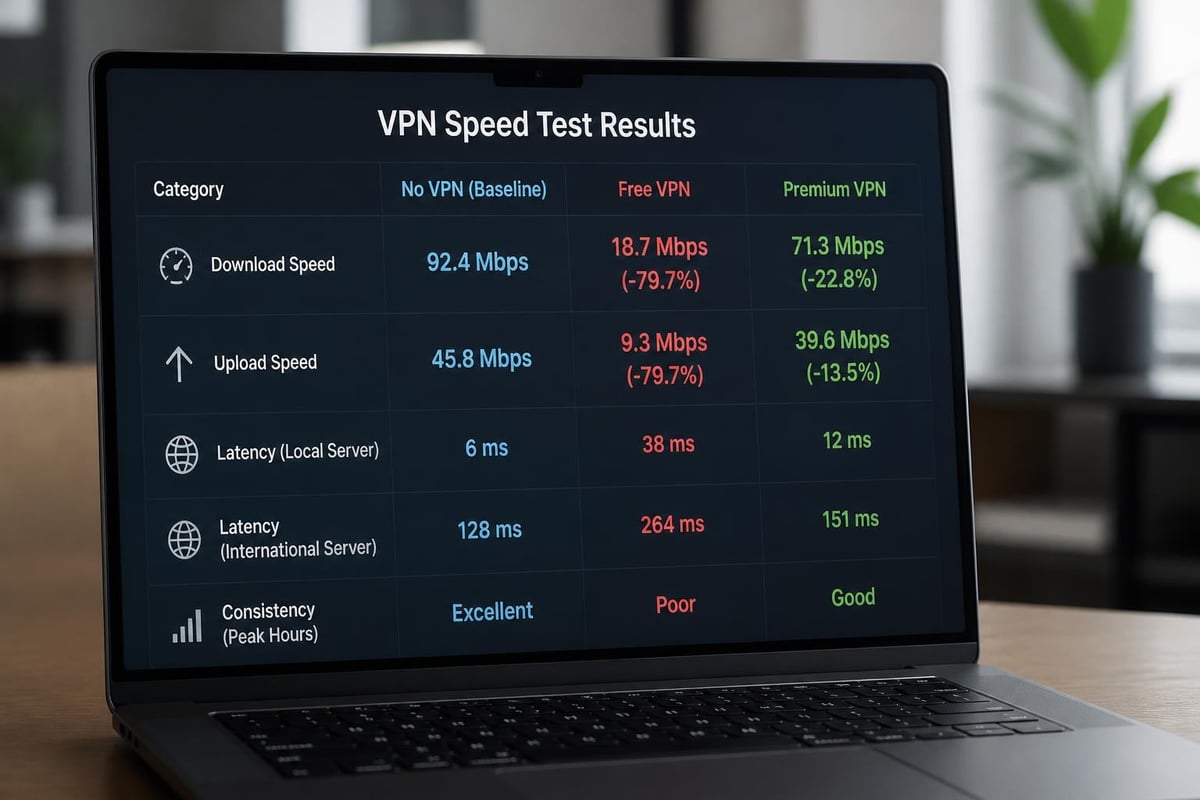
Independent VPN testing under Windows 10 provides objective performance metrics across multiple providers. These assessments measure download speeds, upload speeds, latency, and connection stability over extended periods.
Baseline internet speeds without VPN protection serve as the control measurement. Premium services typically deliver 70-90% of original speeds, while free VPNs often reduce performance to 30-50% of baseline measurements.
Performance factors to evaluate:
- Connection establishment time (should complete within 5-10 seconds)
- Download speed consistency across different server locations
- Upload speed for cloud backup and file sharing activities
- Ping/latency for real-time applications and gaming
- Packet loss percentage during sustained connections
Users seeking fast VPN performance should conduct personal testing using multiple servers at different times of day. Peak usage hours (evenings and weekends) often reveal significant performance degradation on free services.
Server Network Coverage and Selection
Geographic server distribution determines connection quality and content access capabilities. A top rated free vpn for windows should offer strategic server placement across major regions.
Server Location Strategy
| Region | Importance | Free VPN Availability |
|---|---|---|
| North America | High | Usually Limited |
| Western Europe | High | Often Available |
| Asia-Pacific | Medium | Rarely Included |
| Latin America | Low | Seldom Offered |
| Middle East | Low | Almost Never |
Free tier limitations typically restrict users to 3-5 server locations concentrated in the United States, United Kingdom, and Netherlands. This geographic restriction impacts both performance and privacy optimization.
Proximity to VPN servers directly correlates with connection speeds and latency. Accessing servers 5,000+ miles away introduces significant delay, making real-time applications frustrating or unusable. Users should prioritize services offering servers within their general region or countries they frequently need to access.
Server selection considerations include:
- Physical distance from your actual location
- Server load percentage (under 70% utilization is ideal)
- Local internet infrastructure quality
- Data center redundancy and reliability
- P2P/torrenting permission status
Advanced users who manually configure VPN connections gain granular control over server selection and protocol choices unavailable through simplified applications.
Privacy Risks Specific to Free VPN Services
The "free" model introduces fundamental privacy concerns that paid services avoid through subscription revenue. Understanding these risks enables informed decision-making about which free options might be acceptable for specific use cases.
Data Collection and Monetization
Free VPN providers require revenue sources to maintain infrastructure and operations. Research on free VPN data practices reveals that many services monetize through user data collection and third-party sales.
Common monetization strategies include:
- Injecting advertisements into browsing sessions
- Selling anonymized browsing data to marketing companies
- Installing tracking cookies and analytics scripts
- Redirecting search queries through affiliate partnerships
- Operating as honeypots for surveillance agencies
The EFF's guidance on VPN privacy emphasizes threat modeling to determine whether free services provide adequate protection for your specific risk profile. Casual privacy protection against ISP monitoring differs substantially from protecting against state-level surveillance or advanced persistent threats.
Jurisdictional Considerations
VPN provider location determines which laws govern data handling and government cooperation requirements. Services based in Five Eyes countries (United States, United Kingdom, Canada, Australia, New Zealand) face legal obligations that may compromise user privacy.
Preferred jurisdictions for privacy include:
- Switzerland (strong privacy laws, no EU data sharing)
- Iceland (constitutional privacy protections)
- Panama (no mandatory data retention)
- British Virgin Islands (offshore, minimal cooperation treaties)
ZioFree operates under privacy-friendly jurisdiction with advanced security protocols that protect users from surveillance attempts, including specific protections against Israeli hacking operations.
Windows-Specific Configuration and Optimization
Windows offers native VPN capabilities alongside third-party applications, each approach presenting distinct advantages and limitations for users seeking a top rated free vpn for windows solution.
Built-in Windows VPN Client
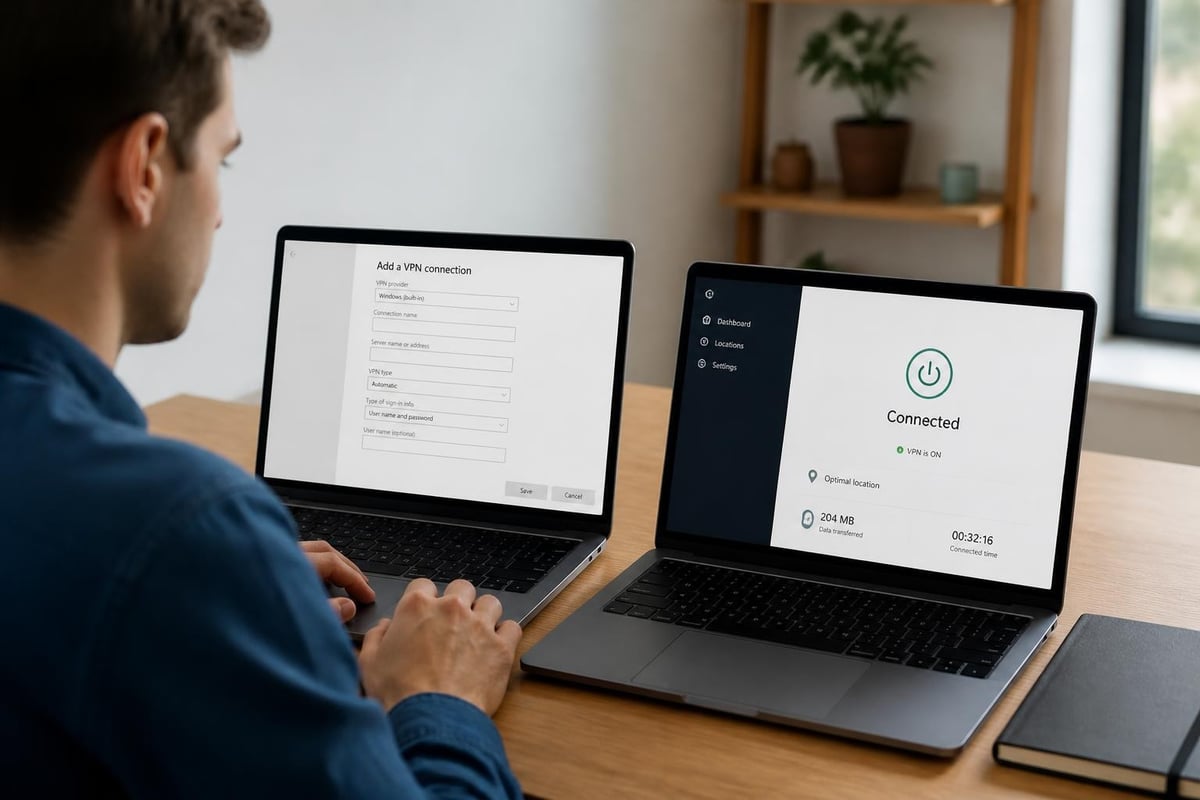
Windows 10 and 11 include integrated VPN functionality accessible through Settings > Network & Internet > VPN. This native approach eliminates third-party application requirements but demands manual configuration.
Advantages of native Windows VPN:
- No additional software installation required
- Reduced system resource consumption
- Direct OS integration with network stack
- Simplified management through Windows settings
- Consistent interface across Windows versions
Configuration steps for manual setup:
- Obtain VPN server addresses and credentials from provider
- Navigate to VPN settings in Windows Control Panel
- Add new VPN connection with provider details
- Select appropriate VPN protocol (IKEv2 recommended)
- Configure authentication method and credentials
- Test connection and verify IP address change
Third-Party VPN Applications
Dedicated VPN applications provide streamlined interfaces and automatic optimization but consume additional system resources. Most free VPN providers distribute Windows applications with built-in server selection and protocol management.
Application-based solutions typically offer:
- One-click connection establishment
- Automatic server selection based on performance
- Kill switch functionality to prevent data leaks
- Split tunneling for selective routing
- DNS leak protection and IPv6 blocking
Users concerned about application permissions and system access should review the privacy tradeoffs inherent in VPN use before installing third-party software with deep network integration.
Evaluating Free VPN Providers for Windows
Selecting a trustworthy top rated free vpn for windows requires systematic evaluation across multiple criteria. The following framework helps identify services that deliver genuine value without unacceptable privacy compromises.
Security Audit History
Independent third-party security audits provide objective validation of VPN provider claims. Services willing to undergo professional scrutiny demonstrate commitment to transparency and user protection.
Look for audits that examine:
- Server infrastructure and configuration security
- Application code for vulnerabilities and backdoors
- Privacy policy compliance and data handling
- Logging practices and data retention procedures
- Encryption implementation and protocol security
Comparative Analysis of Leading Free Options
Detailed comparisons of free VPN services reveal significant variation in features, limitations, and trustworthiness across providers.
| Provider Characteristic | Premium Tier | Quality Free Tier | Low-Quality Free |
|---|---|---|---|
| Monthly Data Cap | Unlimited | 10GB | 500MB-2GB |
| Server Locations | 50+ countries | 3-5 countries | 1-2 countries |
| Speed Throttling | None | Minimal | Severe |
| Advertising | None | Minimal/None | Heavy injection |
| Privacy Policy | Audited no-logs | Documented limits | Vague/concerning |
| Windows App Quality | Excellent | Good | Poor/buggy |
Academic Research on Free Proxy Risks
Technical analysis of free proxy services demonstrates vulnerabilities that also affect free VPN offerings. This research documents man-in-the-middle attack risks, encryption weaknesses, and data integrity compromises across free intermediary services.
The academic perspective emphasizes that "free" services inherently create misaligned incentives between provider profit motives and user privacy interests. This structural tension makes truly privacy-respecting free VPNs economically challenging to sustain long-term.
Advanced Features Worth Considering
Beyond baseline security and performance, several advanced capabilities differentiate exceptional free VPN services from basic offerings. While these features typically appear in premium tiers, some free options include limited implementations.
Kill Switch Protection
Network kill switches automatically terminate internet connectivity if the VPN connection drops unexpectedly. This critical safeguard prevents accidental data exposure during connection interruptions.
Kill switch implementations vary:
- Application-level kill switches that close specific programs
- System-level kill switches that disable all network traffic
- Protocol-specific switches that trigger on VPN disconnection
- Selective switches that protect only designated applications
Most free VPN services omit kill switch functionality, making secure VPN services with this feature particularly valuable for privacy-conscious Windows users.
Split Tunneling Capabilities
Split tunneling allows selective routing of traffic through VPN or direct connections. This advanced feature optimizes performance by tunneling only privacy-sensitive traffic while maintaining direct connections for services requiring local IP addresses.
Common split tunneling scenarios include:
- Routing streaming services through local connection for better speeds
- Protecting sensitive work applications while maintaining home network access
- Accessing local network devices while connected to VPN
- Optimizing bandwidth by tunneling only specific applications
Multi-Hop and Double VPN
Multi-hop configurations route traffic through multiple VPN servers in sequence, adding additional encryption layers and geographic distribution. This advanced technique significantly enhances privacy but substantially reduces connection speeds.
Free VPN tiers virtually never include multi-hop functionality due to the computational and bandwidth costs involved.
Use Case Scenarios and Recommendations
Different user requirements demand tailored VPN solutions. Understanding your primary use case helps identify which compromises in a top rated free vpn for windows might be acceptable.
Casual Privacy Protection
Users seeking basic protection from ISP tracking and public Wi-Fi threats can accept more limitations than those with advanced privacy requirements. Casual use cases include:
- Browsing without ISP surveillance
- Protecting credentials on public networks
- Accessing region-restricted content occasionally
- Basic privacy for everyday online activities
These scenarios tolerate monthly data caps of 5-10GB and limited server selections, making quality free VPNs viable options.
Remote Work and Business Use
Professional applications demand higher reliability and security standards. Business use cases include:
- Accessing company resources remotely
- Protecting confidential client communications
- Securing file transfers and cloud synchronization
- Maintaining privacy during business travel
Free VPN limitations (data caps, speed restrictions, limited support) make them unsuitable for consistent business use. Organizations should invest in professional VPN solutions with guaranteed uptime and support.
Content Streaming and Entertainment
Streaming services actively block known VPN IP addresses to enforce geographic licensing restrictions. Free VPNs struggle with streaming for multiple reasons:
- Limited server inventory makes blocking easier
- Overcrowded servers trigger rate limiting
- Speed restrictions prevent HD streaming quality
- Frequent IP address changes required
Users prioritizing streaming should consider premium services or accept significant limitations with free alternatives.
High-Risk Privacy Scenarios
Journalists, activists, and users in restrictive countries face elevated security requirements that free VPNs rarely satisfy. High-risk scenarios demand:
- Independently audited no-logs policies
- Advanced encryption and obfuscation protocols
- Jurisdiction outside surveillance alliance countries
- Dedicated 24/7 technical support
- Emergency connection capabilities
Free services lack the resources and infrastructure necessary for protecting users facing state-level threats or targeted surveillance.
Common Pitfalls and Warning Signs
Identifying dangerous or ineffective VPN services protects Windows users from services that compromise rather than enhance privacy. Several warning signs indicate problematic free VPN offerings.
Suspicious Application Permissions
VPN applications requesting unnecessary system permissions may engage in data collection beyond VPN functionality. Legitimate services require network access and potentially system settings modification but should not request:
- Access to contacts or calendar
- Camera or microphone permissions
- Storage access beyond configuration files
- Location services when not connected
- Accessibility service control
Ownership and Corporate Structure
Researching VPN provider ownership reveals potential conflicts of interest or concerning corporate relationships. Many free VPNs operate as data collection fronts for larger advertising or analytics companies.
Investigate provider backgrounds through:
- Corporate registration documents
- Parent company relationships
- Board member profiles and histories
- Previous business ventures and controversies
- Funding sources and investment partnerships
Services concealing ownership information raise immediate red flags about trustworthiness and accountability.
Performance Red Flags
Technical performance issues often indicate infrastructure problems or deliberate user experience degradation. Warning signs include:
- Connection establishment taking over 30 seconds consistently
- Frequent disconnections requiring manual reconnection
- Inability to load basic websites within 10-15 seconds
- Complete service unavailability during peak hours
- DNS resolution failures or timeout errors
Quality VPN providers maintain infrastructure capable of delivering consistent performance even under free tier limitations.
Migration Path from Free to Premium
Most users eventually outgrow free VPN limitations as usage patterns increase or privacy requirements evolve. Understanding the upgrade path helps plan for eventual transition to paid services.
Identifying When to Upgrade
Specific indicators suggest free VPN limitations have become problematic:
- Monthly data caps reached before month ends
- Work productivity impacted by speed restrictions
- Desired server locations unavailable in free tier
- Need for simultaneous device connections
- Requirement for dedicated customer support
ZioFree offers affordable premium plans with unlimited bandwidth, global server access, and advanced features while maintaining the same strong privacy protections.
Feature Comparison and Value Assessment
| Feature Category | Free Tier | Premium Upgrade Value |
|---|---|---|
| Data Allowance | 2-10GB/month | Unlimited usage |
| Server Network | 3-5 locations | 50+ countries |
| Connection Speed | Throttled | Full speed capability |
| Simultaneous Devices | 1 device | 5-10 devices |
| Customer Support | Email only | 24/7 live chat |
| Advanced Protocols | Limited | WireGuard, OpenVPN, IKEv2 |
The cost-per-month for premium VPN services typically ranges from $3-12 depending on commitment length. This investment provides substantially enhanced capabilities and eliminates the privacy concerns associated with free service monetization.
Choosing a top rated free vpn for windows requires balancing security, performance, and privacy tradeoffs inherent in no-cost services. While free VPNs can provide basic protection for casual use, understanding their limitations and risks ensures informed decisions about digital privacy. ZioFree delivers high-speed VPN access with military-grade encryption, a strict no-logs policy, and a global server network designed to protect your privacy from surveillance attempts. Experience true online security without compromise.